Server Version#: 1.32.6.7557
Player Version#: 10.2.0.4488
Hi,
4K videos keeps buffering on 4K TV even if both video and audio shows as “Direct play”. TV is connected to WiFi AC which guarantees 866Mbps.
Also, there is no buffering at all with older version of Media server 1.21.0 and Player 8.10.0.
Can anyone help with troubleshooting? Server logs are attached.
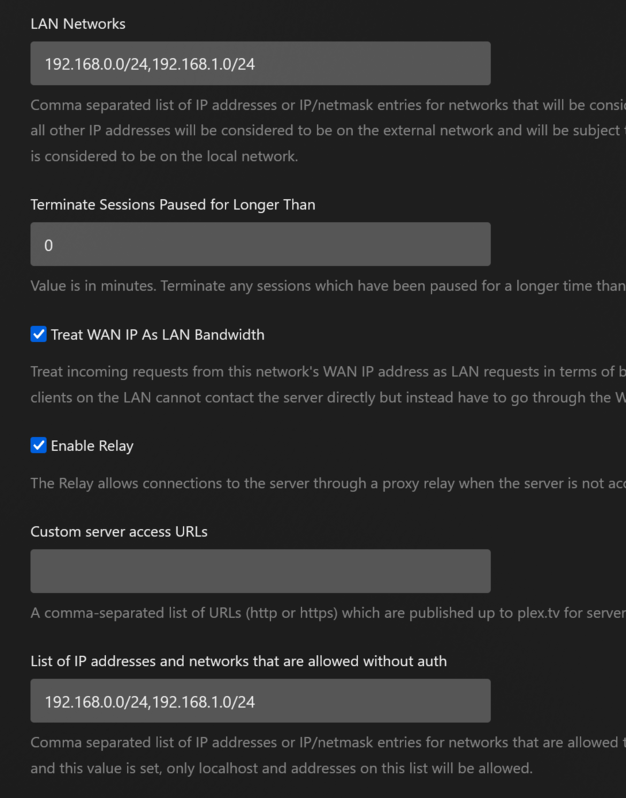
There is a problem with the Allowed Networks entry. Looks like you are missing the / after 192.168.0.0. Also, the separator is a comma, not semi-colon. Oct 26, 2023 18:42:36.537 [139672049752888] ERROR - Error parsing allowedNetworks entry '192.168.0.0 24;192.168.1.0/24': Invalid argument [system:22]
You need to re-enable debug (default), but not verbose, level logs. Info level does not contain enough information.
The network setting had nothing to do with buffering. Correcting it makes sure the devices on those subnets can access the server without authorization.
Regarding the buffering, it is visible in the log files, but there is no info on why it is happening.
Can you pull the android log file from the Plex app on the Sony? Maybe it will show something.
Enable Network Logging in the Plex app settings. You’ll see a URL at the bottom of the screen: http://client_ip_address:32500/logging. Leave the app running, point a browser at that address, and you should see the log file. Save it as a text file (or copy/paste into a text file) and attach it to the thread.
Also, please pull the XML Info for Avatar.Extended Cut.2009.4К and attach it to the thread. You’ll need to zip the file or save it as a .txt file. The forum does not support .xml attachments.
I’ve fallowed your instructions and collected all needed information. Log files from Media player, Media server and XML file are compressed in the attached file.
Thank you for your help!
In the logs I’ve found interesting parts, but since I’m not a Plex developer, I don’t have any knowledge how to interpret these log lines. Maybe someone from Plex devs can eplain, what does these lines mean in practice?
What is resized in this case from 4K to Full HD resolution, when 4K video is played? At least, TV itself is 4K resolution and Plex server shows “Direct play” both for video and audio. If anything was resized (somehow for some reason), shouldn’t “Direct play” be changed to “Transcoding”? I totally don’t get it, why full HD resolution is mentioned here…
A bit later in the logs I see the same full HD resolution mentioned again:
10-28 23:03:58.926 i: [DisplayBehaviour] Reverting back to the original display mode.
10-28 23:03:58.937 i: [DisplayBehaviour] Current Mode ID: 1 / {id=1, width=1920, height=1080, fps=60.000004}
10-28 23:03:58.938 i: [DisplayBehaviour] Mode is already set to our best mode of 1920x1080 @ 60.0000Hz (1).
I’m also having this issue. It just started recently. I thought it was my home network so I wired in my tv, but the buffering persists even though it’s direct play.
I’ve read various articles in various forums and identified main pattern, related to 4K, Plex and wired connection: majority of TV owners think, that wired connection guarantee stable and fast connection. The problem is, that most of TVs (even latest models) have just 100Mbps network interface. From your side you can check, what’s the speed of network interface is in your TV Also, if you have more advanced router, from it’s console you can check, what network speed is advertised towards to your TV
Also tested on Emby, and it had no issue. This issue recently just started happening. I’ve been watching 4k HDR/DoVi content for a while without this issue.
@Etas Thanks for the additional info. I’ve looked it over several times.
Question: Does the buffering happen with all 4K media, including 4K HDR? Or is it just the “AI upscaled” and other 4K H.264 video?
The only thing out of the ordinary I noticed is that the Avatar video is 4K H.264 Constrained Baseline.
4K H.264 is not very common. 4K movies on Blu-ray are HEVC, and the streaming services also stream 4K in HEVC.
In addition, the Constrained Baseline profile is normally used for services such as video conferencing (H.264 Profiles). Movies normally use the High profile. If you rip a 1080p Blu-ray, the video will be High@4.1.
The buffering does show up in the log files, but there are no error messages or other indications of why it is happening.
You mention the TV has a strong 5 GHz WiFi signal, so bandwidth should not be a problem.
I’m wondering if the Sony TV just does not like 4K H.264 Constrained Baseline video. In theory, it should work, but in practice that is not always the case.
That’s why I’m asking about other 4K video.
FYI, WRT Avatar, the 4K HDR10 version was released in June. You might look for an updated version so you can watch in HDR.
EDIT: Regarding the display mode switch, the Plex app is displayed in 1080p. When you play the movie it will switch to 4k mode, then back to 1080p when you stop playing and are back in the Plex menus.
First of all, thank you for helping me with troubleshooting and ideas
I notice the same buffering issues with all 4K videos. If you say that 4K movies are/should be HEVC (and probably, it would be better to test with HEVC), I have an example with HEVC, which can be used for testing I’ve attached XML file of “Passengers” movie together with Plex player and Plex server logs: 4K Plex buffering. Passengers edition.zip (1.6 MB)
It’s very important to mention, that I can play all 4K movies including “Passengers” without any buffering, when Plex server version is 1.21.0 (file PlexMediaServer-1.21.0.3711-b509cc236-x86_64.spk) and Plex player version 8.10 (com.plexapp.android_8.10.0.21911-816142704_minAPI21(armeabi-v7a)(nodpi)). With old versions of media player and Plex server, everything is working perfectly smooth. But I’d like to start using new Plex media player and it’s new features.
Regarding network/WiFi: I’ve done a simple test, by copying a large file from NAS (where Plex server is running) to an internal TV memory using FTP protocol. Speed is about 170-180Mbps. Also, no changes in the network side has been made.
@FordGuy61 are you still be able to help with troubleshooting OR should I just remove this thread and get back to and old Plex setup? Don’t want to be pain in the ass for Plex employees with my Plex problems.
Replying to myself and maybe to somebody, who will or is facing with the same issue
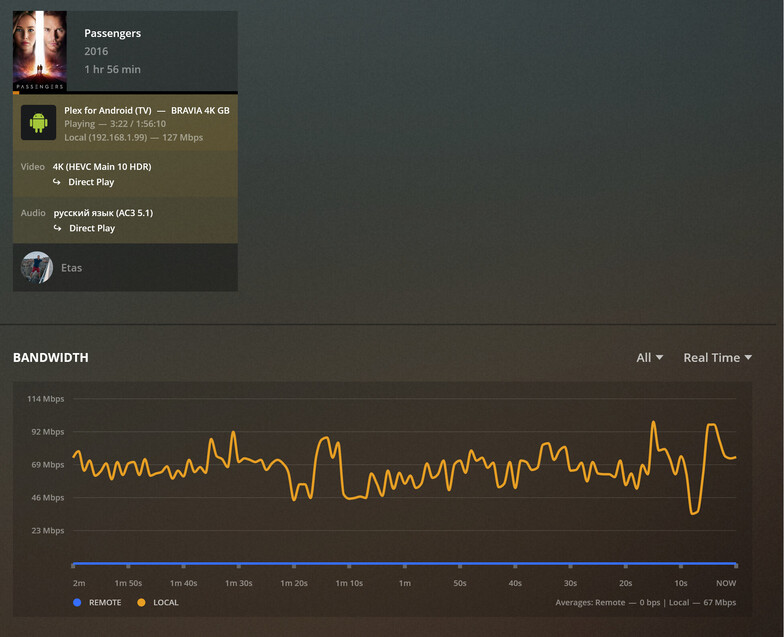
For some reason, newest Plex media server and Plex media player somehow somewhere affect bandwidth.
The same movie, the same network setup, everything the same, but with Plex media server 1.21 and Plex media player 8.10:
As you can see, bandwidth is more or less stable.
Let’s take a look a bandwidth results with Server version 1.32.6.7557 and Player version 10.2.0.4488:
I really wish Plex would take the time to do some network optimization in the near future. There been to many reports of buffering issues, my self included. Cant watch 4k content remotely from my friend for the last year or so, and vice versa. Used to work before we both updated our servers. Actually thinking of downgraiding or in worst case switch to another. But like the plex interface way better than the competitions. Just wish they focused more on general Optimization with priority on network stuff ( cashe/packet/buffer ).
Hi,
maybe this post would help to someone, who is facing with the same issue as I do. I’ve found a working solution: use PMS on later than 1.24.5 and Player no later than 8.10. Also, disable secure connections.
Short feedback about this forum, Plex ninjas and employees. They will help only in simple cases. If they see, that the case require more attention, they will just disappear and ignore you. Childish behavior, but it is what it is.
Good luck to everybody anyway
 Server logs are attached.