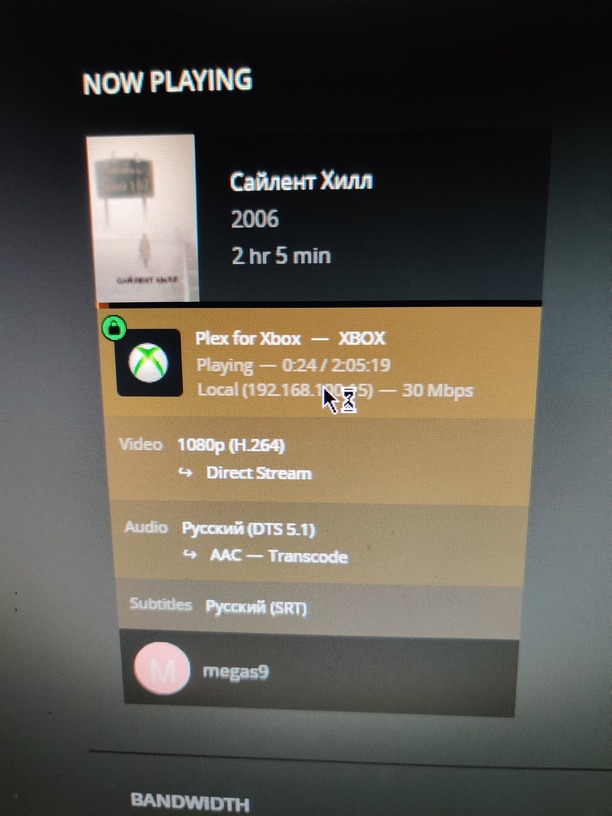
Server Version#: 1.26.2.5797 (win10)
Player Version#: 5.38.1 (plex for xbox)
I’m trying to play some movies from my collection (server on windows 10), through the plex client on my xbox series x. And all I see are interruptions and green bars all over the screen.


Here is the metadata of one of the films:
General
Unique ID : 243080745796893507722706167898023618425 (0xB6DFA612BCF92DD79827A1D475636779)
Complete name : E:\Media\Films\Silent Hill (2006)\Silent Hill (2006).mkv
Format : Matroska
Format version : Version 2
File size : 34.8 GiB
Duration : 2 h 5 min
Overall bit rate mode : Variable
Overall bit rate : 39.7 Mb/s
Encoded date : UTC 2011-10-04 07:42:59
Writing application : mkvmerge v4.8.0 (‘I Got The…’) сборка от May 24 2011 03:12:58
Writing library : libebml v1.2.0 + libmatroska v1.1.0
Video
ID : 1
Format : AVC
Format/Info : Advanced Video Codec
Format profile : High@L4.1
Format settings : CABAC / 2 Ref Frames
Format settings, CABAC : Yes
Format settings, Reference : 2 frames
Muxing mode : Container profile=@0.0
Codec ID : V_MPEG4/ISO/AVC
Duration : 2 h 5 min
Bit rate mode : Variable
Width : 1 920 pixels
Height : 1 080 pixels
Display aspect ratio : 16:9
Frame rate mode : Constant
Frame rate : 23.976 (24000/1001) FPS
Color space : YUV
Chroma subsampling : 4:2:0
Bit depth : 8 bits
Scan type : Progressive
Language : English
Default : Yes
Forced : Yes
Audio #1
ID : 2
Format : DTS
Format/Info : Digital Theater Systems
Codec ID : A_DTS
Duration : 2 h 5 min
Bit rate mode : Constant
Bit rate : 1 510 kb/s
Channel(s) : 6 channels
Channel layout : C L R Ls Rs LFE
Sampling rate : 48.0 kHz
Frame rate : 93.750 FPS (512 SPF)
Bit depth : 24 bits
Compression mode : Lossy
Stream size : 1.32 GiB (4%)
Title : Дубляж
Language : Russian
Default : Yes
Forced : No
Audio #2
ID : 3
Format : DTS XLL
Format/Info : Digital Theater Systems
Commercial name : DTS-HD Master Audio
Codec ID : A_DTS
Duration : 2 h 5 min
Bit rate mode : Variable
Channel(s) : 6 channels
Channel layout : C L R Ls Rs LFE
Sampling rate : 48.0 kHz
Frame rate : 93.750 FPS (512 SPF)
Bit depth : 16 bits
Compression mode : Lossless
Title : Tycoon
Language : Russian
Default : No
Forced : No
Audio #3
ID : 4
Format : DTS XLL
Format/Info : Digital Theater Systems
Commercial name : DTS-HD Master Audio
Codec ID : A_DTS
Duration : 2 h 5 min
Bit rate mode : Variable
Channel(s) : 6 channels
Channel layout : C L R Ls Rs LFE
Sampling rate : 48.0 kHz
Frame rate : 93.750 FPS (512 SPF)
Bit depth : 16 bits
Compression mode : Lossless
Title : Гланц и Королёва
Language : Russian
Default : No
Forced : No
Audio #4
ID : 5
Format : DTS XLL
Format/Info : Digital Theater Systems
Commercial name : DTS-HD Master Audio
Codec ID : A_DTS
Duration : 2 h 5 min
Bit rate mode : Variable
Channel(s) : 6 channels
Channel layout : C L R Ls Rs LFE
Sampling rate : 48.0 kHz
Frame rate : 93.750 FPS (512 SPF)
Bit depth : 16 bits
Compression mode : Lossless
Title : Андрей Гаврилов
Language : Russian
Default : No
Forced : No
Audio #5
ID : 6
Format : DTS XLL
Format/Info : Digital Theater Systems
Commercial name : DTS-HD Master Audio
Codec ID : A_DTS
Duration : 2 h 5 min
Bit rate mode : Variable
Channel(s) : 6 channels
Channel layout : C L R Ls Rs LFE
Sampling rate : 48.0 kHz
Frame rate : 93.750 FPS (512 SPF)
Bit depth : 16 bits
Compression mode : Lossless
Title : Юрий Немахов
Language : Russian
Default : No
Forced : No
Audio #6
ID : 7
Format : DTS XLL
Format/Info : Digital Theater Systems
Commercial name : DTS-HD Master Audio
Codec ID : A_DTS
Duration : 2 h 5 min
Bit rate mode : Variable
Channel(s) : 6 channels
Channel layout : C L R Ls Rs LFE
Sampling rate : 48.0 kHz
Frame rate : 93.750 FPS (512 SPF)
Bit depth : 16 bits
Compression mode : Lossless
Language : English
Default : No
Forced : No
Audio #7
ID : 8
Format : DTS
Format/Info : Digital Theater Systems
Codec ID : A_DTS
Duration : 2 h 5 min
Bit rate mode : Constant
Bit rate : 384 kb/s
Channel(s) : 2 channels
Channel layout : L R
Sampling rate : 48.0 kHz
Frame rate : 93.750 FPS (512 SPF)
Bit depth : 24 bits
Compression mode : Lossy
Stream size : 344 MiB (1%)
Title : Commentary by Andrew Mason & Sebastien Prangere
Language : English
Default : No
Forced : No
Text #1
ID : 9
Format : UTF-8
Codec ID : S_TEXT/UTF8
Codec ID/Info : UTF-8 Plain Text
Title : R5
Language : Russian
Default : Yes
Forced : No
Text #2
ID : 10
Format : UTF-8
Codec ID : S_TEXT/UTF8
Codec ID/Info : UTF-8 Plain Text
Title : Tycoon
Language : Russian
Default : No
Forced : No
Text #3
ID : 11
Format : UTF-8
Codec ID : S_TEXT/UTF8
Codec ID/Info : UTF-8 Plain Text
Language : English
Default : No
Forced : No
My PC: GTX970+I5-4690+16GB Ram
I tried to turn off all possible transcoders, but nothing helps. By the way, the same movie plays fine through the vlc player on windows.
Many thanks