Running Plex on Synology NAS (DS218+),
I had to replace a few seasons of a certain tv show because the audio was horrible, but after replacing the video files plex no longer automatically matched the subtitles for those seasons.
Other metadata (posters; description; …) loaded correctly.
When I replaced the (same) files on my Mac’s Plex Media Server with the new ones, the subtitles get matched automatically after replacing the video files.
Plex media server version 1.19.4.2902 (for both my NAS and Mac)
Same settings for both libraries, same settings for agents, same login (and settings) for opensubtitles.
I already tried the “plex dance” and created a new library for Tv shows where I imported the video files, but the issue remained.
Did you try marking the audio tracks of the new video - with a language? Like yours?
Unknown, pretty much means Plex doesn’t know what to do.
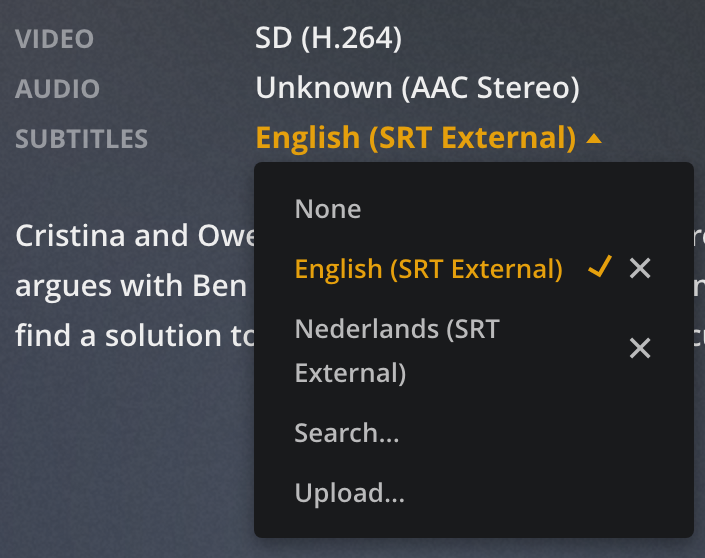
Audio language is shown as “Unknown”,
can I mark the language of the audio tracks in Plex of should I use something else?
The odd thing is, on my mac it automatically finds the english subtitles, on my NAS for some reason it no longer does and I have no idea why or how 
Yea, well… what’s a Mac?
lol
The easiest way is to use MKVToolNix.
The header editor, if your file is an MKV, is almost instant - if not an MKV use the Multiplexer - and your file will soon be an MKV.
You will end up with an MKV file - if that matters - use something else - but I don’t have a clue what.
https://mkvtoolnix.download/downloads.html
If the new file has embedded subs - mark them English too.
If the new file is hoping the old srt files will work - good luck, but miracles happen.
I’m just wondering why it works with my PMS on Mac, but doesn’t work with PMS on my NAS (and I assume it worked with previous versions of Plex Media Server since episodes that were not replaced - that used to have automatic subtitles - no longer get them.
Talk to the Hand…
actually, talk to @anon18523487
or his sidekick @BigWheel
(one of 'em should be here - soonish)
Your issue seems a bit deeper than a quick fix, but I can tell ya right now - Unknown ain’t good for anybody.
BTW: What IS a Mac? Seriously.

A computer from Apple? 
MacBook, iMac, Mac Pro
Nope… not ringin’ a bell…lol
I’m not sure what you mean by “match subtitles” are you refreshing metadata after replacing the video file. Are the new video files named the same as originals. Are these local subtitles or do you mean the opensubtitle agent getting them
Yes
Yes, but some of the new ones are mp4 files instead of mkv’s
I’m using the subtitle agent
This is a screenshot taken from the metadata from a file located on my Mac (and processed with the Mac PMS)
This is a screenshot taken from the same file located on my NAS (and processed with my NAS’ PMS)
Both run the same version of the Plex Media Server (1.19.4.2902)
Can you please grab the XML for that file from both servers.
Could you let me know the location of the xml?
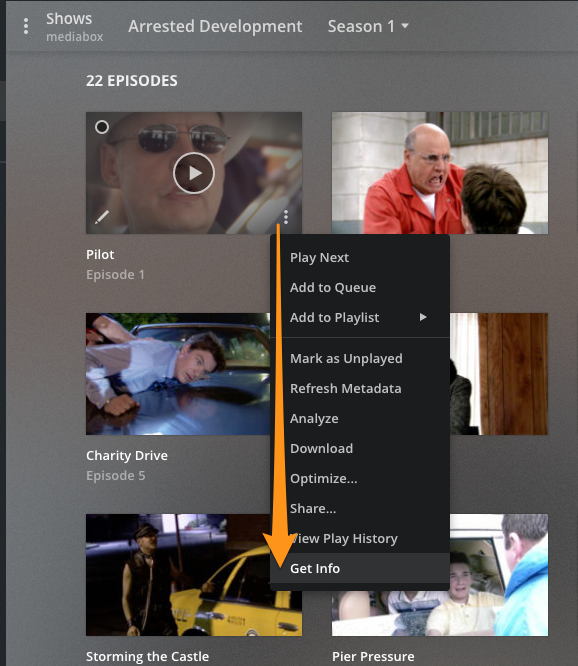
on an episode “get info” then in the window that opens click “View XML” copy and paste that into a text file. do this for the same episode on each server
attached a TXT from both xml’s
MAC.xml.txt (3.5 KB) NAS.xml.txt (3.1 KB)
OK those look fine. can you grab the logs from the NAS server after refreshing that show. (Trouble Shooting section of settings)
Logs attached, I performed a “refresh all metadata” action on the show at 22:20 GMT+1
Plex Media Server Logs_2020-06-09_22-26-20.zip (4.1 MB)
Is there a way to process batches with the MKVToolNix?
The TV show I’m having issues with has 16 seasons with 10-25 episodes each so that’s a ton of work to process them manually.
Probably - If you ask the right person.
You can drag and drop 5-10 and work your way through the tabs. During the ‘Big Fix’ that’s what I did. It was tedious.
I forced myself to suffer through the operation so I would NEVER forget to do that before I add - whatever it is - to the library. Only takes a moment - then.
Everything I add goes through Xmedia Recode for a sub-mux, audio fix and at that time I have it mostly ‘trained’ to tag the tracks English, but I do check if it misses one. I even tag the Video track. I can’t help myself - just in case there are some 608s aboard - otherwise they’d be ‘Unknown’ and that’s right out.
It’s just not clear to me why Plex is having so many issues with the ‘unknown’ audio language.
My settings say I prefer English audio, but I chose to always enable English subs (when I have a Spanish tv show, the subtitles are automatically in English). So in my setup, the audio language shouldn’t really matter, or ‘unknown’ should be handled the same way as foreign languages like ‘german’ or ‘spanish’. So to me this looks like a bug.
Alternatively, I think it would be helpful if we can actually ‘pick’ the audio language for an entire tv show as metadata (the same way I can upload a poster or change the summary, without actually having to change the audio language in a third party video editor), even if it’s not tagged in the file. Most tv shows have the same audio languages for all episodes.
If preferred I can create a feature suggestion for this @BigWheel