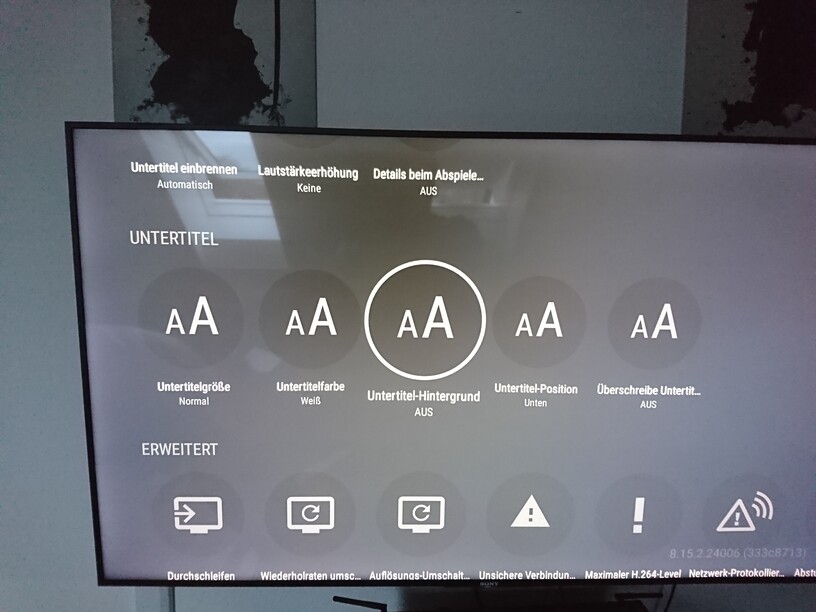
So the only reason my NAS has to transcode anything or I have to buffer anything, it’s because Plex for some reason cannot simply show included subtitles with styling.
So here’s my suggestion: (I can’t be the only one watching things with subtitles)
ADD AN OUTLINE TO SUBTITLES IN THE SETTINGS!
The only reason I need styled subtitles, is because default subtitles are crap. They have no contrast. All you have to do is add an outline so it’s easier to distinguish from the background.
You will have to specify the client type you are using. Because some clients can do that already.
While Windows plays it without transcoding, Android TVs, FireTVs and generally every other hardware player I’ve had in my hands does not.
It’s only “subtitle color” and “subtitle size”, that’s it.
I can’t exactly use a Windows PC for every media player in the house.
On my Shield and my Android phone, I can add a background to text-based subtitles. It helps immensely with the readability.
Is this not available on all Android devices?
Background, yes. But there is a huge difference between “background” and “outline”
A background darkens up to 20% of the screen while an outline still clearly lets you see what’s behind the text. On a PC monitor, having 13pt text might be fine due to it being 30-50cm away from your face. When I’m 2-4m away from my TV, I’d rather have it 36 - 64pt, so it is readable at a distance. That makes the dark background huge.
My Sony Android TV:
My Amazon FireTV