So I have a Plex server currently running from a MAC mini. This has a local NAS and a Synlogy storage connected which is fine. We have around 25-30 users using the service on a “crew” account not all at once but can be a fair few. We keep getting playback issues and the only thing this leads to is the volume of people trying to use the service at once.
Does Plex have a maximum number of streams it can handle simultaneously?
Am I able to limit this to a certain number of users and throw up a notification to say we have reached the maximum capacity? As it kills the service for all!
We use the app and web url to connect mainly.
What would be a suitable upgrade to make this run smoothly?
Hopefully this post is in the correct section.
Thanks in advance.
Have you had system monitor up on the Mac Mini while a ton of people are using PMS at the same time? I’m curious to know how CPU and memory are being used. If a lot of transcoding is occurring then the CPU could be pegged. Another question has to do with how folks are connecting. Are they remote users? If so, then another bottleneck is going to be your internet service. ISP’s typically are designed for fast download and slow upload since most folks are pulling content down. When remote users connect and use PMS they are actually uploading from your network. You can limit the fidelity of uploaded content in admin settings.
There are to many variables there to give you a definite answer. We will need more information.
What kind of connection from the NAS to the mac mini do you have? 10G/1000/100/10 ethernet.
What kind of content are you viewing? SD, HD, or UHD? How is it encoded? H.264 or H.265?
What is the connection to to the clients? Wifi, ethernet? And what speeds?
How old is the hardware you are using?
Yes, lots of questions but there are so many variables to conciser. Off the top of my head for that many streams doing SD I would recommend at least a i5/i7 9600 or 9700 with 16 GB of memory and running ether Windows or Linux. I only so those two OS’s because I don’t know about the capacity of Mac’s when it comes to Plex. I recommend Intel processors because they are not artificially limited in HW based transcoding like NVidia is.
My personal set up is a I5-9600K running fedora 30 with 16 GB of RAM. This currnet system can handle at least 6 UHD transcodes in hardware with minor issues. Once above 3 transcodes I’ve seen some buffering take place but that might have been network congestion.
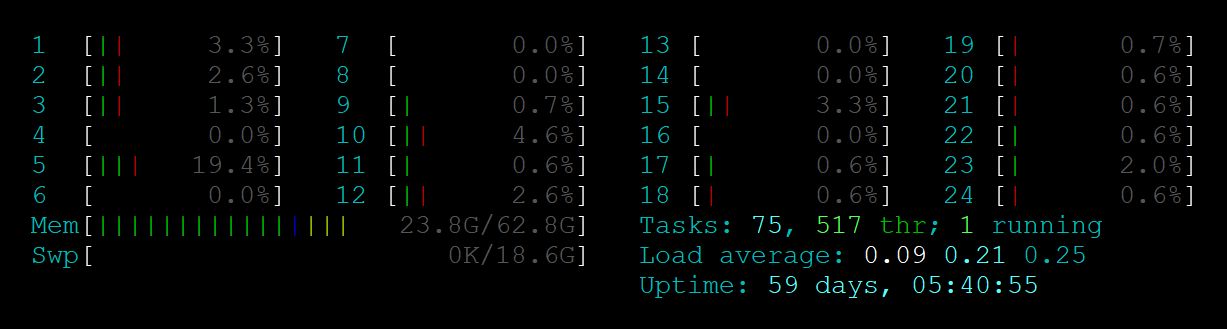
Ive watched the system monitor feedback and nothing is overloading or peaking. Its hard to know the exact time and how many people are watching but Ive seen the CPU and memory only running on half which is what made me believe it was the amount of streams not processing.
All users are just on the local VLAN using the Plex app or through the web browser none are connecting remotely.
All the content is either 720p or 1080p or less, no UHD. Everything has a hard wired connection apart from the end users who are wireless via phones/laptops. Every switch is Cisco catalyst so its a minimum of 1GB some are 10GB.
The MAC mini is relatively old but the management company are being tight with the budget and wont buy anything else
My thoughts are that the MAC is the bottle neck but was just seeing if plex had any tips or tricks to prevent the amount of streams at once.
Figure 20 Mbps approx for each 1080p Direct Play.
30 users x 20 Mbps = 600 Mbps. Doable on 1G switches, but you should watch your PMS Dashboard or OSX Activity monitors for network bandwidth being used. If those streams approach 800 Mbps, you’re verging on lag.
That’s probably the issue I put in bold. The web app only supports certain media formats for Direct Play. Otherwise the video gets transcoded. I’ve been trying to find the official list of the supported media, but there’s not Articles or FAQ I could find. Essentially an MP4 container holding h264 video and AAC sound has the largest ability to DP across web clients.
If you want to list your web clients, we could try to get you the information.
Can you investigate your media also, and then test out the different types of videos to see which one is getting transcoded if any? (It could be the web app had Direct Play disabled by the user accidentally). In your PMS dashboard, you can see the video being played, and you can expand the details for that to see if it’s being transcoded (and into what exactly)
More often than not it’s the audio that’s being transcoded. Let us know.
Screenshot a lot of things for us. It’s easier.
One last thing I forgot is HTTP Pipelining. I think that’s a speed increaser, at no additional cost, but it’s technical and needs to be well understood before attempting. Not sure if Direct Play to a web browser comes over HTTP. Just thinking out loud.