+1 to adding audiobook support. .m4b would be a plus as well.
+1 For Audiobooks - particularly .m4b file formats which would support metadata such as chapter positions. Currently using a thirdparty tool and mp3 files and while it can ‘kind of’ track play position it is infuriating when it fails or I open on a different device.
I looked back at this old post of mine, and they have implemented two of these. They have m4b support (insofar as m4b files can be played), and Musicbrainz is a (community-run) agent from which audiobook metadata can be obtained.
But there is no Watched status or Album-level Resume function.
…also they don’t support inline collections.
I want to add also this would be a great option to add.
Would very much appreciate this feature. m4b support preferred.
+1 have been patiently waiting for Audiobook multi file and better organization.
Enough of work arounds etc etc to make audiobooks work. Should just have a new library option which is for audiobooks and it just works.
I don’t agree with the above statements that there is no financial benefit for Plex. IF they add this feature, all the people we talk to and recommend Plex to will be more inclined to start using it, thereby increasing the user base. WIN WIN!
Either way it works for me
Please go all out to make an audiobook specific feature. Trying to get the work around never works for me and this is the feature that would allow me to solely use plex for all of my media management.
Yes please!
With the arrival of MacOS 10.15 (Catalina) Apple Removed the iTunes support for Audiobooks leaving a huge vacuum for the rest of us to manage our Audiobook Libraries. Many of us have literally TB’s of audible files which now are filed in the Library of our Mac’s with no real way to manage what we have bought and paid for. Books in print or audio media are a very precious commodity.
I have use PLEX to collect all my Movie DVD’s to reduce the volume of the storage clutter. Similarly I would really like to see a PLEX solution to the current Audiobook dilemma.
PLEX has been the Go-To-Solution for our Movies, TV Shows, Music, Photos now it seems it is Time for our Books, Print, ebook, and audiobooks need PLEX
Just my two cents of a much loved topic of discussion
Thanks for Listening
would love the feature to support m4b audiobook
I guess Im responding to a post from seven years ago, but I wonder is there an answer to this? Can PLEX remember the play position for an audiobook?
Ive tried following guides from PLEX, Reddit and Github but they all devolve into a confused mess.
The only way I’ve been able to keep my position across devices for my audio books is making the book a playlist and choosing the last file I was on. One of the reasons I use MakeItOne and make no book larger than 5 files total. Also lets me keep the originals as meant to be so if Plex ever gets their act in gear, I still have them.
Thanks for that Forkboy. I cant even seem to tag the media correctly. Using MP3Tag but my results are inconsistent. Like I said, Ive tried following 3 different tutorials but none really work and Ive not been able to follow any of them completely because following the steps at some point just isnt possible.
I’ll have to wait for Plex…
So I know I ranted about we shouldn’t have to use work arounds…but I got frustrated (Like so many others because of Mac OS Catalina).
So 24 days later, I just finished using a work around for Plex and so far… it works beautifully. If you are interested, here is what I did:
-
Used Audiobook Converter on Github to convert all files to m4b. Not a necessary step, but I like the idea of having one file audiobooks.
-
Follow Plex Audiobook Guide on Github, with the exception of #3.
-
I personally did not want auto-meta data so I didn’t install the plex meta data agent. I used the mp3tag initial meta data download and manually adjusted from there.
-
Downloaded Prologue an excellent app made specifically for audiobooks on a Plex server (I think iphone only at this time).
If you’d like more detailed instructions on how I got this the way it is, PM me and I’d be happy to help you out.
The result is, in the Plex for Windows (Grid View):
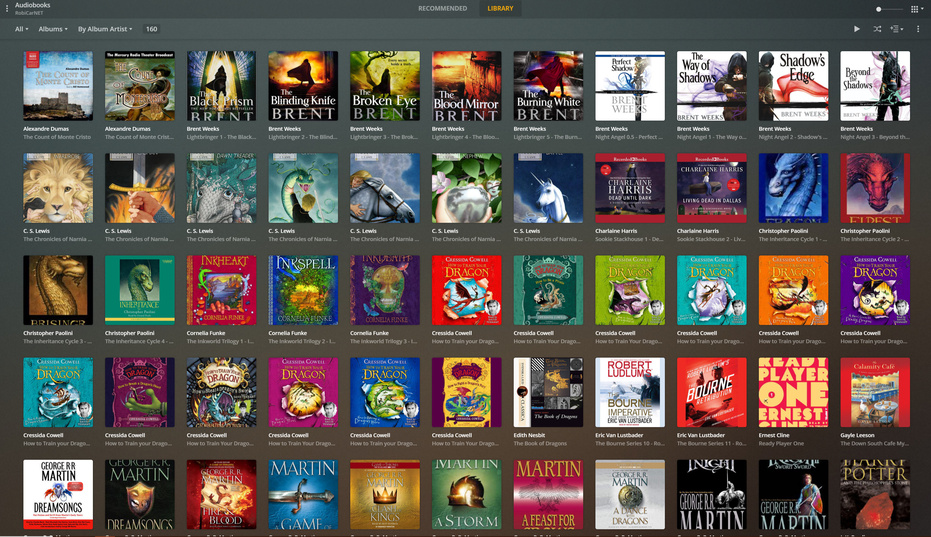
Plex For Windows (Summary View):

Prologue App on iPhone:
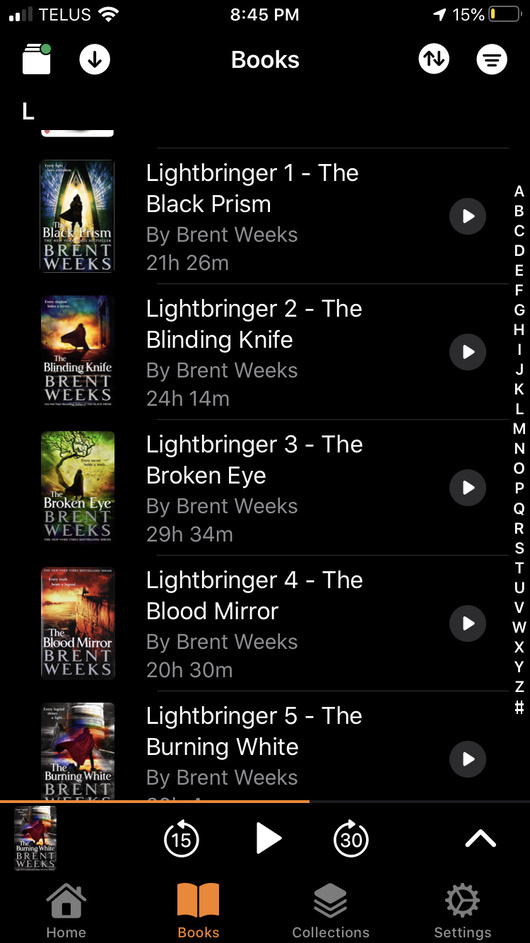
in addition - if you are on a headless server - i am using https://github.com/sandreas/m4b-tool which works very well as replacement for step 1.
Very happy with the results!
I would really appreciate, in addition to the usual audio book controls, a playback control that allows for variable less than 1.0 speeds, e.g., 0.75, 0.60.
I listen to audio books to fall asleep (headphones under the pillow) and usually turn the speed to about 0.60 for a boring, monotonous experience. The narrators all sound like they’ve been mixing booze and opiates. It’s perfect.
Currently, I copy a book file to my phone (or to my google account) and then use google books to play the file back at reduced speed. It would be nice to be able to just do this from within Plex. Thanks.
It would be very nice for Plex to have real audiobook support. But, honestly at this point with the Prologue application I would be happy enough if the system would just reliably read the Cover Art images from my book files. I know it can as it reads about 2-4% of them but then I cannot ever figure out how to get it to read the remaining images. I have well over 1,000 books all properly tagged with embedded images. I really would prefer to NOT have to download all new external files in order to get Cover Art on my books in Plex…simply should not be needed.
have you set the media agent for albums to prefer local assets?
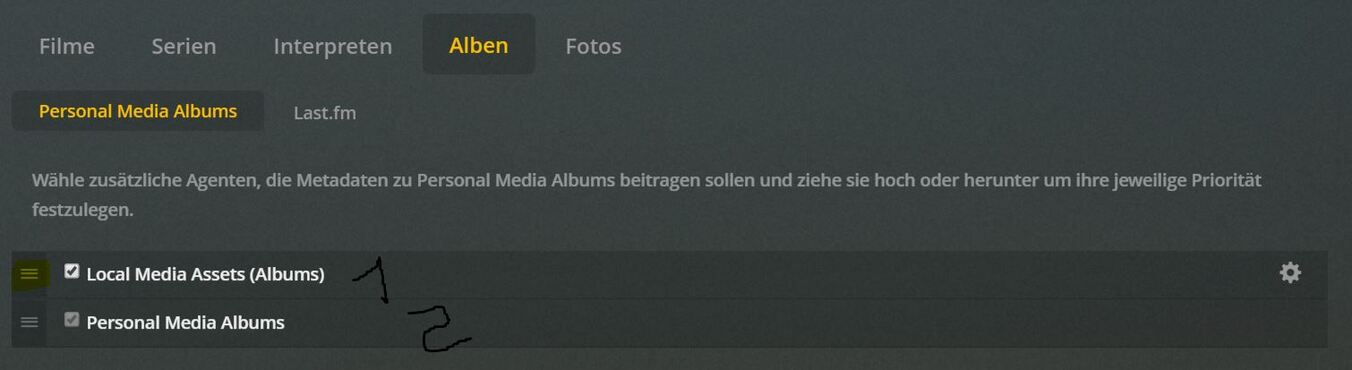
if you have picture files in the folders plex dont load them if it has the wrong name. you could rename them with powershell. maybe like this, but if you have multible picture files it renames only the first one it finds, its primitive
get-childitem -path ‘c:\audiobooks’ -filter *.jpg -recurse -erroraction silentlycontinue | where {DOLLARSIGN_.extension -eq “.jpg”} | rename-item -newname {$UNDERLINE.name -replace $UNDERLINE,’cover.jpg’}
(i cant post that here correctly it seems, you have to replace capitalized words)
Well. It was reading most of the meta data but just not the embedded image (in most cases) on my test batch. And, yep I played with the settings a LOT and deleted and recreated the library many times. In the end I decided that I really wanted it to work instead of continuing to keep my books in iTunes, so I loaded about just over 500 of my books from 45 authors. It seemed across that part of my library to load about 30% of the images (??) and I just went through book by book and downloaded the missing (not really missing but not loaded) images and saved them with the book as folder.jpg.
So, now I do have about half of my library loaded and will load the rest with the same steps once I find another several hours to do so. LOL
