10-08 08:50:49.310 i: [DownloadQueueManager] /storage/736A-3E16/Android/data/com.plexapp.android/files/1/30/.grab/717a9723c2869cc8ff15ebbddd580a9fef4d8138-local/11 - Wastland.flac has been downloaded
10-08 09:08:28.100 i: [DownloadQueueManager] /storage/736A-3E16/Android/data/com.plexapp.android/files/1/30/.grab/79a315113da30e2d7e011f3b5abe46bb0ab09d37-local/02 - Monday.flac has been downloaded
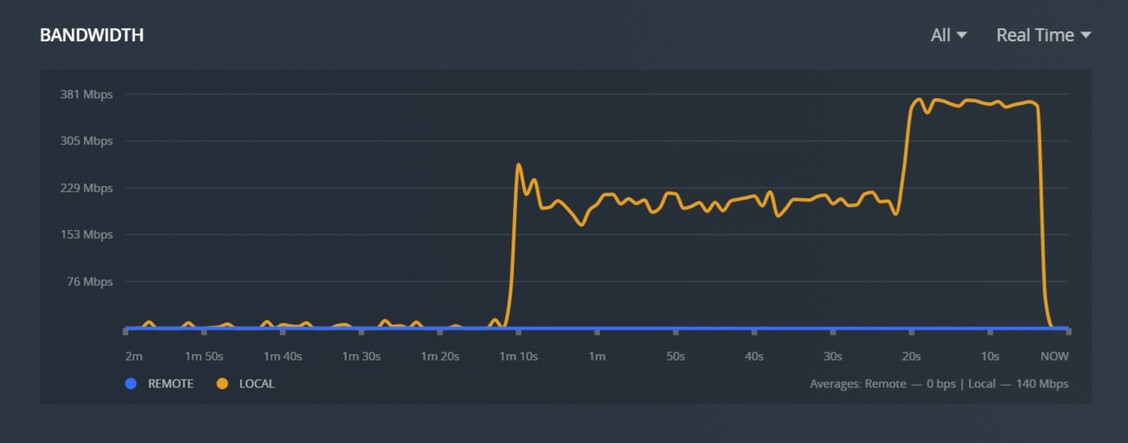
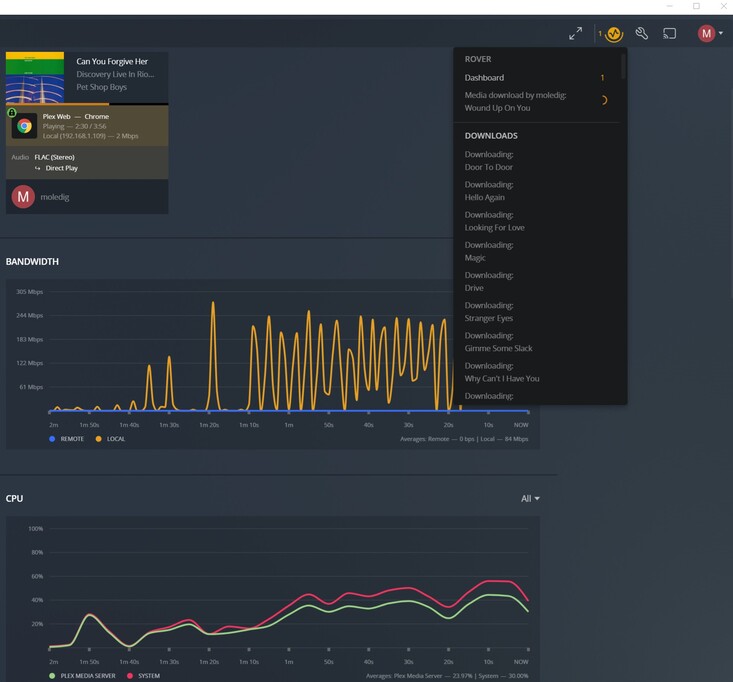
But it can download, up to a point. I was able to download 7 albums in about a minute. But if I tried the same “All Music” Smart list the same slowdown is seen. So there seems to be something that builds up and slows it down to a crawl as the number of tracks increases into the thousands.
Lastly I noted that it took a bit of time for the server to recover from me canceling the 3500+ download. It was reporting high network usage long after the client’s network traffic returned to normal. The CPU usage on the Dashboard stopped reporting until the phantom network traffic completed and things calmed down in the console.
You are correct. The new Downloads feature is controlled by the client, while Sync was controlled by the server. This change does remove the features you mentioned above but it allows Downloads as a whole to be more stable.
That sucks, much easier to manage from web interface and sometimes you aren’t in front of your device and just want to tee some stuff up for later. Disappointing.
MovieFan - have you got any update about the slow downloads when using sd cards please? I’ve just had to switch my tablet back to sync, and it did a couple hundred shows in a few hours, whereas it takes weeks using download.
I can live with the other changes, but this one is a real deal breaker for me right now and i’m worried that sync is going to be retired before this has been fixed?
I (luckily) found out that downloading something as “me” (password protected user) with say 18+ age rating, appears accessible under download from any “kids” profile user without passcode.
Also, any filters such as e.g. age-restricted content, avoiding tags for a user is also not applied.
My expectation is that if I have a kids account, that account only has access to whatever is downloaded as the kids account.
I don’t post in Plex forums anywhere near as often as I used to, because it seems all I have to say over past 2-3 years for every major change Plex has made is negative, and I TRY so hard to live by what I was taught growing up (if i don’t have something nice to say, don’t say anything at all).
But allowing kids to download (or watch) non-kids appropriate content (from Plex) and “No current plans” to fix is NOT a good thing.
I’m so frustrated with what seems like half-baked ideas being implemented into Plex over the past few years.
To be clear, kids cannot Download content they are restricted from. They won’t see the content from the server to be able to Download it. However, if a non-child account Downloads something then the Downloaded content will be visible to all users. This is no different than Sync. Once content was Synced, it was available to all users.
Kids can watch plex downloaded content even logged in as kid account with PIN.
Yeah, still sounds half baked, but, thanks for clarification.
I wasn’t aware Sync allowed it, but seems if a ‘old’ item is being replaced with ‘new/improved’, that’s a feature that should also be improved.
I’ll crawl back into my say nothing hole for a while.
Thanks.
Subtitles for downloaded shows are not selectable.
After downloading my shows on Plex for iOS for offline viewing, the usual subtitles available for download/selection when I’m streaming are gone.
Even when I download the .srt files separately and import them using Plex on my iPhone, it doesn’t show up in the subtitles menu while I’m playing the downloaded file.
I’m afraid I’m not impresses with this feature yet. Sync doesn;'t seem to work anymore, but more concerning is that the new Download doesn’t seem to work at all on my Android, so now there is now way to download any offline content at all.
Did you have a subtitle selected already? It’s possible it got burned into the video? Have you checked for that?
Also, are these subtitles you provided yourself, i.e. they are sitting next to your video files? If these are the subtitles automatically obtained by Plex using the old Tv show agent and OpenSubtitles or obtained using the manual search option, these do not get Downloaded.
What did you do? You can’t manually add subtitles to already Downloaded content.
I can’t seem to find this info in any notes, nor in this thread… weird.
With this Downloads feature, am I now finally able to give my family that is far away, the ability to download any of my shared family photos and video clips?
I’m experiencing two main issues with the Downloads feature, both mentioned above in the thread, just want to chime in with my experience (though would love it if someone helped debug me the second one): the first one being generally terrible speed for Downloads, but I can live with that.
The second one, however, is ruining my Plex watching experience altogether, and it’s related to not being able to use subtitles. If I download a show (or in my case, anime, typically Matroska container with H.264 video and SSA subtitle track(s) embedded into the container), there are two ways of playing it:
from the Anime library, where Plex shows the subtitles on the episode overview screen, but as soon as the actual playback starts and I want to select the subtitle track from the Playback Settings screen, suddenly there are no subtitle tracks detected;
or from the Downloads section of the iOS app, which somehow behaves totally differently – it shows subtitles on the episode overview screen AND displays subtitles during playback, BUT rarely marks the episode as watched on my account and definitely doesn’t ever execute webhooks once the playback finishes (or reaches 90% watched mark).
Let me attach a video, in which I play the same episode, once from the home screen (which plays the episode from the Anime library I created) and once from the Downloads section, to demonstrate the behaviour more clearly than words can: RPReplay Final1635741145 - YouTube. Since I rely both on subtitles and on Plex webhooks for my watching experience, Downloads essentially broke Plex for me.