While you are watching, do you see the status in your Plex dashboard? The watched status should change once the playback is done. If your server isn’t reachable at the time, it should update the next time it is reachable.
I don’t believe webhooks will fire when watching Downloaded content. Webhooks are sent from your server and since your server isn’t controlling the playback, webhooks isn’t triggered.
Yes I’ve checked, no subtitles are available for selection.
The subtitles files are not sitting next to my video files, I searched for them using the in-built subtitle downloader while in the player and downloaded them while I was watching the downloaded show.
I used the in-built subtitle downloader in the player menu to “Import…” subtitle files I downloaded separately in my iPhone.
If it helps to diagnose the issue I’m facing, I have a video file that demonstrates the issue if you could provide me a place to upload. Thank you!
Interesting… when watching some anime episodes today, the playback status eventually got updated on the server like you suggested, thank you! Though a few days ago, I definitely remember some movies not marking as played, or only getting marked as 70-80% played, not finished… I’ll keep monitoring this.
I see, that’s a bigger problem then. I’d really want to avoid having to navigate to the Downloads section just to properly play offline content. With Sync, I did not need to go anywhere special, just selecting a movie/TV show from my library would play the offline version (properly with subtitles) if that file was synced prior. Would you have any insight into the subtitle issue shown in my screen recording?
That’s not what that feature does. That “Import” feature allow you to upload a subtitle file to your server. There is not a way to do this with Downloaded content so that option shouldn’t even be shown when playing Downloaded content.
You shouldn’t need to. There is a setting in the app to “Prefer Downloaded content”. If that is enabled it will play the local copy.
I did recently find a bug where playing content from the Continue Watching tab would indicate it was streaming from your server, but it is actually playing the local one. It’s possible this bug is also causing the subtitles to not get listed. Let me look into this.
I hope this is what you need. I tried clicking on the download button for an album, but not UI response. Then I tried downloading individual tracks from an album and still no response.
Were you trying to Download a podcast before? There appears to be one that is stuck/failing. This appears to be blocking the other Downloads from working. Try removing that failed podcast and see if things get moving again.
The one I see with errors is “The Agency Accelerator”.
Right. The local playback itself seems to be working (thank you!), though it’s showing the subtitle issue, thus in the grand scheme of things, it’s not actually working right now.
I see! Thank you for looking into this, but I was also able to replicate the issue when navigating directly into the library with that particular episode, and attempting the playback from there – it’s the same as playing from the Continue Watching tab, that is – on the episode overview screen, I can see the subtitles listed, but as soon as playback (using a local file) starts, the subtitles are nowhere to be found, neither in the Playback Settings screen nor are they showing in the video.
I switched my phone to English this time, and re-recorded the demonstration, trying three different approaches:
playback from the Continue Watching tab plays the local file as expected, but without subtitles
playback from the library plays the local file as expected, but still without subtitles
playback from the Downloads section plays the local file and with subtitles, but without triggering my webhooks, so… still not a solution for me, I’m sorry.
By the way, isn’t the fact that the subtitles are embedded in the Matroska container (rather than a separate file – thus pretty much have to be downloaded to the mobile device – surely the subtitle track is not de-muxed out of the Matroska file just before the download, right?) an indication that it’s the iOS app problem, somehow not detecting the subtitles being present in the video file/container on the video player screen only?
Ah I see, but can I suggest that this be made possible since it seems like such a basic feature to have.
The “Import” button does appear during playing of downloaded content though, so that is confusing. Or Plex could be configured to upload the subtitle file to my server and simultaneously make it available to my downloaded content?
So overall, the ONLY way to have subtitles for my downloaded show is to have the subtitle file beside my video file in my server before I start downloading them?
@Cellane Playing from CW or the library is the same issue. Basically the app is getting confused where the stream is coming from and also why it’s losing track if there is a subtitle track or not. They are related and should both get fixed at the same time.
@henger Those subtitles are meant to be temporary. I don’t know if it will be possible to include those with the Download. I will see if it’s possible to search after it’s Downloaded, that would actually be very useful.
For now, yes, the subtitles need to be ones you provide next to your file or embedded in the video file for Downloads to include them. I can see improvements in this area so maybe something for the future.
Ah, cool! I misunderstood you, I thought you’re saying that playing from Continue Watching section specifically might trigger the issue. Thanks for the confirmation! Can I ask if I should report the bug in some more official capacity somewhere/somehow, or whether mentioning it here is enough to get it reported and eventually fixed? Thank you!
Sorry if I wasn’t clear. It’s not where you watch the video from. It’s the “Prefer Downloaded content” setting. The app is still looking at the server version first then switching to the local one and somewhere in this switch, it’s getting the information mixed up.
Reporting bugs here in the forums is the correct way to bring them to our attention.
I had posted this to the blog post about downloads but I will repeat it here. I hope that’s OK.
I fiddle with downloads. It was horrible. Case in point. I downloaded all of my music to my phone. This is so I can listen to music uninterrupted while on the road and perhaps in an area with sketchy to no connections. Fire up Plex. Can I get to my downloaded content? No. Instead it just spins and spins trying to get to my server. Update: I can select the menu and downloads on device but there was nothing to indicate that was possible. Moral: If there is already content downloaded then SHOW IT. Don’t wait for a network connection. If the user chooses content that is not downloaded then perhaps spin your wheels, but let the user get to their downloaded content. After all that’s exactly why they downloaded it!
Another problem - In downloads I get “External storage not found. Swipe to remove or tap to retry”. Huh? I’ve already patiently downloaded all of this stuff. Of course, tap to retry does absolutely nothing and swipe to remove (BTW which direction to swipe? Can’t be explicit?!?) does what? Removes the thousands of songs I’ve already downloaded?
BTW when I was downloading all my music this message would come up and I’d have to disconnect my phone from the internet, reconnect it, tap several times until it finally woke up and started downloading more. Confusingly it started with ~6500 songs to download, crapped out at about 4000 songs. When I finally got it to continue it said something like “1 of 4203” or some such. I didn’t know that it had already had downloaded about 2000 songs. This happened several times and I babysat it until it was all downloaded. Now it says External storage not found. Really? I don’t have external storage. There’s only internal storage on my S21. Bad UI design.
There should be an easy indicator to know if something is locally available or not. Like say an orange dot for things that or local or perhaps grey out things that are remote. None of this is in the UI design.
Totally unknown but show be extremely knowable and configurable but shouldn’t podcasts be downloadable by default or configurable to be downloaded?
And I would like to add that I would love for podcasts to be handled better. By that I mean automatically downloaded and with the FF/REW controls changed to 30 seconds FF/REW (or a configurable amount.
That was a bug and discussed before. It should be fixed in the current Beta as mentioned above. If you don’t run beta, just wait a bit longer for it to become public.
(BTW which direction to swipe? Can’t be explicit?!?)
This is an Android convention to swipe left to remove/delete things.
When I finally got it to continue it said something like “1 of 4203” or some such.
It will recheck content sometimes. We are looking to better improve this.
There should be an easy indicator to know if something is locally available or not
There is an arrow icon over the posters if the item has been downloaded. It appears to be missing on the album and we don’t have a good way to show for individual tracks since there are no posters. I’ve made of note to get it looked at. If you’ve Downloaded a bunch of music, I assume they were playlists. You should also see the icon over the playlists.
Not sure what bug you were describing. Maybe I could be clearer. Here are my questions: 1) What do you mean by external storage? I have no external storage! 2) Tap to retry didn’t work for me. As I said I tried several times. I had to disconnect from internet and reconnect before it would sense things.
You have plenty of room to say “Swipe left or right to…” and thus be explicit instead of relying on people to “know” the Android convention. It’s not like it’s intrusive or a ton of verbiage.
Well if you have the total count of what’s been downloaded so far a better message might be "1 of 4203 left to download (2534 already downloaded).
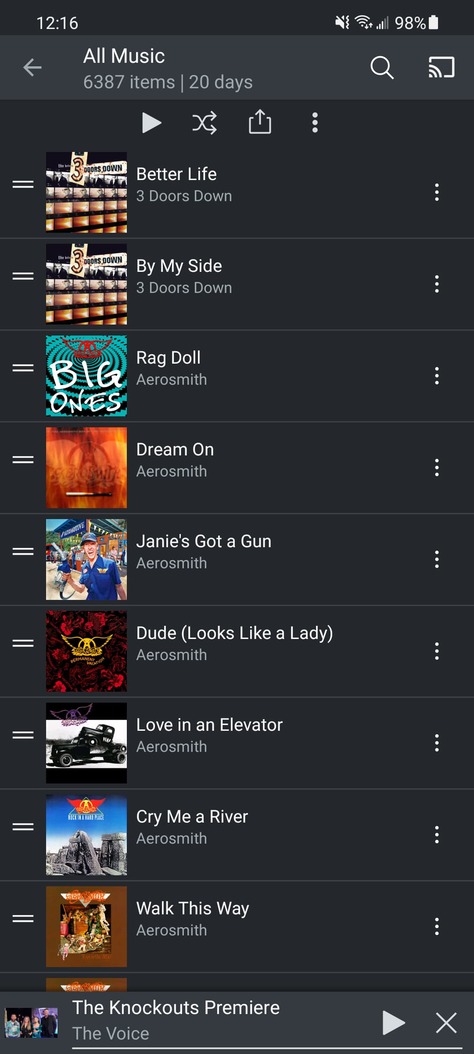
Yes, I did download by playlists. I have 6387 music files in my All Music playlist. If an arrow icon appears there does that mean all 6387 items have been downloaded? What if only half are downloaded? How do I know which are downloaded and which aren’t?
Additionally, when I go just to my Music library from the main menu and then tap on All Music I see this:
Are any of these downloaded or not? I can’t tell. There’s plenty of room to put say a little orange dot to indicate that this particular music file is locally available.
I see a lot of room to indicate this file has been downloaded but I see no indication of that.
But I think you missed my biggest gripe, that being sitting in the car waiting for the Plex app to talk to the Plex server before I can do anything, especially since I know there’s local content. Try this. Download some music files. Next go out to the country where there’s no internet or perhaps just turn off wifi and cellular. Fire up the Plex app. Can you get to your local content at all?
And personally, I see little use for a “Downloads” menu selection and a Music menu selection. WRT Music (and hopefully podcasts down the line) I just want to see what’s there in a manner that I can easily discern whether something is local or remote. Show me the local stuff first, fill in with the remote stuff as you attempt to connect in the background. Don’t make me wait.
I have a question regarding functionality. When selecting downloads, the “Delete downloaded episodes - After a day” is confusing me a bit.
After an episode is played, when is the day counted? Is there a specific time where the download feature clears those played episodes? Sometimes the played episodes stay for more than 2 days and I’m wondering if there is a timed task or something else behind the scenes.
ça fonctionne vraiment mal et je n’ai plus accès à l’ancienne fonction de synchro qui était parfaite. J’avais pris un compte plex lifetime uniquement pour cette fonction.
Je vais passer sur Emby ou Jellyfin.
it works really badly and I no longer have access to the old sync function which was perfect.
I had taken a plex lifetime account only for this function.
I’ll switch to Emby or Jellyfin.
Sorry to be a nuisance but I was wondering if there’s any update on triaging or fixing the issue with subtitles not loading for downloaded content in Plex on iOS.
(And while I’m writing, I originally mention that the slow downloads are an issue but a bearable one – let me alter that previous statement, the download speeds really are unbearably slow Especially when downloading larger shows (especially^2 when synchronizing a playlist, which for some reason doesn’t allow you to specify how many episodes should be downloaded), and especially^3 when considering that Plex on macOS on the same network just absolutely breezes through the same downloads and smokes the iOS version so much it’s not even funny.)

 Especially when downloading larger shows (especially^2 when synchronizing a playlist, which for some reason doesn’t allow you to specify how many episodes should be downloaded), and especially^3 when considering that Plex on macOS on the same network just absolutely breezes through the same downloads and smokes the iOS version so much it’s not even funny.)