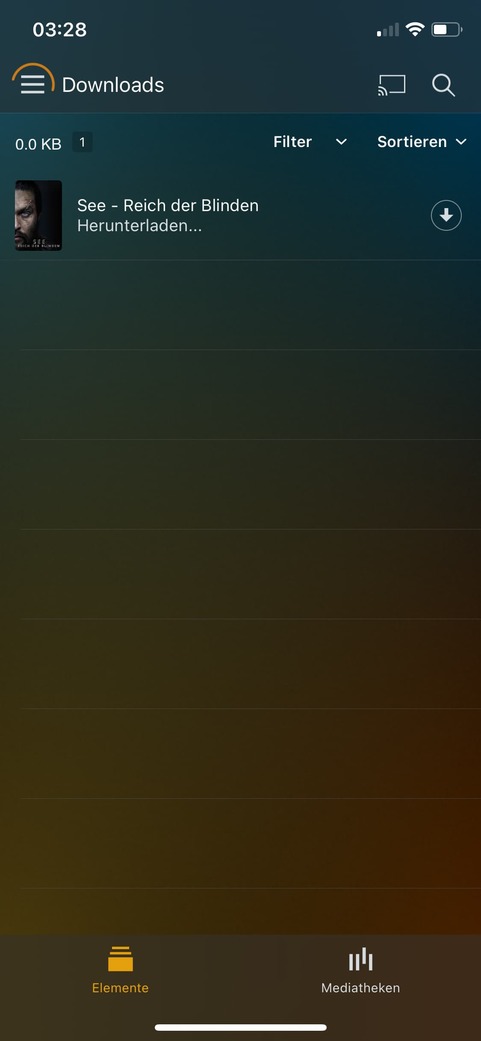
It should run in the background, but it’s up to the OS if the app gets killed or not. If you leave the app on the “Downloads” page, that will prevent the device from going to sleep while a Download is active.
Where these files larger than 2 GB? There is a bug currently causing an issue for files that get Download and > 2 GB. A fix is coming but not yet available.
If that’s not the case, I’ll need logs.
How so?

This has been previously mentioned. Downloads is controlled entirely by the client, not the server. Your server has no knowledge of what has been Downloaded to a device. We are planning to provide more information in the server about Downloads such as history so you can see what was Downloaded but it won’t show what is currently on the device, since it won’t know.
There are some TV show left in android mobile. I can see them in the sync items but not able to delete as before by “Manage” at top right corner. There is no item after I click the manage button. I sync another item and it appear in the manage tab. I tried disable the “Enable new downloads” in the Setting > Download, also no item in the manage tab. That is curious when I change the sync storage, the storage can recognize the usage of sync (legacy) items used space.
I am not sure if this relate to those synced items from a server I setup before which is removed and reinstall as a new Plex server.
Please advice how I can remove the items and thanks for your time.
@ManitouZero I’m not clear on your issue. Be aware that Sync and Downloads do not work at the same time. When you enable 1, the other becomes almost like a read only. If you want to manage Sync, disable Downloads, then you can manage the Sync items.
Thanks for the reply. I think this is it
However (don’t mean to sound mean here). But a bug that breaks the feature on 2gb or larger files is pretty massive to get into the wild. The feature should never be rolled out like this.
I had attempted to download a lot of files before a long trip only to discover the failures. Most of my library is larger than 2gb files as I assume many many others. Downloads is essentially beta at this point and should not have become default until these large issues resolved.
As for handling of tv shows. The old sync has the option to set a certain amount of unwatched episodes downloaded and would auto clear them after being watched. So far unless I’m missing something this doesn’t exist anymore. And episodes can only auto clear after a set time. Not watched status
I’m all in favour of this new feature and it makes a faster good addition to sync. But it’s basically beta still and this was an incredibly frustrating and anger inducing experience. Especially since I ended up having to leave without media to watch
1 Like
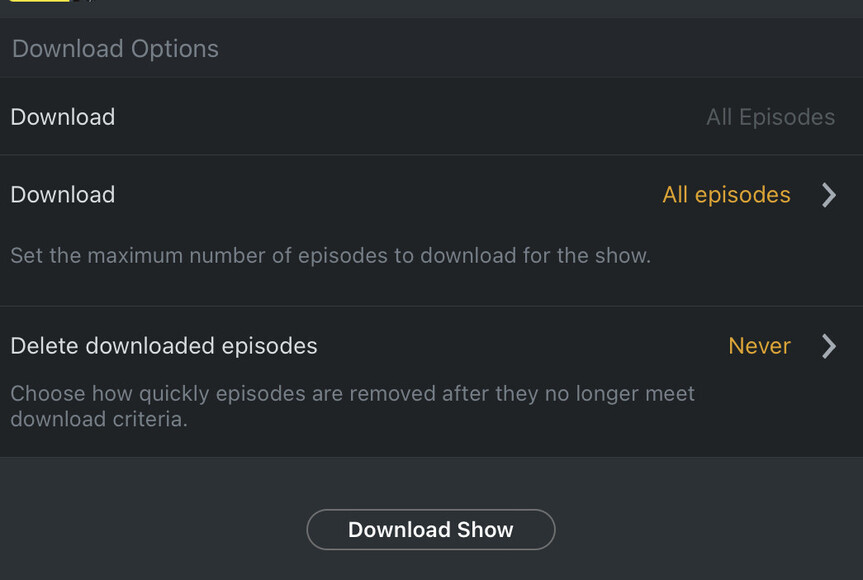
When you choose to download a show there’s an option for how many episodes to download and when they get deleted. What’s always annoyed me is we can’t choose the default. I’ve never EVER used that default value.
1 Like
This was working before. Something broke along the way.
The old sync has the option to set a certain amount of unwatched episodes downloaded and would auto clear them after being watched.
As mentioned above, downloads does similar. It won’t let you pick a specific number, but when you Download a show or season there are choices on how many unwatched episodes to include. These should roll over and update as you go through and watch them. For example, if you set it to Download 3 unwatched episodes, say 1, 2, 3. These will get Downloaded, then when you finish watching episode 1, it will get removed and start downloading episode 4. This may not happen right away if the app is busy, but if you manually refresh (swipe down) the Downloads page, you should see it update.
Thank you for your reply. My situation is I synced TV shows from my previous own hosted plex server to my mobile phone but it crashed. At previous mobile app version, I can manage the synced items. After upgrade to current mobile version, I can’t manage those synced items, although I changed back to use sync option. There is no item for me to manage by click the manage button but those TV shows can be view when I browse sync items tab.
Is that able to remove all sync items or download items if I remove Plex app in my phone?
Did you disable Downloads? You can’t manage Sync while Downloads is enabled. I see the manage option and it works for me.
Yes. Uninstalling Plex will remove all Synced and Downloaded content. However, If you don’t delete the Sync items, they may try to re-sync automatically. If you still can’t manage to delete these from the app, you can use Plex Web and remove your device from the Authorized Devices page. Then uninstall the app.
Hi, this new Download feature is a huge step backwards. Syncing a Playlist my iPad worked fine for me, but moving to downloads:
- Downloads not only don’t work in the background but also stop if I leave my iPad alone for more than about 30 mins. iPad is connected to power, Plex app is running and I’m in the list of downloaded shows. When it stops I then have to restart Plex on the iPad to have it kick off downloads again, and there’s no way to know it’s stopped from the iPad, I need to look at the Plex server via the web to see that the bandwidth used has dropped to zero
- No real way of knowing the status of downloads from the iPad app, says it’s downloading when it’s not
- Episodes downloaded don’t just show up in the library on the iPad, needs a refresh
- Some episodes just download over and over but don’t then show up in the library
- I’ve shut down syncing completely, tried to delete all downloaded content which didn’t work and then had to remove the Plex app completely to try and reset things. Still no better.
Massive step backwards here to fix a problem that didn’t exist
3 Likes
This Download Feature is still not working…
This is my Setting:

But why iOS Download 17 Episodes? This TV show has only 13

I can sync photos, but have not figured out how to download photos. What am I doing wrong or is downloading photos coming later but before sync is dead.
That should keep the app from closing. Do you have your ios log from when this happened?
No real way of knowing the status of downloads from the iPad app, says it’s downloading when it’s not
If it is downloading, the circle on the right side will change from white to orange to indicate progress. If you don’t see anything, then it’s likely not working.
Some episodes just download over and over but don’t then show up in the library
Check if the show is set to hide seasons. This is a known issue and being worked on.
What does the Downloads page show. That status is for all Downloads. The other 4 may be for something else.
Photos are not currently supported.
So you will be killing off sync of photos without replacing this functionality?
Thanks for your suggestion and I am able to clear those legacy synced items by remove authorized devices and uninstall the app.