LOL, not Sidney at least n the next 2 months but end of next I willl have a 15 hours flight from Lisbon-Madrid-Mexico
And the worst part … for whatever unknown reason I can’t sleep in the airplanes, which in my line of work represents many hours without sleeping
Awesome to know that will have the freedom to overload my tablet with fresh new episodes
This is a huge step in the right direction. Thank you for developing this. There is some key information I can’t seem to find: Can I access downloaded files on my device outside of Plex? What is the default download directory on an Android device?
In Download Settings it simply gives me the option of “Internal Storage”, but after a successful download of an album from my library, I cannot seem to locate the files when browsing my device using a file manager.
This is an essential feature for me. I‘m so often in hotels or apartments with really bad connectivity. Cast some content from the smartphone to a fireTV or a chromecast is so incredible. Or cast at a roadtrip a movie to the kids tablet.
iPadOS 14.7.1
Plex IOS 7.21.1
Plex server 1.23.6.4881 running on Ubuntu 18.04.5 LTS
I just decided to upload Plex on my iPad to latest version 7.21.1 and after update, download stop working.
I already try to remove app and reinstall it, but get same issue
When I press the download on a movie or episode … nothing (absolutely nothing) happens.
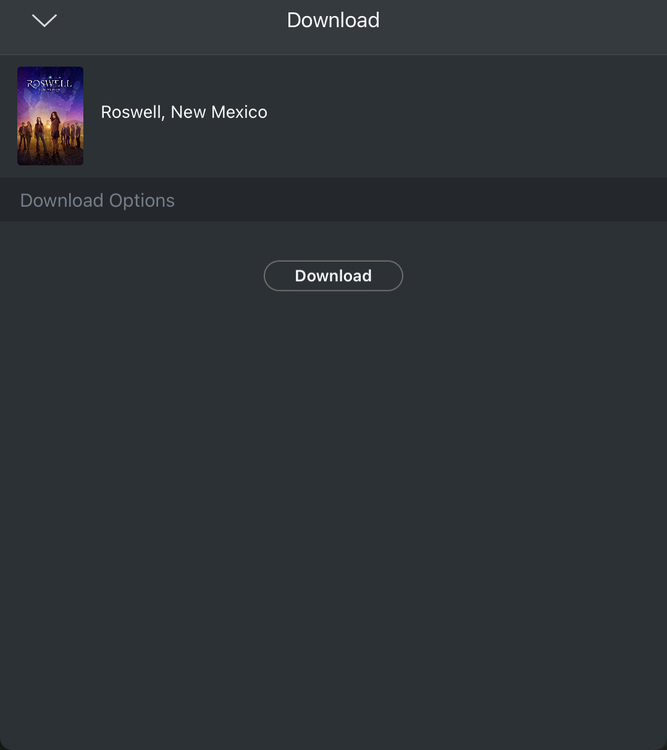
When I press download in a show, I get this screen
A few comments/questions after trying out the new concept:
As I understand from the feature request on h265 transcoding for downloaded content, Plex will not be implementing h265 as a transcoding target. If I want to use the new download feature to grab a reduced-size version of a 4K HDR BluRay backup, does that mean it will do a 4K h264 HDR or SDR conversion? As I understand it, 4K h264 (HDR) hardware playback support is limited compared to h265 content? Even if I wanted to do a 1080p downscale to reduce storage requirements, keeping the HDR information would be desirable for me.
I think the global video quality setting falls short of handling the considerable file size jumps from various 1080p video files up to uncompressed 4K BluRay backups. For on-the-go versions I might be okay with a significantly lower bitrate for 1080p content, than I would accept for a synced 4K HDR movie.
Shouldn’t the conversion status and information be available on the server dashboard activity, sync, or conversion page? I can only see a bit of info on the activity icon dropdown, and no info on anything that might cause transcoding or info on estimated-time-to-completion.
I have been experiencing a bug with the new “Downloads” system in the last couple days, after it worked perfectly for the first few days. All downloads start normally, progress most of the way, then restart – this repeats indefinitely. As such, I am not able to download anything.
I’m using PMS 1.23.6.4881 and Plex iOS (iPad) 7.21.1. The app is set to use the new downloads system and to transcode to 720p and 320kbps audio. iPad is running iOS 14.7.
Hi,
Wanting to try this feature i have updated my Windows PMS and ensured my ipad is also up to date, however when trying to download to the ipad nothing happens, not even a sub menu.
Reverting back to sync and everything works fine.
Any ideas where i might have gone wrong?
Regards, Dave
im the same about cant sleep on a plane, my answer in the end was noise canceling headphone, but no music or video, just the headphones on their own. Hope this helps
@roddneyuk so Sync doesn’t work either, or is this a problem with both sync and the new downloads feature? Both are working fine for me on a few different iPads.
When you are using the downloads feature, you don’t get any additional menus or dialogue boxes, the content starts downloading straight away. However the UI tells you in multiple places that a download is happening. Here are a few screen shots and descriptions that might be useful?
I’m that case (sorry I scanned the thread to see other posts and missed your statement about sync) my response is of absolutely no use at all.
Hope that the team can help in some way, because as we all know a working sync approach is really a not working sync
I’m still personally having other issues, so still using another playback app that works with plex to make sure that for travel I have a solid local collection where downloads/sync work just fine.
But looking forward to returning to Plex client with my Plex server and enjoying the wonderful new downloads feature.
I’ve seen many posts now about sync not working properly and I wonder what the problem is, i’ve rarely if ever had a problem with it, but then I optimise my collection so i’m not waiting for the server to transcode all the time. The down side to this is i cant ‘randomly’ watch episodes that easily. Maybe Download can solve everyone’s problems
For me sync worked fine for 264 media (some stuff just always transcoded, but this worked most of the time), however I’ve moved to 265 almost exclusively and every 265 file transcodes, and at a rate of only 2x or 3x (in my experience) so it took ages to complete, often timing out.
I was able to get around this by modifying the profiles for iOS in my a Plex server config, but with each server software update/patch, you have to modify the profile file again.
Hence it worked for me about 60-70% of the time.
Downloads, once the initial small bugs are ironed out, will fix this 100% for me.
Ahh fair enough, my server is a now ‘old school’ i7-2??? at least 10 years old so it’s doing well on H264 and no chance on H265. I’ve just taken another look at infuse and considering the low cost of subscription wondering if it’s worth it, whilst streaming or downloaded i have noticed a/v does not sync (WMV file) but seems fine with optimised (MP4). Not a big deal as im slowly converting my collection to MKV H264 anyway. Im also noting that it is not respecting episode metadata when downloading (wrong episode name and data showing)
@Pleitao - I had a quick look at your log and it looks similar to mine specifically this line:
2021/08/06 01:06:34.192 (238 MB) (15078) ❌ PMPrePlayHeaderViewModel.m:937 | Error requesting immediate download for item <PMKMetadata:0x132fd9d60 key:/library/metadata/90071 title:N Is for Night Terrors type:4 isDirectory:0>: Error Domain=PMKHTTPResponseError Code=404 "Response error" UserInfo={NSLocalizedDescription=Response error}
I can make some guesses at what it means, but hopefully this points a Plex dev in the right direction.
A minor observation, in your log there are 172.16.** IP addresses mentioned, this makes me think you are probably running your Plex server inside Docker? I am also. I have not tried outside of Docker, but of the strange issues I have had with Plex in the past, they tended to end up being network and/or Docker related (most memorable was the DNS Rebind bug that stopped Direct Play from working).