Thanks for the clarification Chuck, nevertheless please confirm.
I uninstall the PMS using the “Erase all of PMS from this system (Not Recoverable) ”
I install “ARM V7 ”.
Both the “Plex ” and the “PlexMediaServer ” folders shown in my first message will be deleted from the NAS.
Hi Chuck,
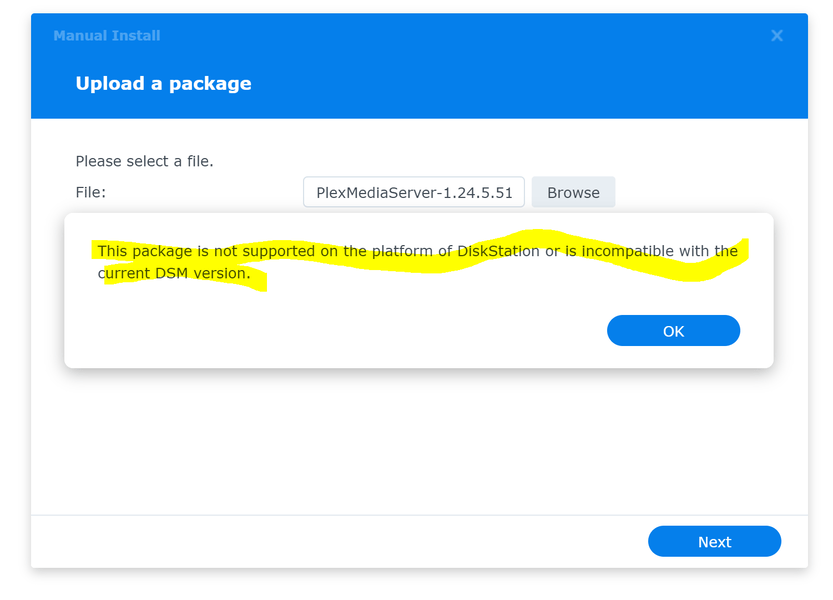
The manual install of the DSM 7 app (ARM V7) did not work as shown below.
Please advise what you now suggest.
ChuckPa
November 12, 2021, 3:15am
24
@The-Dons
Synology DiskStation DS1517+ Specifications

CPU
CPU Model: Intel Atom C2538
CPU Architecture: 64-bit
CPU Frequency: Quad Core 2.4 GHz
Hardware Encryption Engine (AES-NI)
Synology DS1517+ x64 (Atom C2538) 2.4 Ghz Yes Some Some No No No No No No No No No
It’s not an ARMv7
Control Panel - Info Center will confirm the CPU
I confirm my DS1517+ specifications.
According to the Plex NAS Compatibility the Synology DS1517+ is from the +17 series.
According to Media Server Downloads | Plex Media Server for Windows, Mac, Linux, FreeBSD and More the Synology DSM7 package choice for the +17 series is the ARM V7.
I asked twice to confirm to install the ARM V7 package, and this was not addressed.
If the Plex package to install is not ARM V7, please advise which package I do install?
ChuckPa
November 12, 2021, 5:44pm
26
@The-Dons
Install X86_64 version. You do not have an ARMv7 CPU
The DS1517+ is X86_64 Intel
Ref: What kind of CPU does my Synology NAS have? - Synology Knowledge Center
I uninstalled the PMS using the “ Erase all of PMS from this system (Not Recoverable) ”
The contents of “PlexMediaServer”, which contains the rogue installation, WAS NOT DELETED.
I did not manually delete anything.
I manually installed the DSM7 Intel X86_64 version.
Installation was successful with the following message.
From the above, steps 1-6 were carried out successfully.
Connecting with Plex worked.
The following day Plex stopped working.
The permissions from 7 above had disappeared.
The File Station shows the “Library” folder in the Plex folder as shown below.
Please advise how to proceed.
ChuckPa
November 14, 2021, 4:06pm
28
The-Dons:
I uninstalled the PMS using the “ Erase all of PMS from this system (Not Recoverable) ”
The contents of “PlexMediaServer”, which contains the rogue installation, WAS NOT DELETED.
This is not possible unless there was manual manipulation of the “PlexMediaServer” shared folder permissions. ( I wrote the installer code. )
Now having “Not Authorized” points to NAS → Plex.tv connectivity (needs internet to authorize with).
Please :
Stop Plex
FileStation: PlexMediaServer / AppData / Plex Media Server
Right-click Logs → Compress to Logs.zip
Download the ZIP
Attach the ZIP file here for review
Logs.zip (110.3 KB)
There were two manual manipulations.
After Installation was successful with the message described in point 5 above.
Today after Plex stopped working, following these instructions DSM 7 - Plex Media Server - Release Info & Migration instructions - #6 by ChuckPa
ChuckPa
November 14, 2021, 7:24pm
30
You are using the QuickConnect link in Package Center.
Synology changed its behavior in the latest DSM 7 update.
It’s broken for Plex use until the server is fully initialized
Nov 14, 2021 17:31:47.491 [0x7fcc84a22b38] DEBUG - Request came in with unrecognized domain / IP '192-168-1-15.thedons.direct.quickconnect.to' in header Host; treating as non-local
Open the Synology by direct LAN IP address.
I’m trying to make this work in spite of Synology’s changes
Thank you Chuck, that solved the issue. Unfortunately, the viewing history was lost but no big deal in the scheme of things.
Would you recommend to now delete the highlighted “PlexMediaServer” folder?
ChuckPa
November 18, 2021, 3:13pm
32
@The-Dons
The PlexMediaServer shared folder is where PMS lives now.
We no longer use the “Plex” shared folder.
If you have no need of the “Plex” shared folder – you can delete it.
Here’s how PMS looks now on DSM 7 (DSM 7 in its final, production , release form)
system
February 16, 2022, 3:26pm
34
This topic was automatically closed 90 days after the last reply. New replies are no longer allowed.