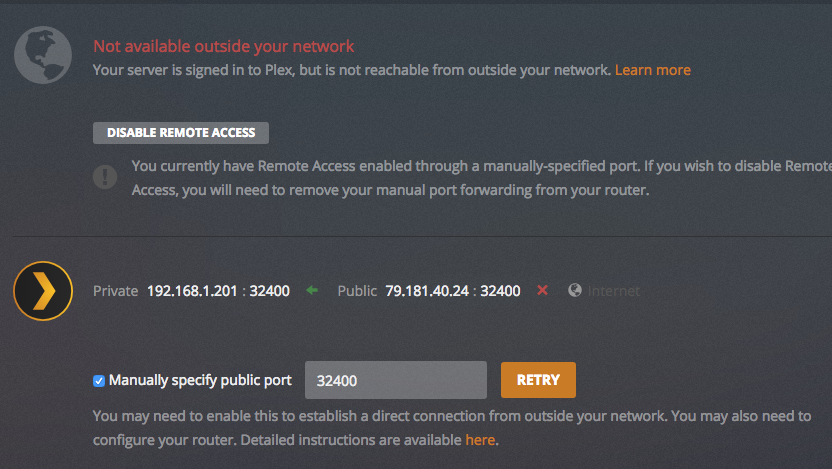
Can not connect to the server even though I opened a port and updated a version.
Can you help me please?
Can not connect to the server even though I opened a port and updated a version.
Can you help me please?
Thank you very much for the detailed response.
Unfortunately, your solution did not help me.
Just note that I did not mention that I have already opened port in my
server I have in my Mac (screenshot attached) and it works fine)It is incorrect to forward the same external port to two different IP addresses internally.
You might want to do:
32400    32400   TCP   192.168.1.200
32401    32400   TCP   192.168.1.201
The PMS system at IP 200 will specify “Manual external port: 32400”
The PMS system at IP 201 will specify “Manual external port: 32401”
It’s work!!!
:)
Finally!!!
Thank you so much!!
Do not be mad:)…
You’re right. That’s what I’ll do next time.
Thanks for any case
I’ve tried everything on this post and is not working 
The App suggest me about “Double-NAT” scenario, so I’ve tried to double forward the ports and I think what I did is logical, but again it’s not working.
What I did is:
Then,

Thank you very much in advance! 
let’s not mix topics… yours appears to be a different, more common scenario.
a single port-forward should do (external IP: any, pointing to 192.168.1.149; PMS manual port forward referring to the external port you specified)
– the double-entry proposed above was only required because the OP is running 2 independent PMS in his network and both should be accessible from the outside.
if your issue persists, please post this as an own thread!
OK, I’ve called to my ISP and they say I’ll be out of CGNAT in 24/48 h!!
So… now I’m waiting… I will explain more if they get me out of CGNAT
Yes! It’s SOLVED! my ISP (Yoigo in Catalonia, also in Spain) got me out of CGNAT. Since then all is working fine… I haven’t had to forward ports, all is working good automaticly.
So:
I just went to this forum and i was able to solve my big problem, i follow your instructions and it worked very good, thanks very much
This topic was automatically closed 90 days after the last reply. New replies are no longer allowed.