"Tag photos" crashes 64-bit Server with SQLite Error

Server Version: Windows 64-bit - 1.29.1.6276
Player Version: Windows 64-bit - 1.55.0.3278-c6164b3c

I’ve added some pictures yesterday to present them on family gathering … doing so crashed the server constantly, while it worked flawlessly during the last weeks.
Investigated this a bit more today, adding the photos (and videos) worked fine until the option tag photos is activated.

During the following scan metadata the server crashed with an SQLite syntax-error:

Oct 10, 2022 14:57:33.814 [9380] DEBUG - Doing expensive tags write for '20221003_080031' because something changed.
Oct 10, 2022 14:57:33.819 [9380] DEBUG - AutoTagging: processing M:\Fotos\2022.09.30 Rom\20221003_083837.JPG (id: 10332). Current Version 1
Oct 10, 2022 14:57:33.820 [9380] DEBUG - AutoTagging: regenerating tags for metadata item 10332 as our AutoTag version has changed 1 => 2
Oct 10, 2022 14:57:33.948 [4500] DEBUG - Doing expensive tags write for '20221003_075039' because something changed.
Oct 10, 2022 14:57:33.953 [20956] DEBUG - Doing expensive tags write for '20221002_194046' because something changed.
Oct 10, 2022 14:57:33.953 [4500] DEBUG - AutoTagging: processing M:\Fotos\2022.09.30 Rom\20221003_083930.JPG (id: 10333). Current Version 1
Oct 10, 2022 14:57:33.955 [4500] DEBUG - AutoTagging: regenerating tags for metadata item 10333 as our AutoTag version has changed 1 => 2
Oct 10, 2022 14:57:33.956 [20956] ERROR - SQLITE3:0x7ff64deac4e0, 1, near "s": syntax error in "select tags.id as 'tags_id', tags.parent_id as 'tags_parent_id', tags.metadata_item_id as 'tags_metadata_item_id', tags.tag as 'tags_tag', tags.key as 'tags_key', tags.tag_type as 't

The complete log is attached. If you need a specific image to reproduce, I can provide one.

Plex Media Server Logs_2022-10-10_15-11-16.zip (14.0 MB)

Edit - Added two Photos causing the crash

20221002_194046.JPG
20221003_083930.JPG

Edit - and the resulting log after restart

Plex Media Server Logs_2022-10-11_19-28-16.zip (450.4 KB)

It’s still the same messages:

Oct 11, 2022 19:28:54.809 [19304] DEBUG - Doing expensive tags write for '20221003_083930' because something changed.
Oct 11, 2022 19:28:55.327 [13108] DEBUG - Doing expensive tags write for '20221002_194046' because something changed.
Oct 11, 2022 19:28:55.337 [13108] ERROR - SQLITE3:0x7ff64deac4e0, 1, near "s": syntax error in "select tags.id as 'tags_id', tags.parent_id as 'tags_parent_id', tags.metadata_item_id as 'tags_metadata_item_id', tags.tag as 'tags_tag', tags.key as 'tags_key', tags.tag_type as 't

The scanner is logging this

Oct 11, 2022 19:29:02.006 [14132] ERROR - HTTP 408 downloading url http://127.0.0.1:32400/library/changestamp
Oct 11, 2022 19:29:02.006 [14132] ERROR - Exception analyzing media file 'M:\Fotos\2022.09.30 Rom\20221002_194046.JPG' (Unable to allocate a changestamp from the server)
1 Like

Would you drop one of those picture that fails into your reply please?
I’d like to try to reproduce this.

Sure, you can download 2 of them with the following links, both were referenced in the log right before the SQLite error message.

20221002_194046.JPG
20221003_083930.JPG

Thanks for the samples!

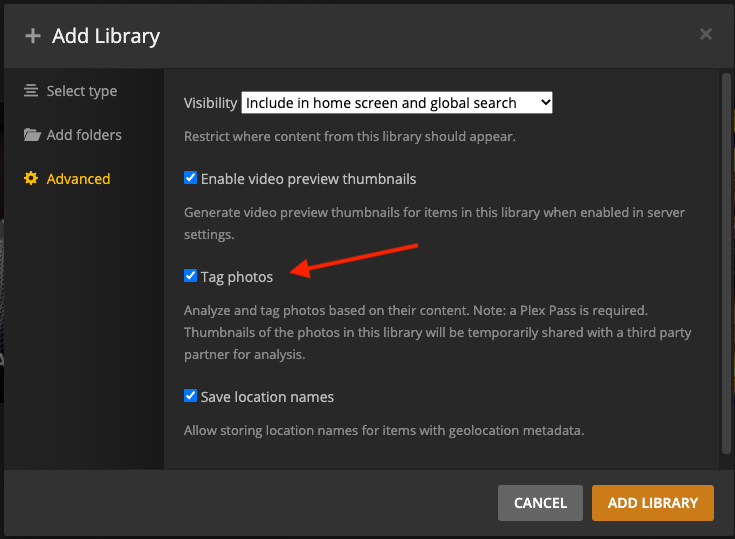
In your Photos library Settings → Advanced do you have Tag Photo’s selected?

also

In your server Settings → Scheduled Tasks do you have the two Photo options selected?

I added the two photos you uploaded to my library with all PMS options selected as shown above.
I didn’t get any crashes, but autotagging added no tags to one of them.

  1. photo of a city autotagged well.
  2. photo in a restaurant did not autotag anything

which seemed strange considering there’s whip cream, a spoon, and is that teenager? I don’t have one. :slight_smile:

City photo -> View XML
This XML file does not appear to have any style information associated with it. The document tree is shown below.
<MediaContainer size="1" allowSync="1" identifier="com.plexapp.plugins.library" librarySectionID="4" librarySectionTitle="Photos" librarySectionUUID="0d164f6a-c1b3-4c20-af56-d0cb60b40c9f" mediaTagPrefix="/system/bundle/media/flags/" mediaTagVersion="1664830401">
<Photo ratingKey="1802" key="/library/metadata/1802" guid="com.plexapp.agents.none://1802?lang=en" type="photo" title="20221003_083930" librarySectionTitle="Photos" librarySectionID="4" librarySectionKey="/library/sections/4" summary="" index="2" year="2022" thumb="/library/metadata/1802/thumb/1665499339" originallyAvailableAt="2022-10-03" addedAt="1665499339" updatedAt="1665499339" createdAtAccuracy="epoch,local" createdAtTZOffset="7200">
<Media aperture="f/1.7" exposure="10/20000" iso="64" make="Sony" model="XQ-BQ52" id="2254" width="4032" height="2268" aspectRatio="1.78" container="jpeg">
<Part accessible="1" exists="1" id="2257" key="/library/parts/2257/1665499191/file.jpeg" file="/Volumes/NVME/NPhoto/20221003_083930.jpeg" size="3041295" container="jpeg" orientation="1"/>
</Media>
<Autotag id="4559" filter="autotag=4559" tag="City" confidence="45.0"/>
<Autotag id="4605" filter="autotag=4605" tag="Town" confidence="40.0"/>
<Autotag id="4606" filter="autotag=4606" tag="Travel" confidence="38.1"/>
<Autotag id="4607" filter="autotag=4607" tag="Architecture" confidence="35.6"/>
<Autotag id="4608" filter="autotag=4608" tag="Mountain" confidence="30.9"/>
<Geolocation>
<Coordinates latitude="41.90990" longitude="12.45579"/>
</Geolocation>
<Extras size="0"></Extras>
<Related></Related>
</Photo>
</MediaContainer>
Restaurant -> View XML
This XML file does not appear to have any style information associated with it. The document tree is shown below.
<MediaContainer size="1" allowSync="1" identifier="com.plexapp.plugins.library" librarySectionID="4" librarySectionTitle="Photos" librarySectionUUID="0d164f6a-c1b3-4c20-af56-d0cb60b40c9f" mediaTagPrefix="/system/bundle/media/flags/" mediaTagVersion="1664830401">
<Photo ratingKey="1801" key="/library/metadata/1801" guid="com.plexapp.agents.none://1801?lang=en" type="photo" title="20221002_194046" librarySectionTitle="Photos" librarySectionID="4" librarySectionKey="/library/sections/4" summary="" index="2" year="2022" thumb="/library/metadata/1801/thumb/1665499339" originallyAvailableAt="2022-10-03" addedAt="1665499339" updatedAt="1665499339" createdAtAccuracy="epoch,local" createdAtTZOffset="7200">
<Media aperture="f/1.7" exposure="10/150" iso="500" make="Sony" model="XQ-BQ52" id="2253" width="4032" height="2268" aspectRatio="1.78" container="jpeg">
<Part accessible="1" exists="1" id="2256" key="/library/parts/2256/1665499164/file.jpeg" file="/Volumes/NVME/NPhoto/20221002_194046.jpeg" size="2184612" container="jpeg" orientation="6"/>
</Media>
<Geolocation>
<Coordinates latitude="41.89998" longitude="12.48040"/>
</Geolocation>
<Extras size="0"></Extras>
<Related></Related>
</Photo>
</MediaContainer>

Yes, this option triggered the crash. At first I had this one enabled and the server kept crashing. For my closer look yesterday I kept it disabled at first, worked just fine. After enableing it and refreshing metadata, the server crashed.

Did not notice those before, but both are activated (by default, I suppose).

But with these options enabled the server should crash, if it is related to the tags. Just not when adding the pictures, but when running the maintenance tasks. Seems not the case, though, as it stays running … Or will these option only be relevant when Tag Photo’s is selected in the library?

We probably should get some logs from you demonstrating restarting PMS then adding those two photos and a crash. If you did that at 9:30am for example, then the only relevant logs would be ones with a timestamp of 9:30am or later.

Zip up the folder with those and drop it into your reply when you get a chance, thanks.

Just reset my library to 8th Oct. before adding those pictures and doing a rescan now. I’ll restart the server than and adding those pictures with “Tag Photos” enabled and provide the logs of that time.

1 Like

I run into the same issue
First I thought it was the database so I created another post but it kept crashing every 10-15 minutes or so as the library scan was running
After deactivating the photo tagging no more crashing till yet…
Hope it stays like this and the problem will get solved…

Just restarted the Server and added just those two pictures. Crashed in one minute or so …

Logs written after the restart are attached.

Plex Media Server Logs_2022-10-11_19-28-16.zip (450.4 KB)

It’s still the same messages:

Oct 11, 2022 19:28:54.809 [19304] DEBUG - Doing expensive tags write for '20221003_083930' because something changed.
Oct 11, 2022 19:28:55.327 [13108] DEBUG - Doing expensive tags write for '20221002_194046' because something changed.
Oct 11, 2022 19:28:55.337 [13108] ERROR - SQLITE3:0x7ff64deac4e0, 1, near "s": syntax error in "select tags.id as 'tags_id', tags.parent_id as 'tags_parent_id', tags.metadata_item_id as 'tags_metadata_item_id', tags.tag as 'tags_tag', tags.key as 'tags_key', tags.tag_type as 't

The scanner is logging this

Oct 11, 2022 19:29:02.006 [14132] ERROR - HTTP 408 downloading url http://127.0.0.1:32400/library/changestamp
Oct 11, 2022 19:29:02.006 [14132] ERROR - Exception analyzing media file 'M:\Fotos\2022.09.30 Rom\20221002_194046.JPG' (Unable to allocate a changestamp from the server)


If you need verbose logs, let me know.

Can you take a look, if it is the same error messages and provide a log?

So this is the last major thing to do: if you carefully follow the Plex article on check and repair a database, you would safely eliminate another possibility that the database needs care.

Considering that we’re seeing an SQLITE error that cuts off, it’s worth going through the check and repair on a copy of the database just to see if it finds anything. Make sure you stop PMS before you do anything to the database! If you have questions, ask. The article is a bit cryptic.

Holger I would also collect the sample image links and the latest log into your OP so any dev that reads this has everything in the first post.

For me it looks the same
It crashed as soon as it scanned my photo library.
I added some on sunday and the last 2 month or so none so no additions were done…

Since I deactivated the photo tagging within the library the scans works and no more crashing…

Plex Media Server.zip (1,9 MB)

and here 4 server logs
do you need one of the other logs?

like mentioned in my other post - I created it as I first thought it was something else - my db was checked like in the support page mentioned as I first thought the problems came from the db

also the photos are from the same device as always

I checked and the last photos I added was in 27.08.2022 and here nothing happened - all went well
On 9/10/2022 I added 309 files and now it blocks with the tags on the photos.
Good I never used them I must admit, so it’s no drama that they are deactivated now for me but as we already 2 with for me the same problems (like I say for me - I’m not a dev lol)

I’ve edited my OP to include the information you listed.
The database check, did not find anything out of order.

1 Like

@OttoKerner would you assist please? I believe we have a good report in the OP of crashing (being seen by others too).

Thank you sir

1 Like

Unable to reproduce the crash.
Could I have a zip of the database please

Suggest - doing the following:
1, reproduce the crash one more time
2. After the crash copy out the 3 db files and zip the copied files

C:\Users\Administrator\AppData\Local\Plex Media Server\Plug-in Support\Databases\com.plexapp.plugins.library.db
C:\Users\Administrator\AppData\Local\Plex Media Server\Plug-in Support\Databases\com.plexapp.plugins.library.db-wal
C:\Users\Administrator\AppData\Local\Plex Media Server\Plug-in Support\Databases\com.plexapp.plugins.library.db-shm
  1. Copy out the logs and zip

You can send me the database zip by private message

It is an identical crash to the one from @Holger-Kuehn

Oct 11, 2022 17:22:14.393 [4904] DEBUG - Doing expensive tags write for '08-10-2022 18h27m22s' because something changed.
Oct 11, 2022 17:22:14.393 [4904] ERROR - SQLITE3:0x7ff76db8c4e0, 1, near "s": syntax error in "select tags.id as 'tags_id', tags.parent_id as 'tags_parent_id', tags.metadata_item_id as 'tags_metadata_item_id', tags.tag as 'tags_tag', tags.key as 'tags_key', tags.tag_type as 't
Oct 11, 2022 17:22:14.393 [3332] DEBUG - AutoTagging: processing M:\Photos\2022\2022-10-08 - Nuit des musées - Luxembourg\08-10-2022 18h32m47s.JPG (id: 281515). Current Version 1

Could you send me zip of your database

1 Like

Are there any Plex Crash Uploader.xx.log / Plex Crash Uploader.log` log files created at after / at time of the crashes ?
If you find any - then need to look for filename with the crash report identifier in %TEMP%

1 Like

May be i did not get the crash because the issue could be to do with a previously tagged photo that needed to be re-tagged - both sets of logs have

DEBUG - AutoTagging: regenerating tags for metadata item xxxxx as our AutoTag version has changed 1 => 2
1 Like
