I am digitizing and home streaming my DVDs and Blu-rays. On some of my digitized Blu-rays the play pauses and buffers. Sometimes I get a message saying "The connection to your server is not fast enough check… (the message is gone to fast for me to read the rest). I have a new Sony TV x85j (2021 model), use a Synology server DS 920+ (2021 model) streaming to the TV over home Wi-Fi. I have tried changing the quality settings on both the Plex server and on the TV app in all the configurations I can think of.
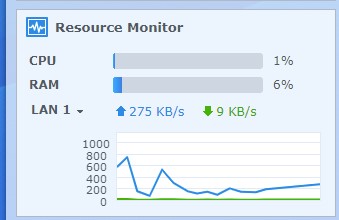
Synology: Lan1: KB/S goes up to 3500 mb/s on the videos that buffer
CPU: 2%
RAM 6%
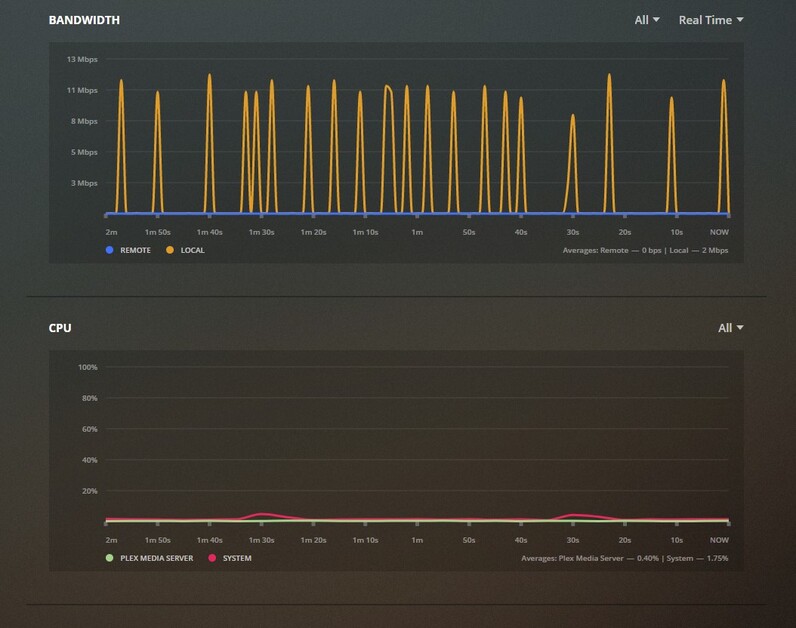
PLEX Bandwith: up to 46 mb/s on the videos that buffer.
My wi-fi is several years old. Do I need a faster wi-fi or is something else the problem?
Streaming via WIFI is a pain. Many tv vendors only offer slow(er) 100 Mbps LAN ports or none at all. WIFI can theoretically provide better performance but is easily distracted/impacted… e.g. by competing WIFI networks on the same bands, parallel communication, interferences or physical barriers (walls, even furniture…), badly positioned antennas…
For blu-ray quality tips, a 100 Mbps LAN line will be good enough… so if you can, attempt to connect your tv using a wired connection. If that’s not possible try to troubleshoot your WIFI… it’s usually beneficial to use the 5 GHz over the 2.4 GHz band… while you won’t bring down walls it might help to review the position of your router/AP and the TV (as far as it’s possible… I’ve seen friends placing their router inside a cabinet: try to avoid that )
Also: it’s worth to double-check if the issue is actually a bad connection or if the client just thinks it’s too slow while the culprit is some slow transcoding on your server (-> check the now playing tile/card on your server dashboard while playing that video)
Thanks for the reply.
My wi-fi has a 2.4 GHz band. It also has a 5 GHz band, but that never seemed to work with my cell phone or lap tops. I don’t remember the 5 GHz band appearing as an option when I set up my TV. Maybe I should check on that. It is impossible to hard wire the connection. I could add a wi-fi booster/repeater to increase the signal. This is not a global problem. It only occurs on some videos, and only on the same videos. It always works well with some blu-rays and always pauses/buffers on others. All of my videos were run through the same software for ripping and saving/converting to MP4, h.264 files. After work I can check about transcoding, but if all the files are the same type, that should not be an issue, right?
That’s what I’m forced to use (as I’m not willing to rip open my walls to put some cables in). Used to be super unstable for some time but currently they’re doing a great job for me (though the 1200 Mbps connectors will only produce a real world bandwidth of 300-500 Mbps due to the cabling/other devices on the cables – still much better than 100 Mbps or a WLAN connection close to a student dorm where every room has their own WIFI )
There was a time they were a PITA, but from what I here nowdays the quality adapters are very impressive. I would use the Ethernet connection rather than the Wifi but both will work.
.MP4 and .MKV are “container” files. They can contain multiple different video and audio streams. You can’t tell much from looking at “Movie.mp4” and “Other Movie.mp4”. They could be wildly different internally.
Common video codecs include H.264/AVC and H.265/HEVC. But then there are still a bunch of relevant variables - bitrate, color depth, and many options within the codec.
There’s just as many variables for audio codecs. And for subtitles.
Plex will transcode the video, audio, and subtitles into something palatable for your TV or player device. This can be a trivial process, or can be enough to overwhelm a server, depending on what is required.
I’d investigate this first - is the video transcoding - before I started rewiring my house.
I meant that they were all h.264/AVC, packaged as MP4. I am at work now but will defiantly look to see if any of the videos are transcoding. If they are and that is the issue, what do I do about it. The Synology NAS is brand new and purchased specifically for this purpose. I am not willing to replace it with something else. Do I change the videos to a different format? And if so, and I am using the same software programs to process these videos and some work and others don’t, how would I do that?
One step at a time.
When you’re able to look into this, check out the now playing dashboard information – with that information it’ll be significantly easier to get to a conclusive way forward
I checked to see if there is transcoding. It does not look like there is. Last night, everything I tried to play was buffering. Even videos that had been playing well. Go figure. Below are screen shots from a video that has never played without buffering.
I can get a powerline adapter and try that. Unfortunately my wi-fi router does not have any free Ethernet ports. I think I’ll get a powerline adapter, try that out, and probably end up getting a new router with more ports. Incidentally, if I play my videos on my Synology NAS, they play properly.
No projects are simple and plug and play. There are always problems to deal with and it always takes 3 trips to the store and 3 times as long to complete them. Just like plumbing problems.
I would first try changing 2.4GHz Band Channel, especially if it is on default (Channel 6), also check if Channel width is set to 20/40MHz and not 20MHz.
Sorry, I am not particularly computer savvy (OK, not at all). I assume you mean changing the band channel and channel width on the wi-fi router. Where is this located. Is it a switch or what? Sorry.
When I look for wi-fi signals (like from the TV), I see the 5GHz listed but nothing ever seems to be able to connect/stay connected to it.
You will find that information in your router or Gateway, normally by entering LAN IP of router into browser address field. Enter your password and go to WiFi section.
Normally there are drop down menus for varying Channels or Width for each band.
Also note, that your 5GHz issue could be related to Dynamic Frequency Selection ( DFS ), some Tv’s struggle with DFS so lower channels on 5GHz band without DFS may resolve your problem on that Band.
Thank you for the info. The router is upstairs and on the other end of the house. I am worried the signal strength will not be enough and I will end up having to buy equipment. I’ll try a 4 port switch and a powerline adapter and hopefully that will resolve the issue. I’ll let people know how it went.
 )
) )
)