The server is unreachable - triggered by transcoding

Server Version#: 1.20.1.3252
OS: Welcome to Ubuntu 18.04.5 LTS (GNU/Linux 4.15.0-117-generic x86_64)
i7-6700 cpu, 16 GB RAM, SSD 50% used
VAAPI installed via
apt install ubuntu-restricted-addons

Player Version#: macOS application 2.58.0.1076-38e019da
but any local LAN or remote player really will trigger

A transcoding session appears to hang the entire server. If a web browser session is already open it will report “The server media04 is unavailable.”

When I log on the server, I see there are 8 zombie processes.

Two questions:

  1. How do I address the transcoder failure?
  2. How do I recover the server without having to reboot?

Here is the transcoder command line:
brad@ubuntu01-media:~$ ps -fp 10577 | grep plex
plex 10577 1430 10 20:57 ? 00:05:36 /usr/lib/plexmediaserver/Plex Transcoder -codec:0 hevc -codec:1 eac3_eae -eae_prefix:1 <<token01>>_ -ss 1422 -analyzeduration 20000000 -probesize 20000000 -i /media/TV/Normal People/Season 01/Normal People - S01E03 - Episode 3 - WEBDL-2160p (h265 10-bit) (EAC3 5.1).mkv -filter_complex [0:0]scale=w=720:h=406[0];[0]format=pix_fmts=yuv420p|nv12[1] -filter_complex [0:1] aresample=async=1:ocl='stereo':rematrix_maxval=0.000000dB:osr=48000[2] -map [1] -codec:0 libx264 -crf:0 21 -maxrate:0 1724k -bufsize:0 3448k -r:0 25 -preset:0 veryfast -x264opts:0 subme=6:me_range=4:rc_lookahead=10:me=hex:8x8dct=1 -map [2] -metadata:s:1 language=eng -codec:1 libopus -b:1 162k -map 0:2 -metadata:s:2 language=eng -codec:2 copy -map 0:t? -codec:t copy -f segment -segment_format matroska -segment_format_options live=1 -segment_time 1 -segment_header_filename header -segment_start_number 0 -segment_list http://127.0.0.1:32400/video/:/transcode/session/<<token01>>/<<token02>>/seglist?X-Plex-Http-Pipeline=infinite -segment_list_type csv -segment_list_unfinished 1 -segment_list_size 5 -segment_list_separate_stream_times 1 -avoid_negative_ts disabled -map_metadata:g -1 -map_metadata:c -1 -map_chapters -1 chunk-%05d -start_at_zero -copyts -y -init_hw_device vaapi=vaapi: -hwaccel_device vaapi -filter_hw_device vaapi -nostats -loglevel quiet -loglevel_plex error -progressurl http://127.0.0.1:32400/video/:/transcode/session/<<token01>>/<<token02>>/progress

Transcoder quality: make my CPU hurt (since changed to Prefer higher quality encoding)
Transcoder temporary directory: /tmp/plex
Transcoder default throttle buffer: 90
Disable video stream transcoding: unset/clear
Use hardware acceleration when available; set/checked
Use hardware-accelerated video encoding: set/checked
Maximum simultaneous video transcode: Unlimited

(Question 1a is “How can I preempt the on-demand transcoding by using Create Optimized Version?” - specifically How do I translate between the two settings:

  • observed SD / particular sound in the dashboard > now playing page and
  • the options in Optimize? )

Here are the zombie processes:

brad@ubuntu01-media:~$ ps -ef | grep defunct
plex      1430     1  0 20:16 ?        00:00:48 [Plex Media Serv] <defunct>
plex      1573  1430  0 20:16 ?        00:00:18 [Plex Script Hos] <defunct>
plex      1715  1430  0 20:16 ?        00:00:05 [Plex DLNA Serve] <defunct>
plex      1718  1430  0 20:16 ?        00:00:02 [Plex Tuner Serv] <defunct>
plex      2127  1430  2 20:17 ?        00:02:34 [Plex Script Hos] <defunct>
plex     12952  1430  0 21:03 ?        00:00:00 [Plex Relay] <defunct>
plex     16896  1430  0 21:16 ?        00:00:00 [Plex Media Scan] <defunct>
root     29875  1824  6 21:59 ?        00:00:00 [/usr/share/webm] <defunct>

It also tends to zombify the webmin process so I can’t manage the server with a web browser either… which is inconvenient to say the least.

server will reboot using reboot command.

Any ideas/suggestions/next steps?

I did see a post that recommended kernel 5 rather than kernel 4, so I was considering the upgrade to Ubuntu 20.02 LTS, but don’t want to go down that rabbit hole if not necessary just yet.

thanks in advance… Brad

Just for fun, I decided to run an optimize session.

It ran for maybe 90 seconds and I was able to trace it in webmin before the sequence described above happened again.

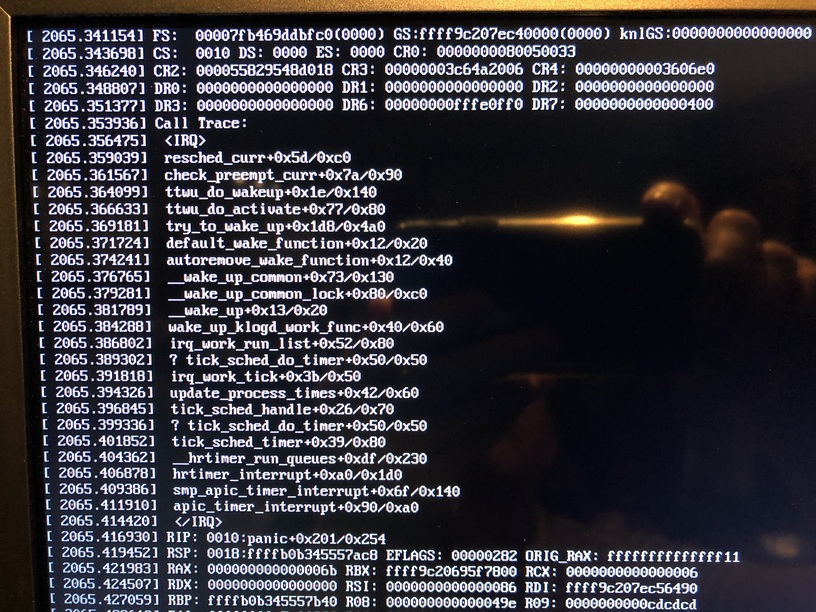
Here’s a screen cap of the trace:

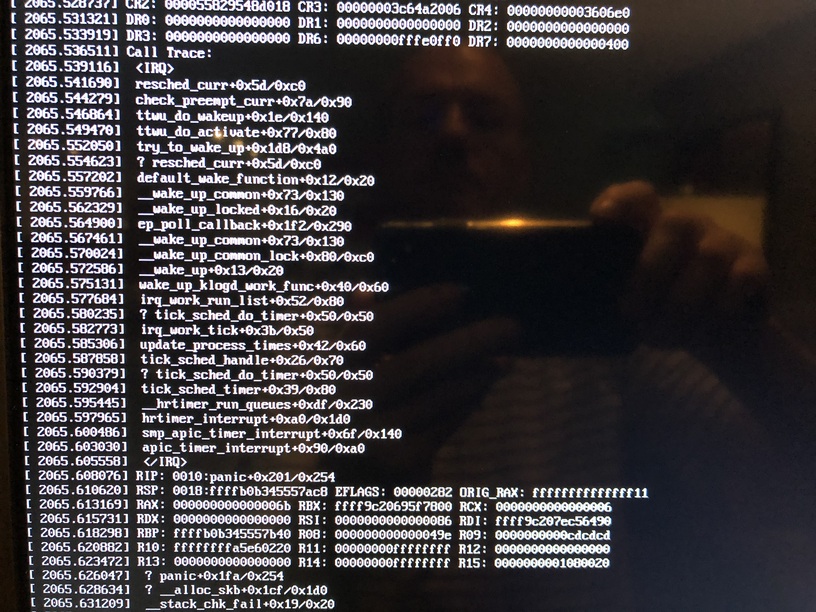
Unlike the first time, I am not able to ssh to or even ping the server anymore.

server console (apologies for poor quality images)

Is that CPU overheating ?

It looks like either the ethernet adapter driver or the i915.

May I see the full logs ZIP please, preferably a set where this is captured?
Also, may I see the journal kernel logs for the event?

This looks very much like a hardware issue but also could be a bad kernel issue.

Happy to get those to you - where can I find them?

Kernel logs are

sudo journalctl -xe > /tmp/kernel.log

After it writes out the log to the file, Please open in a text editor and delete all the old and unwanted entries (those logs can get big). You probably want to start at the bottom of the file and work backwards. When you find what you want, delete everything above that point (allow about 100 lines above in case something precipitated it)

started an optimization session; this command running starting at 12:18 pm PT 2020-09-10:

/usr/lib/plexmediaserver/Plex Transcoder -codec:0 hevc -codec:1 eac3_eae -eae_prefix:1 <<token1>>_ -analyzeduration 20000000 -probesize 20000000 -i /media/TV/Normal People/Season 01/Normal People - S01E05 - Episode 5 - WEBDL-2160p (h265 10-bit) (EAC3 5.1).mkv -filter_complex [0:0]scale=w=1280:h=720[0];[0]format=pix_fmts=nv12[1];[1]hwupload[2] -filter_complex [0:1] aresample=async=1:ocl='stereo':rematrix_maxval=0.000000dB:osr=48000[3] -map [2] -codec:0 h264_vaapi -b:0 3000k -maxrate:0 4000k -bufsize:0 8000k -r:0 25 -map [3] -metadata:s:1 language=eng -codec:1 aac -b:1 216k -f mp4 -map_metadata -1 -map_chapters -1 -movflags +faststart /media/TV/Normal People/Season 01/Plex Versions/Optimized for Mobile/Normal People/.inProgress/S01E05.mp4.2238 -map 0:2 -metadata:s:0 language=eng -codec:0 copy -f srt /media/TV/Normal People/Season 01/Plex Versions/Optimized for Mobile/Normal People/.inProgress/S01E05.mp4.2238.127625.sidecar -map 0:3 -metadata:s:0 language=spa -codec:0 copy -f srt /media/TV/Normal People/Season 01/Plex Versions/Optimized for Mobile/Normal People/.inProgress/S01E05.mp4.2238.127626.sidecar -y -init_hw_device vaapi=vaapi: -hwaccel_device vaapi -filter_hw_device vaapi -nostats -loglevel quiet -loglevel_plex error -progressurl http://127.0.0.1:32400/video/:/transcode/session/<<token1>>/progress

system hung ~ 12:21 pm PT (2020-09-10T12:19:42.273314-0700 according to line 162)

  • ssh dead
  • console dead

hard rebooted server

line 162 is the first problem in the hevc decoder shared lib, lib_hevc_decoder.so:

2020-09-10T12:19:42.273314-0700 ubuntu01-media kernel: Plex Transcoder[25881]: segfault at 48 ip 00007f72b9d158e8 sp 00007f72b2b9da30 error 4 in libhevc_decoder.so[7f72b9cfc000+16d000]

Following on, there is another crash starting at line 2510

Here’s the log:

(generated with command: sudo journalctl -xo short-iso-precise -S “2020-09-10 12:00:00” > /tmp/kernel_plex_2020-09-10_02.log)

kernel_plex_2020-09-10_02.log (366.5 KB)

thanks… Brad

THanks, I see it now.

Check the video, I’ll bet it is HEVC HDR (10 bit).

The i7-6700 can only do HEVC SDR (8-bit) in hardware.
HDR (10 bit) is first available in the Kaby Lake (-7xxx processors).

I had a 6700 and it was pain. For me, it would fault and throw fits like nobody’s business.

Indeed it is. I have seen on the dashboard where 10-bit HDR was tagged as being HW transcoded… which left me scratching my head (because I was aware of the 8-bit HDR limitation on the 6-series Core I7).

Shouldn’t Plex fall back to transcoding it in software then?

Seems like Plex is not sending the file down the right processing path.

thoughts?

thanks… Brad

Thanks Brad,
I am writing that up. It should know better than to attempt hardware transcoding of HDR on a 6700.

I wonder if the test frame it uses is a SDR frame. If so, that would explain what’s happening.

Can you please provide me the XML (media part only) for inclusion in the trouble ticket?

In the FWIW department. The i7-6700 and i7-7700 are pin-compatible.
My QNAP came with a 6700 but when it failed, upon request, they dropped in a 7700 for me.

Thanks Chuck. Thought I was going crazy there.

Here are the <media> elements for two files that shoot the server dead…

<Media id="34283" duration="1718912" bitrate="15692" width="3840" height="2160" aspectRatio="1.78" audioChannels="6" audioCodec="eac3" videoCodec="hevc" videoResolution="4k" container="mkv" videoFrameRate="PAL" videoProfile="main 10">

<Media id="29668" duration="8961984" bitrate="54531" width="3840" height="2160" aspectRatio="1.78" audioChannels="8" audioCodec="dca-ma" videoCodec="hevc" videoResolution="4k" container="mkv" videoFrameRate="24p" audioProfile="ma" videoProfile="main 10">

Looks like they both are tagged correctly as 10-bit in the videoProfile attribute…?

I was planning on upgrading to a new 10-gen CPU… when budget permits - but of course that starts the dominos falling on new motherboard & RAM.

I did pull the trigger on a used Core i7-7700k, so hopefully the extra speed over the stock i7-7700 will help the transcoding etc.

In the meantime… Is there anyway to block usage/transcoding of these main 10 files (aside from putting them in a private library)?

Appreciate your fast and thorough help on this case. Hopefully developer team can look at this defect soon.

best regards… Brad

Yes, both are.

I will add this to the ticket

Thank you!

As for blocking it? Not without turning off HW decode.

I have this thread referenced in the ticket so can report back here when there is action taken.

Personally, I’m glad I got the 7700. I don’t need fuss with it because my HEVC rips are too much to perform in software, I need the HW capability.

Ok thanks!

If I’m feeling brave/stupid maybe I will turn off HW processing and see what happens until the new CPU arrives.

Thanks again… Brad

Hi Chuck - just checking in.

Did the development team accept this defect and find the problem?

thanks… Brad

I don’t know if it’s fixed for you.

There are corrections in 1.20.2.

have you tried it?

I’m on Version 1.20.2.3402 now.

Unfortunately I’m not able to execute the i7-6700 test case anymore - upgraded my system to a Core i7-7700k over the past week.

Generally stable, so far but have not tried transcoding 4k yet.

Hints on where to find the release notes for that release?

thanks… Brad

Release-announcements tag