Server Version#: 1.21.1.3876 (rpm)
Player Version#: Plex for Windows 1.25.0.1511-47afccd4
This error appears when attempting to delete automatically-obtained subtitles. I am unsure if they were sourced through the OpenSubtitles agent, or some other built-in means. This does not apply to any subtitles obtained using SubZero.
The relevant logs reporting that the delete action failed is this:
Request: [<IP:PORT REDACTED> (Allowed Network (Subnet))] DELETE /library/streams/117778 (15 live) GZIP Signed-in Token (<USERNAME REDACTED>)
Completed: [<IP:PORT REDACTED>] 403 DELETE /library/streams/117778 (15 live) GZIP 1ms 458 bytes (pipelined: 45)
The 403 Forbidden response is unexpected, as I have set the permissions quite generously. The user and group of the plexmediaserver service are equal to all the files inside /var/lib/plexmediaserver/Library/Application Support/Plex Media Server/Media and I even set all the files to 777 as well. The process still fails with a 403 error.
The player I am attempting this through is logged in and can administrate the server, and the local IP address of the machine running the Plex Media Player is allow without auth in the PMS settings too. I also tried this in the web browser, both logged in and not logged in, and the 403 is still happening.
I am unsure what else to try to delete an unwanted subtitle. To perform the action, I am going to the episode in my TV Show library, and in the “Subtitles” dropdown I am clicking the X on the particular subtitle I do not want. There are other subtitles in this list that I want to keep.

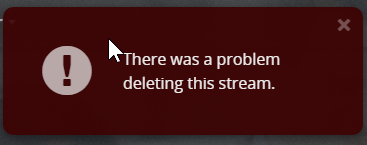
And this is the error that appears in the UI.