Server Version#: Version 1.22.2 and 1.22.3.4392 (same problem)
Player Version#: latest
all of the sudden,
for my series section
plex/web: recommandations tab is gone, while the actual media-tab works (Home has no “Series” entry anymore). continue watching still shows Series-entries
androidtv: the whole section is gone - says add media (while landingpage items still working in continue watching)
where an items shows up, it has metadata and is playable … O_o
optimized database, rebooted, still nothing
is this the “beta” in Plex-Series-Scanner(beta) ?
PLEX.zip (6.0 MB)
everything else works … except downloading logs results in " 500 Internal Server Error"
Anime Section (also plex-series-scanner(beta), is fully working on all devices …
A few feature flags got flipped today. Some things changed for the Home screen.
Some steps to try, easiest first:
- force-reload the web app (Shift+F5), make sure to use the hosted one http://app.plex.tv
- restart the server
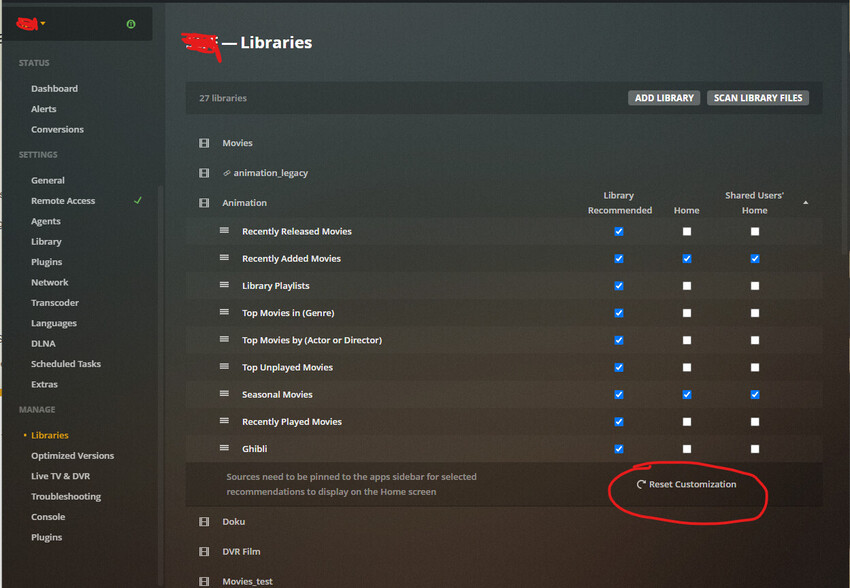
- make sure the affected library has been pinned to the side bar
- edit the affected library, go to the ‘Advanced’ tab and toggle the ‘Visibility’ preference back and forth
- go to Settings - Server - Manage - Libraries
and unfold the affected library and “Reset Customizations” there
thank you
yeah seems it was a bad idea to change the Agent a few days ago …
saving that options (visibility) gave an “error saving changes”.
but somehow the Series section had recommandations on plex/web again. but now the movie section does not show up anymore and is loading forever 
seems there is pretty bad stuff going on with my database 
optimizing the database again takes extremely long
okay… everything in settings loads forever too… restarting…
so i restarted pms (again), deleted old packages (again), and hit optimize database (again). this takes now for 20mins+ without the circle moving, while “server settings not accessible” …
restarted (took also long),
only error that came up in console was
SQLITE3:(nil), 13, statement aborts at 38: [select distinct metadata_items.id as 'id', parents.id as 'parent_id', grandparents.id as 'grandparent_id', metadata_items.added_at as 'added_at', metadata_items.library_section_id as '
anyway to rebuild database without rebuilding the whole library ?
That’s not exactly an error. You will see that kind of msgs immediately on the first start after a server software update.
If you see it on every start however, you might have a damaged database.
Unfortunately repairing is currently a bit complicated. If you’re not shy of the command line, you might wanna take a look at Upgrades above 1.22.0 corrupting database
cli is fine. i’ll take a look. thank you
that topic is a lot of noise…
so i tried Repair a Corrupt Database | Plex Support
and now the server isn’t starting anymore … boy … a sophisticated , working guide would be nice
changing an agent in plex is horrible… really annoying… for years
so i guess i have to reinstall a complete backup ?
okay… installing backup… thanks for nothing … and please fix your still pretty broken product before adding more nonsense like the last couple of years … this must be like the 5th time the db was broken for me
and boy, fix/upgrade your (not working) guides …