So my old version of Plex Media Player disappeared from my desktop PC all of a sudden yesterday, so I had to go download the latest version. 2.58.0. I’ve now set it up but my movie library has huge posters so there’s only room for two rows (12 movies in all) on my HDTV. There is no slider either for changing the size of the posters. Why is there no slider for me to adjust, and how do I make it appear? Or is there another way of changing the poster size in ones library?
If ‘Plexweb’ view hasn’t been removed - switch back to it by clicking the TV icon to the left of the ‘Full Screen’ icon.
If ‘Plexweb’ view is gone forever - as promised - use Plex for ‘Whatever’ (Windows/Mac):
Apps/Devices link at page bottom has them both.
There’s no Plexweb, TV icon or Full Screen icon.
I guess I’ll try out Plex for Windows.
Same Version:
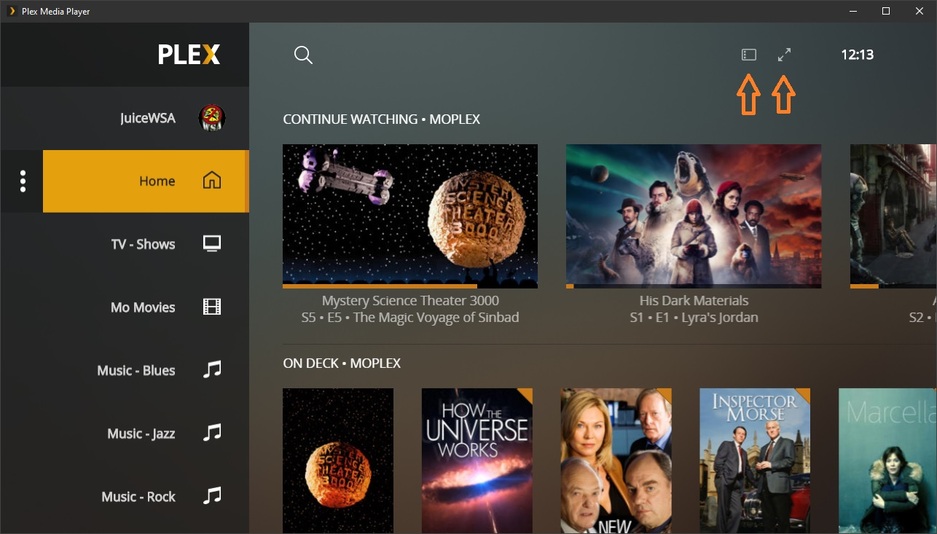
I’m not changing mine to find out what happens - it opens on the TV where I need it. I also use Plex for Windows on the Desktop when necessary.
I don’t have those icons. My Desktop PC is connected to my HDTV with a HDMI cable. I like that the app opens on my TV. Is it possible to download an older version of PMP (the one you got) ?
I just installed Plex for Windows, not sure I wanna use that. It wants me to update Plex Media Server. And it’s in windowed mode.
I have the same version you have - and you can’t get those icons until you roll a mouse over the area (I assume, 'cause I can’t hit the Full Screen icon until a mouse hits that area)… the latest PfW has the slider.
Now I see the icons using the mouse.
But there’s still no slider for adjusting the size of the movie posters.
Oh, so I can only adjust the size on Plex for Windows? That’s a bummer.
Well, if, when you change PMP to Plexweb View there’s no slider - there you go.
Use Plex for Windows.
Plex has ‘promised’ to remove Plexweb View entirely from PMP.
This may be something associated with that - or not - who knows?
I don’t know what this Plexweb View is. I have it in TV mode.
How do I remove the bar at the top (it’s in windowed mode) in Plex for Windows?
Using PMP - what happens when you click the TV Icon with the mouse?
( I am absolutely not changing mine to find out)
Using PfW you can’t remove the bar, but all items that play will play ‘Full Screen’.
It was always in TV mode, with no slider. There’s a slider in Plexweb View but then I have to update my Plex Media Server as well, dunno if I wanna do that. With Plexweb View I can’t even use a remote control. So I should be using PMP in TV mode. I don’t like PfW and its stupid bar at the top.
Well - there’s no ‘slider’ in Plex Media Player’s TV View - unless (and if it works) you go to Plexweb View (the view PfW uses).
If you had ‘Scaling’ set in PMP - you’ll need advanced help:
@OttoKerner
… is as ‘advanced’ as it gets…
The slider works in Plexweb View and changes the poster size, but it doesn’t change the poster size in TV mode.
Guess I will just have to get used to only having 12 movies visible on my TV since the posters are so large.
What is the screen resolution set in the OS?
Did you set a different scaling factor than 100% for the display?
Have you previously customized the shortcut to PMP and included a command line parameter which modifies the scaling factor?
No, it doesn’t - Otto may be able to help with some clever ‘scaling’… let’s find out together…
This is pretty much the norm now. It is made for larger viewing distances.
1 Like
My screen resolution is 1080x1920.
I haven’t modified any scaling factor, I actually don’t know where to do this. I’ll check out Settings.
I haven’t previously customized the shortcut to PMP. I just did a clean install of PMP.
I just don’t understand why my old version of Plex Media Player from last year disappeared from my Windows taskbar suddenly, and now it’s nowhere to be found on my computer. The old version worked perfectly. But now I have to get used to this new stuff that isn’t ideal.
This topic was automatically closed 90 days after the last reply. New replies are no longer allowed.
