Here is a sample: https://www.dropbox.com/s/xk61gdc6c2sk0nk/The%20Double%20(2014).mkv?dl=0
XML: https://www.dropbox.com/s/9re7vo06vfim1ge/139199.xml?dl=0
- This file crashes the iOS app.
- Doesn’t play on the Nvidia Shield TV plex app; overlay says ‘Direct Play’ but file doesn’t process after it is loaded.
- Plays find via in-browser PMP
- Plays okey via SPMC using official plex kodi-addon.
I posted here in the general forum because it didn’t fit to one specific client issue. Let me know if I should repost elsewhere, please.
Running: Plex for Android 5.6.1, iOS Version 4.8, Plex Media Server 1.4.3 on MacOS 10.12.3. Shield connect to receiver that supports all the formats in this file as passthrough.
I note that if I remove chapter one using MKVtoolnix then PMS identifies the DTS as MA. The issue seems to be that plex doesn’t identify the DTS track as MA which is causing all these issues. So a PMS issue i think.
@Afullmark said:
I note that if I remove chapter one using MKVtoolnix then PMS identifies the DTS as MA. The issue seems to be that plex doesn’t identify the DTS track as MA which is causing all these issues. So a PMS issue i think.
That could be it, but your XML shows that the selected track is not the DTS track. I’ll test your sample file later. If you think it is the DTS track, can you remux your file without the DTS track and see what happens.
@anon18523487 said:
@Afullmark said:
I note that if I remove chapter one using MKVtoolnix then PMS identifies the DTS as MA. The issue seems to be that plex doesn’t identify the DTS track as MA which is causing all these issues. So a PMS issue i think.
That could be it, but your XML shows that the selected track is not the DTS track. I’ll test your sample file later. If you think it is the DTS track, can you remux your file without the DTS track and see what happens.
@“MovieFan.Plex” If the PCM tracks are selected then all is well with the world; it is PMS mis-identifying the DTS-MA track as DTS. Weirdly, if I remove chapter 1 with mkvtoolnix then PMS identifies the DTS track with the correct MA profile. As it stands I cannot select the DTS track in the iOS app or the shield app.
No MA profile:

If you can’t pick the DTS track from iOS or the Shield, then it should be playing the PCM track, which you say works. Do you mean it crashes when you switch from the PCM to the DTS track?
@anon18523487 said:
If you can’t pick the DTS track from iOS or the Shield, then it should be playing the PCM track, which you say works. Do you mean it crashes when you switch from the PCM to the DTS track?
If I select the DTS track as default in PMS then neither the iOS or nvidia shield app will play file. PMS is not identifying the DTS track correctly, which is causing the issue. It should be identified as DTS MA.
@“MovieFan.Plex” If i remove the first chapter using mkvtoolnix:
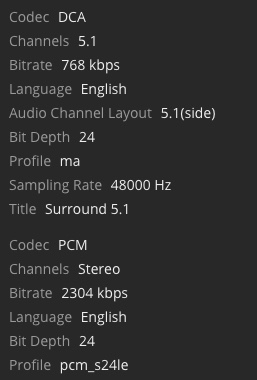
Now PMS identifies as DTS ma and clients can play file with DTS correctly. The first chapter does not have any audio track; audio starts from the second chapter. Could PMS have issue with this. If this is fixed it could help others that have not even discovered this.
Ok. I get it. Just trying to understand the initial problem when you said you can’t select the DTS track. I’ll try to reproduce a little later. Can you confirm that the same issue happens with your sample?
@MovieFan.Plex said:
Ok. I get it. Just trying to understand the initial problem when you said you can’t select the DTS track. I’ll try to reproduce a little later. Can you confirm that the same issue happens with your sample?
@“MovieFan.Plex” Yep. I just loaded that sample into PMS and I get:
- PMS does not identify DTS track in sample as DTS MA
- If the DTS track is selected, the file will not play; it does not play from the PMS using the browser
- The sample does not play in the iOS app nor nvidia shield app nor the PMS player.
