I can’t play movies on my TV anymore, because I always get the message:
"There was a problem playing this item.
This server is not powerful enough to convert videos."
My TV a Panasonic 65EZ950 and has a Plex app installed.
My system is:
Synology DiskStation - all movies are neatly organized in the “Movies” folder there.
Plex Media Server App installed Version: 4.47.3
Movies saved as MKV files
Internet connection: DSL 500MB/s (Wlan approx. 150MB/s downstream, 15 MB/s upstream)
When I want to watch movies via the Plex app e.g. on my iphone it works fine.
The quality settings of the Plex-server app is not so clear to me, what has where what influence and what the optimal settings are.
So far it has worked. I suspect I have a few settings out of whack.
I ran into this issue over the last few days when trying to play 4k video on a 32Gb 12 core 3900x + nvidia 3070 server.
I spent quite a while playing with various settings until i eventually figured out that i needed to specify a Transcoder temporary directory in Settings -> Transcoder.
Most of their CPUs have about as much power as a Core2 Duo and no means to add a GPU.
On these machines, the usual Achilles heel is when PGS, VOBSUB, or DVDRIP subtitles are encounterd. These machines, and their 800-1500 Passmark ratings are not capable of processing that in realtime.
My point was that the problem i had which caused the exact error message - even when playing media on the server itself - was caused by an empty Transcoder temporary directory field and had nothing do with with the “power” of the server.
Hi petebr,
thank you for your help. Yes this field is also empty in my settings. But there ar no options to link it to a file folder. So i tried it manually: “P:\tmp_transcoding”
But this does not solve my problem… :-((
thank you very much for your answer. But all movies have worked on my plex so far. Not a single one can be played as of late. So it should not be the audio tracks or subtitles. Somewhere a new setting has been added or dropped…
On all other devices Plex works. On the computer, on the iphone, on the ipad.
all plex movies are on my synology NAS system.
Also the Plex app is downloaded there and installed on the synology. I got the data from the Plex app installed on the synology.
But I am sitting at a Windows 10 machine and accessing the NAS disks from there.
However, I changed my Windows machine some time ago. Could it be related to that? But all other devices work as said with the current settings. iphone, ipad, apple mac pro in the office, windows 10 computer - unless the TV suddenly stops working.
Four days ago everything works fine. Except the DTS Sound will not work (but this is an other problem) then i “played” at the settings to solve the DTS problem and now its not working anymore…
I can’t play movies on my TV. Even with the iphone recorded small movies can not be played and it comes the error message:
“There was a problem playing this item.
This server is not powerful enough to convert videos.”
I logged out of the TV and logged back in. No success!
I have also sent you the settings of the TV Plex app as a photo.
I have now tried different settings. Always the same result.
But there is still something very strange. All movies are not playing - except one - a concert by Peter Gabriel. That one runs strangely enough… I have also sent you here again the XML file of the concert film.
In my case I suspect the issue was that i didn’t have enough free space on the default drive (there was about ~30Gb free) to work with the temporary files that are created when delivering 60Gb 4K files. Specifying a path to an alternative folder on a different drive solved the issue for me.
Hi Trumpy sorry, I forgot to include the attachments. Now attached again.
Also the LOG files for a video of Peter Gabriel (the only one that works on the Plex app on the TV). Very strange!
The TV in the living room is connected via LAN cable to a switch that is connected to my WLAN repeater. The IP address of the TV is 192.168.178.1…
As well as the Synology server 192.168.178.1…
Have you added your LAN IP address to the List of IP addresses and networks that are allowed without auth?
This setting has always been empty, since the TV is actually connected to the WLAN.
Thanks for everything. And to you and all in the forum a happy new year!!!
Hi Trumpy,
thank you, i corrected it now in List of IP addresses and networks that are allowed without auth
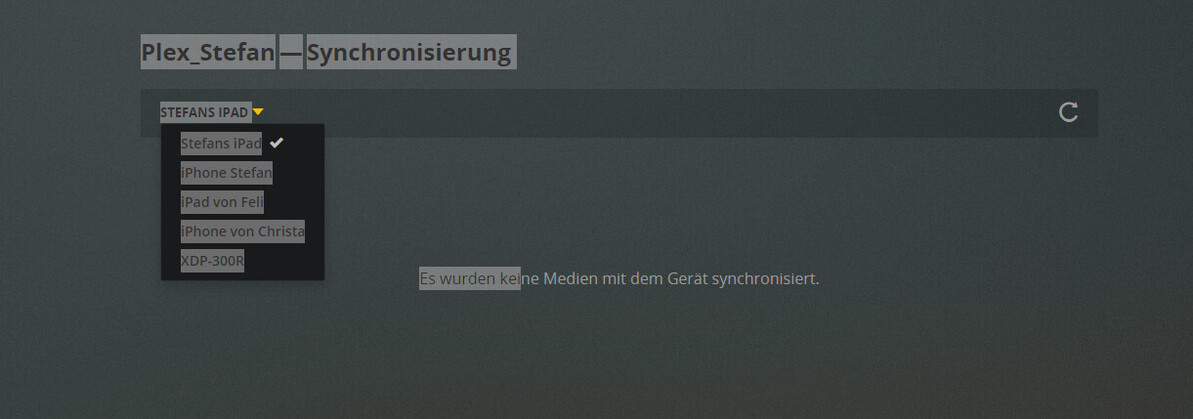
and i wanted to remove any entries in sync - but there is only a drop-down menu and i can not remove anything. Please see my screenshot.
Hi Trumpy,
what I mean is that the problem persists even though I have done all the tips and defaults as stated.
Again about the problem:
Plex is running in latest version on a Synology Server DS918+ (server version also up to date).
So far all movies (game movies in MKV format and home made iphone movies mpeg4) could be played through the Plex app. Both on the PC, on the Mac, on the iphone, on the ipad and on the 4K TV Panasonic EZ950 65 inch via installed app.
For the past 2 weeks, when playing a movie on the TV, the Plex message appears:
“There was a problem playing this item.
This server is not powerful enough to convert videos.”
All the advice I have received so far has been to no avail.
This is what I mean by that.
I suspect the settings in the Plex server app are not correct at some point.