TabasKo
January 29, 2019, 11:31am
1
Hi,
How can I force Plex to rebuild my video thumbs/preview pics ?
Thumbs I’m speaking about are the ones build from the original media.
Thanks if you have any tricks to share.
PMS running on a Synology DS418+ (last PMS version available).
Since making these preview thumbs is very hard on your server CPU, you might have disabled them.https://support.plex.tv/articles/202197528-video-preview-thumbnails/
TabasKo
January 29, 2019, 12:12pm
3
Thanks for your answer, I understand, but this is what I would like to have
I have tones of media in many libraries and I have never had any issue.
Please verify that they are still activated. Both under Settings - Library and in the properties of each video library.
TabasKo
January 29, 2019, 12:33pm
5
Can you be more accurate on what I am supposed to check please ?
Please follow the link I’ve set for you above.
I had a look to your link: not really sure we are speaking about the same thing.
Apologies, then I misunderstood.
What happens when you pick one movie or one tv show and ‘Refresh Metadata’?
Already tested. It works and I can see each files are scanned, but the one with no cover stay with no cover (and the ones with cover keep their cover active).
You mean the actual media were lostPlex data folder lost?
Could you share the contents of the Plex XML info of one affected movie, please?
TabasKo
January 29, 2019, 3:03pm
11
Nothing lost but the image regarding the cover
It was working before.
Sorry, that was not what I was asking for.
TabasKo
January 29, 2019, 6:18pm
13
Are you looking for this ?
#### Média

* Video Resolution 1080p
* Durée 41:52
* Débit 12417 kbps
* Width 1920
* Height 1080
* Aspect Ratio 1.78
* Container MP4
* Video Frame Rate NTSC
* Web Optimized Oui
* Audio Profile lc
* Video Profile high

#### Partie

* Durée 41:52
* File_MyMedia01.mp4
* Size 3.63 GB
* Audio Profile lc
* Container MP4
* Web Optimized Oui
* Video Profile high

* Codec H264
* Débit 12288 kbps
* Bit Depth 8
* Chroma Location left
* Chroma Subsampling 4:2:0
* Color Primaries bt709
* Color Range tv
* Color Space bt709
* Color Trc bt709
* Frame Rate 29.97 fps
* Height 1080
* Niveau 4.1
* Profile high
* Ref Frames 3
* Stream Identifier 1
* Width 1920
* Display Title 1080p (H.264)

* Codec AAC
* Chaînes 2
* Débit 130 kbps
* Audio Channel Layout stereo
* Profile lc
* Sampling Rate 48000 Hz
* Stream Identifier 2
* Display Title Inconnu (AAC Stereo)
No, I am looking for the Plex XML info
TabasKo
January 29, 2019, 8:10pm
15
Sorry.
like this ?
<MediaContainer size="1" allowSync="1" identifier="com.plexapp.plugins.library" librarySectionID="56" librarySectionTitle="PlexFolderName" librarySectionUUID="95f8bdab-124b-43f3-9832-fc7ca43c9351" mediaTagPrefix="/system/bundle/media/flags/" mediaTagVersion="1544817990">
<Video ratingKey="13628" key="/library/metadata/13628" guid="com.plexapp.agents.none://383270645cd497436f0b6b606de3afe4b927eef8?lang=xn" librarySectionTitle="MyFilms" librarySectionID="56" librarySectionKey="/library/sections/56" type="movie" title="_MYFILE01" summary="" year="2019" duration="2171113" originallyAvailableAt="2019-01-26" addedAt="1548495392" updatedAt="1548772761" createdAtAccuracy="epoch,local" createdAtTZOffset="0">
<Media videoResolution="1080" id="14792" duration="2171113" bitrate="12419" width="1920" height="1080" aspectRatio="1.78" audioChannels="2" audioCodec="aac" videoCodec="h264" container="mp4" videoFrameRate="NTSC" optimizedForStreaming="1" audioProfile="lc" has64bitOffsets="0" videoProfile="high">
<Part accessible="1" exists="1" id="15836" key="/library/parts/15836/1548495392/file.mp4" duration="2171113" file="/volume1/MYHDD/SUBFOLDER/ITEM/CAT/_MYFILM01.mp4" size="3370467790" audioProfile="lc" container="mp4" has64bitOffsets="0" optimizedForStreaming="1" videoProfile="high">
<Stream id="32096" streamType="1" default="1" codec="h264" index="0" bitrate="12289" bitDepth="8" chromaLocation="left" chromaSubsampling="4:2:0" colorPrimaries="bt709" colorRange="tv" colorSpace="bt709" colorTrc="bt709" frameRate="29.970" hasScalingMatrix="0" height="1080" level="41" profile="high" refFrames="3" streamIdentifier="1" width="1920" displayTitle="1080p (H.264)"/>
<Stream id="32097" streamType="2" selected="1" default="1" codec="aac" index="1" channels="2" bitrate="130" audioChannelLayout="stereo" profile="lc" samplingRate="48000" streamIdentifier="2" displayTitle="Inconnu (AAC Stereo)"/>
</Part>
</Media>
<Extras size="0"> </Extras>
</Video>
</MediaContainer>
Yes, that is the info I’m after.
guid="com.plexapp.agents.none://...
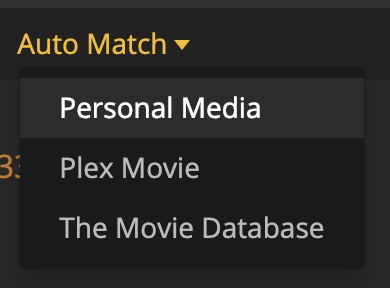
This means the movie has been matched to the ‘Personal Media’ agent and will never load any metadata.
Edit your movie library ,
TabasKo
January 29, 2019, 8:27pm
17
Thanks.
I have this
Please note that all my other library have the same configuration, and I have no issue for my thumbs.
Then it is no wonder you won’t getting anything new when you Refresh Metadata.
Now go to the preplay page of an affected movie
Let’s see what happens.
TabasKo
January 29, 2019, 8:43pm
19
OttoKerner:
Fix Match procedure
I changed my PMS to english language.
Have only this :
I assume what you call “fix match” is “Match”.
Nothing better regarding my problem.
No. The language selector I was referring to is on the ‘Search Options’ dialog.