Anyone know how plex wants thundercats named ? is it season 1 vol 1 and two and season 2 vol 1 and 2 because when i try all 4 seasons as listed online everything after first season is named incorrectly.
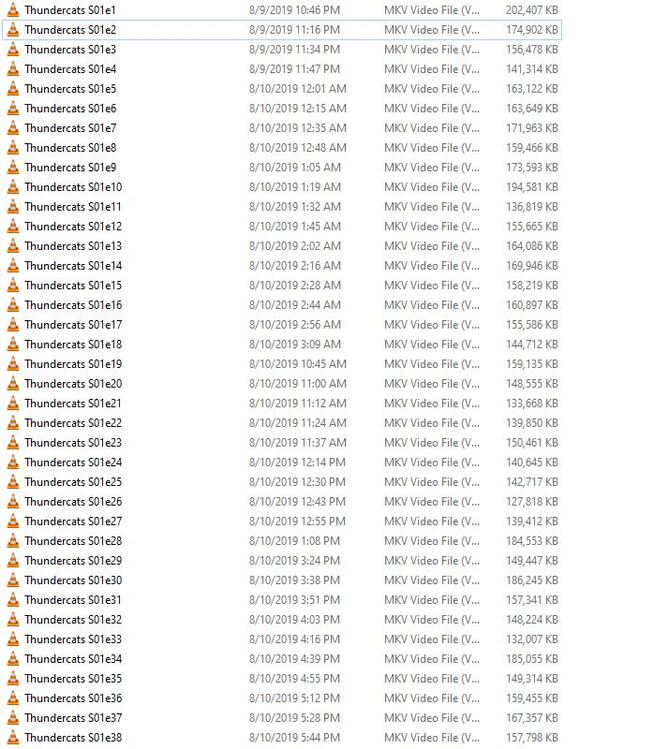
But can you show us exactly how you are naming them.
Plex doesn’t care what any online source says for Shows other than TVDB and there it shows those 4 seasons.

you helped me with tvdb its the thundercats ho episodes they do
not have a home ?
See Naming and Organizing Your TV Show Files.
Make sure you have each season in a separate folder (unclear from your post if this is the case).
/TV Shows/ShowName/Season 02/ShowName – s02e17 – Optional_Info.ext
Also, as @Xhaka writes, follow the structure of TheTVDB, which, for example, lists only 20 episodes for season 2, not 25 as you have in your directory.
Addendum: As mentioned in the support document, place specials, such as ‘Thundercats Ho!,’ in a Season 0 or Specials folder. See TheTVDB for correct structure.
/TV Shows/ShowName/Specials/ShowName – s00e13 – Optional_Info.ext
If I may add: always use 2-digit numbers. s01e01
Thanks everyone for the help
I didn’t know about that tvdb at first and was going by what wiki said and thundercats ho was messing up everything.
I know this is a separate show but just noticed my greatest American hero has issue on season 1. but its because the pilot episode on the disk is 1 file and they later split it into two parts when it was aired so season 1 should have 9 episodes not 8. any idea if there is a way to fix that?
Skip Episode 2 in the naming is the easiest way… So just go straight from 01 - 03
Didn’t if it would allow that thanks
It also shows the greatest american heroine which is on disk 1 should be on season 3 but it doesn’t name right. I am trying to fix it.
You can name it s01e01-e02.
Pros
- You will see both ep1 AND ep2 listed.
- You will have metadata for both episodes.
- You will feel like you got a complete season.
Cons
- Cause it’s one file, you can never play episode 2 without playing episode 1
- And vise-verse.
Or, name it s01e01 and “skip” episode 2 altogether.
Pros
- I don’t know of any at the moment.
Cons
- You will only see ep1 listed.
- You will only have metadata for ep1.
- You will feel like you got an incomplete season.
Or, use a 3rd party program and split the file into two episodes.
Pros
- All the same as any other series.
Cons
- Can be hard to split. Must find the right program that can do the job correctly.
If you really want to see episode 2 in the list, use multi-episode naming.
/TV Shows/ShowName/Season 02/ShowName – s02e17-e18 – Optional_Info.ext
See aforementioned documentation for additional details.
I thank you for your response I wound up skipping 2 and going to
3.
