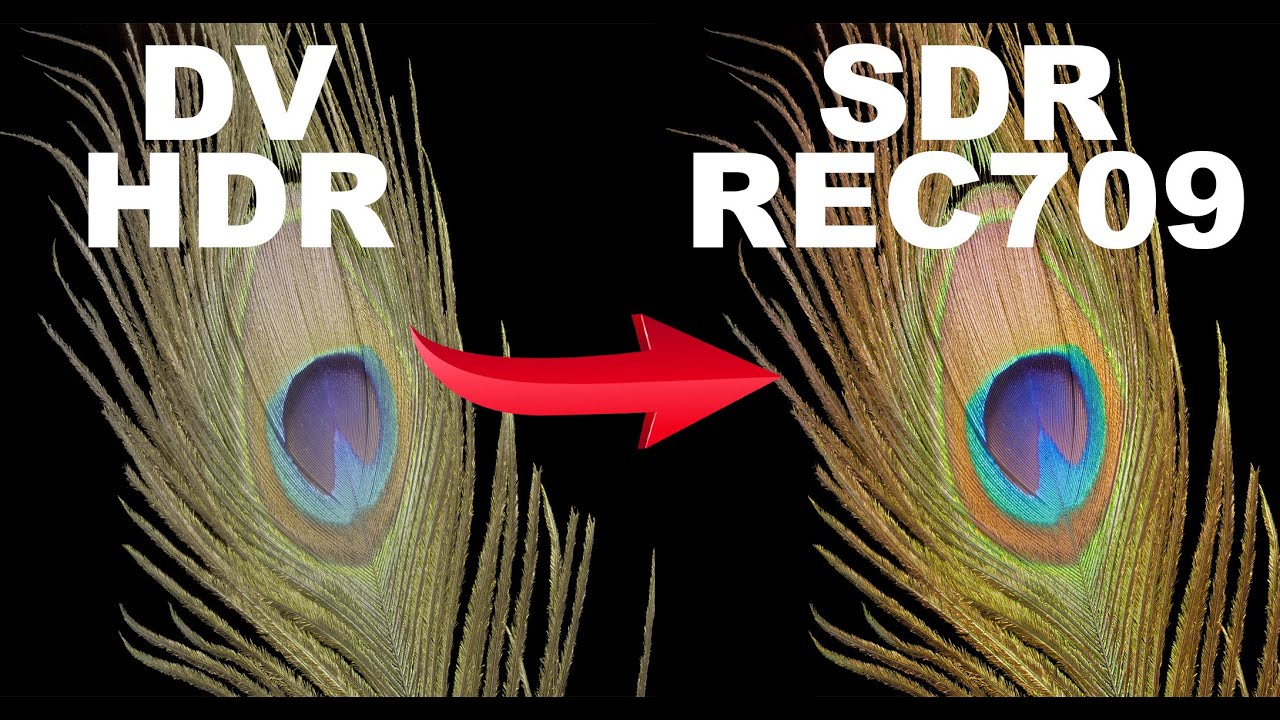
Today, Plex statically tone maps all HDR files to SDR with the same method.
Problem: Plex’s current dynamic tone mapping solution often results in unnecessary color and luminance errors. Colors are under/over-saturated. Shadows are crushed, and highlights are blown out. It does a decent job, but a better solution exists.
Solution: This could be optimized for Dolby Vision files, though. Dolby Vision files contain metadata for dynamically tone mapping the HDR image to a Rec. 709 SDR 100-nit display. This metadata is contained within every Dolby Vision file’s required 100-nit L2 Trim.
Note: This would only work for YCbCr Dolby Vision Profile 7 & 8 files since Dolby Vision Profile 5 files are in a different IPTPQc2 color space. Additionally, today’s static tone mapping method would need to be used as a fallback for HDR files lacking a Dolby Vision 100-nit L2 Trim.
Side benefit: Many plex media server administrators maintain an SDR fallback version of every HDR primary asset. This ensures playback of HDR media on an SDR display won’t be processed by Plex’s current static tone mapping. If the Dolby Vision 100-nit L2 Trim were used then tone mapping would be so accurate that an SDR fallback version would no longer be necessary, thus freeing up significant storage.
But, Plex doesn’t tone-map Dolby Vision at all. A reasonable guess is that Plex has a business relationship with Dolby and doesn’t have an agreement permitting Plex Server tone mapping of DV.
If you believe HDR->SDR tone mapping is inaccurate, you might post info about that. I notice some HDR files are themselves pretty awful.
You’re referring to DoVi Profile 5 files in the IPTPQc2 color space, which I mentioned I’m not referencing. I’m referring to DoVi Profile 7 and 8 files in the YCbCr color space which Plex does support tone mapping, but it just ignores the DoVi 100-nit L2 Trim which contains the dynamic tone mapping metadata that could instruct Plex on how to tone map accurately rather than approximating.
It’s not a question of whether Plex’s HDR to SDR tone mapping is inaccurate… it’s using a static tone mapping algorithm, which means it’s only as accurate as that can approximate. Dolby Vision’s 100-nit trim provides dynamic tone mapping and removes the need to approximate, thus making it significantly more accurate.
This is one of those things you can’t unsee once you’ve seen it. If you have access to DaVinci Resolve then you can take an HDR10 file, analyze it with Dolby Vision’s latest algorithm, and then use that analysis’ 100-nit L2 Trim to output an SDR Rec709 100-nit version… the accuracy will blow your mind and show you what’s possible. Here’s a video demonstrating this:
(If you watch until the end of the video, you’ll see a comparison between a commercial SDR version and an HDR to SDR version using DoVi’s 100-nit L2 Trim - They’re identical).
Plex doesn’t use the Dolby Vision info at all when tone mapping.
My theory is that it’s not a $ issue, but that Dolby doesn’t authorize intermediate transcoding and tone mapping because that would unravel some of the end-to-end control and fidelity promises of the Dolby Vision brand.
Consider voting for the existing feature suggestion:
I’m still not referencing conversion from the IPTPQc2 color space to the YCbCr color space like the thread you linked to is discussing. This is what most people have been discussing up to this point and it’s unrelated from the discussion of using L2 Trims.
Plex can tone map HDR10. If a file has an HDR10 layer, Plex can tone map that.
The feature suggestion post I linked mentions both P5 (IPTPQc2) and P8 (HDR10, YCBCR). You could add commentary there, or you could turn this into a Feature Suggestions post of your own.
That Plex Feature Request mentioned doesn’t mention Profile 8 itself and is only requesting that Plex match Jellyfin’s feature set.
That Plex Feature Request links to a Jellyfin GitHub feature request that mentions Profile 5 and Profile 8 in the title, but Jellyfin only implemented IPTPQc2 to YCbCr color space conversion. Jellyfin still ignores L2 Trims and uses static HDR to SDR tone mapping similar to Plex’s current tone mapping.
I’m asking for something completely different here… support for using the 100-nit L2 Trim. I’m starting a dialogue about this partially because I don’t think many people have investigated how useful this dynamic metadata is for HDR to SDR conversion.
If you think your suggestion is different, turn this into a Feature Suggestions post.
I think it might be a distraction to mention the 100-nit trim. I think the core of the request is “Support tone mapping with dynamic metadata (Dolby Vision)” and maybe “(HDR10+)”.
If Plex implements the suggestion, they’re going to look at it and say “what makes sense?”, not necessarily “Oh, he asked for a specific trim.”
Obviously the 100-nit trim makes sense, but now I’m curious to look at a few files and see what they actually contain.
A tangent, but in support of your suggestion: there are a LOT of TVs that claim Dolby Vision support but aren’t remotely bright enough, and they look way better in SDR mode. On some cheap TVs I really prefer the Apple TV 4K’s DV->SDR tone mapping vs. leaving the TV in Dolby Vision mode.
Do you have any documentation of this? I tested when the Jellyfin devs originally posted the previously mentioned Reddit post and discovered that the L2 Trims weren’t being used.
5.4 Display mapping
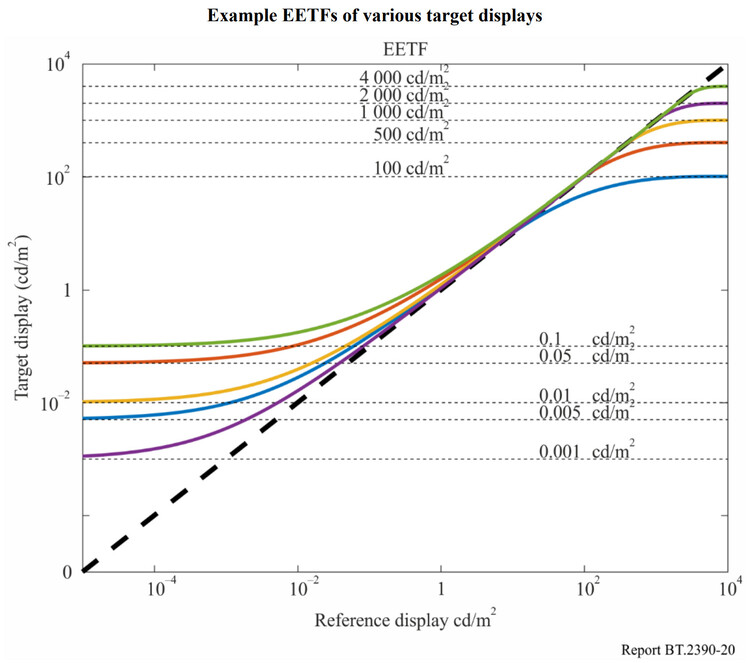
The PQ HDR system generates content that is optimum for viewing on a reference monitor in a reference viewing environment. The reference monitor would ideally be capable of accurately rendering black levels down to or below 0.005 cd/m2, and highlights up to 10 000 cd/m2. Also, the ideal monitor would be capable of showing the entire colour gamut within the BT.2020 triangle. The viewing environment would ideally be dimly lit, with the area surrounding the monitor being a neutral grey (6 500 degree Kelvin) at a brightness of 5 cd/m2. However, content often must be viewed or produced in environments brighter than the reference condition, and on monitors that cannot display the deepest blacks or brightest highlights that the PQ signal can convey. In these cases, the display characteristic needs to be changed in a process often referred to as display mapping (DM).
5.4.1 Mapping to display with limited brightness range
High dynamic range content may be viewed on displays that have less dynamic range than the reference display used to master the content. In order to view HDR content on displays with a lower dynamic range, display mapping should be performed. This can take the form of an EETF (electrical-electrical transfer function) in the display. This function provides a toe and knee to gracefully roll off the highlights and shadows providing a balance between preserving the artistic intent and maintaining details. Figure 18 is an example EETF mapping from the full 0 – 10 000 cd/m2 dynamic range to a target display capable of 0.01 – 1 000 cd/m2. The EETF may be introduced into the PQ signal; the plots show the effect of the mapping, i.e. how the intended light is changed into actual displayed light. In practice the mapping is done on the PQ signal.
Calculating the EETF
The central region of the tone mapping curve is defined as a 1:1 mapping. A ‘knee’ roll off may be calculated using a hermite spline to create a mapping that will reduce the luminance range to the capability of the display. The black level lift is controlled by an offset, b, which would be determined by a PLUGE adjustment. The difference between this proposal and the black level adjustment per Recommendation ITU-R BT.1886 is the addition of a tapering factor (1 – E2)^4. Without such a tapering factor, a constant offset throughout the entire signal range has the effect of increasing the brightness at the high end. With Recommendation ITU-R BT.1886 this effect was limited and not problematic due to the large number of code values at the high end of the gamma curve. The perceptual uniformity of the PQ EOTF causes this effect to be unacceptable. The tapering function allows fine-tuning the lift without a significant impact on mid-tones or highlights.
Practical application
The sample curves shown in Fig. 20 are designed for tone mapping to display black level up to 0.1 cd/m2 and display white level as low as 100 cd/m2.
I haven’t looked more closely yet, and I will (eventually - holidays are busy). It’s interesting that they would claim “Dolby Vision” and “Profile 7” (etc.) if all they’re doing is static PQ.
This likely means that they’re dynamically tone mapping, but not using the reference trim that would allow for an SDR image to be viewed as the colorist intended.
Using the L1 Metadata is great and it would be impressive to see Plex make that leap even if it meant paying a licensing fee and charging their customers for it, but utilizing the L2 Trim Metadata would be the holy grail in terms of enabling a single Profile 8 file to serve any display (no more keeping multiple versions).
 I’m still not referencing conversion from the IPTPQc2 color space to the YCbCr color space like the thread you linked to is discussing. This is what most people have been discussing up to this point and it’s unrelated from the discussion of using L2 Trims.