Similar issue here. Have attached logs. Plex crashes shortly after you try to seek when a stream is transcoding as instead of moving to transcode that part of hte file, it starts another transcode process in Windows and shortly hits 100% CPU use before crashing.
Looked at the logs. Cannot see any process crash.
I can see you shutting down Plex Media Server a number of times
Nov 16, 2019 22:29:51.668 [6148] DEBUG - Ordered to stop server.
Nov 16, 2019 22:29:51.668 [6636] DEBUG - Stopping server...
and
Nov 16, 2019 22:26:50.136 [5224] DEBUG - Ordered to stop server.
Nov 16, 2019 22:26:50.136 [5860] DEBUG - Stopping server...
and
Nov 16, 2019 22:21:49.964 [7244] DEBUG - Ordered to stop server.
Nov 16, 2019 22:21:49.964 [7204] DEBUG - Stopping server...
and
Nov 16, 2019 22:08:05.766 [7692] DEBUG - Ordered to stop server.
Nov 16, 2019 22:08:05.766 [7832] DEBUG - Stopping server...
What do you mean by crashing ? Is it the Transcoder process that is crashing?
Seeks are done by killing the existing transcoder process and starting a new one - that is how it is done.
I will move your post and my reply to a separate new forum topic as it is not related to this forum thread which is for the Plex Media Server.exe process crashing
I have moved your post from the Plex Media Server crashes thread.
Having looked at your logs, I can see an issue with how seeks are being handled leading to repeated transcoder processes being started for same seek.
I will refer this to our development team.
@bitpushr - we may need the file that exhibited this issue to reproduce the problem
"M:\TV\WWE Smackdown\Season 21\WWE.Friday.Night.SmackDown.2019.11.15.720p.HDTV.x264-NWCHD.mp4"
Does the problem arise with any seek ?
Does the problem also arise with media on a local drive ?
Could you let me have the media info xml for that library item
See https://support.plex.tv/articles/201998867-investigate-media-information-and-formats/
Yes, that was from me having to manually re-start Plex after duplicate Transcoder threads were started. It’s either that or have the VM crash from 100% CPU use.
It would appear, then, that instead of doing that, Plex is simply starting a new one without killing the existing one. I should also note that after the duplicate transcode thread is started, Plex just buffers and refuses to play on the client.
No problem, apologies for the post in the wrong area.
That’s good to know!
You can access the file here, you will have to download it:
https://drive.google.com/open?id=1IqAo6KYg4EaijEFYsGqrF7ViPOVSEVja
I should note that I’m able to reproduce it across a number of TV shows across varying file formats, predominantly mkv and mp4.
Yes, if the client requires transcoding I’m able to reproduce it 100% of the time.
Correct.
xml.txt (2.7 KB)
Here are some manual screenshots I took of the media info as well:

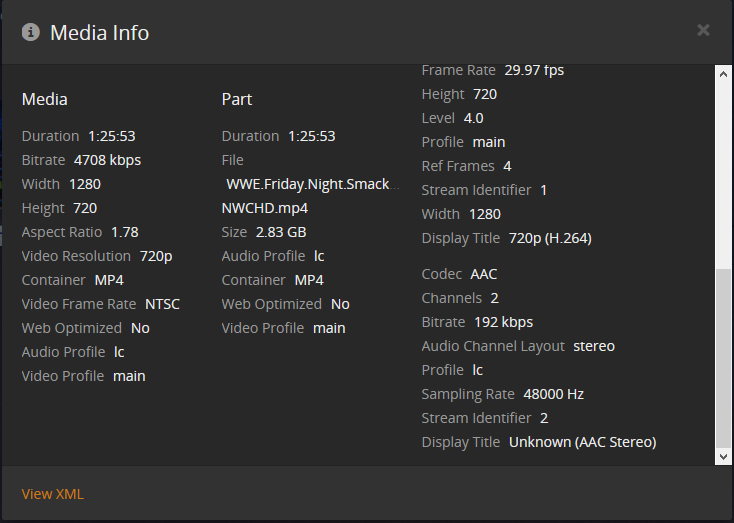
I can also confirm, after rolling back to Plex version 1.18.0.1944 I’m as yet unable to reproduce the issue, though I’m waiting on my remote client who uses his Xbox One to confirm the issue is gone for him.
File needs access permission to download
https://drive.google.com/open?id=1IqAo6KYg4EaijEFYsGqrF7ViPOVSEVja
Apologies. Tested this link in an incognito window and it works.
Is there any update on this issue? Seems like there’s some fairly large issues with transcoding as a whole judging by the forums.
I don’t have an update on this. It has been referred to the development team. Your logs were the first I have come across to show this issue. The more examples we see from other users the better
Just to elaborate on this.
Tested wtih the Xbox One client remotly, and rolling back Plex multiple versions until I got to a working one.
Version 1.17.0.1841
Anything after this version results in broken transcoding and repeated buffering as a result. Rolling back to this exact version fixes it 100% of the time.
Thanks for the feedback - so to confirm
1.17.0.1841-d42cfa161 - no problem with seeks
1.18.0.1846-f62172e99 - problem with seeks and double transcoder process when seeking and
hanging
and also same on latest beta
1.18.2.2041-3d469cb32
Is that correct ?
Correct, I tried on the latest version before rolling back consecutive past versions until I got to the one that works.
Thank you - so you are retracting this statement that you made earlier - or did that fix a different issue ?
Which statement do you mean? Rolling back to that version has fixed the crashing, transcoder issues, high CPU usage from the transcoder, and seek works properly. The version right after it breaks all of these with a change I suspect is rooted in the transcoder.
Your last sentence in this post earlier in this thread
Ah, yes I was able to reproduce the issue on version 1.18.0.1944 but am unable to on Version 1.17.0.1841
This topic was automatically closed 90 days after the last reply. New replies are no longer allowed.
