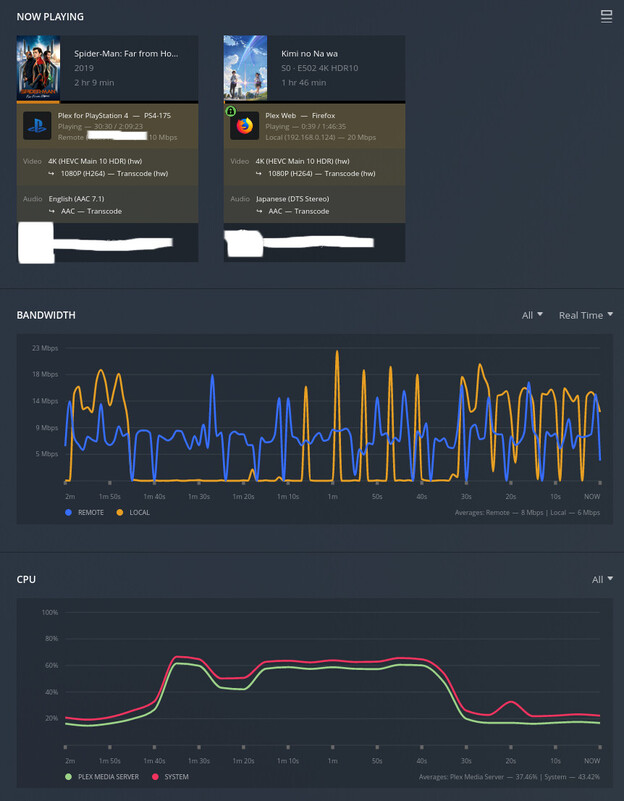
First time poster, long time lurker and enjoyer of Plex.
Server Version#: 1.25.4. 5487
Player Version#: 4.69.1
Synology NAS DS918+ intel J3455 CPU
DSM7.0.1-42218-2
Docker version v20.10.3-1239, Docker Compose v1.28.5-324b023a
Running through docker-compose w/ image from linuxserver/plex, macvlan networking (essentially host mode).
Passthrough /dev/dri with proper group permissions and chmod 666 (). Devices appear in /dev/dri of the container.


Noticed recently that transcoding performance felt a bit off. Shows/movies that would transcode from 4K HEVC HDR → 1080 SDR over web player flawlessly before now struggle to even buffer the first 10 seconds. Average server use is 2-4 4K HEVC HDR without the server breaking a sweat.
Dashboard shows HW accel is being used but top output from the host shows CPU is being slammed


Tried reverting back as far as 1.22.0 but no luck.
I’ve tried turning off HDR tone mapping; it results in a slightly faster transcode but with obviously washed out colors.
Turned off subtitles; resulted in slightly less CPU hit to the point where things would be watchable but not even close to how it performed before.
I tried various combinations of installing/removing intel opencl libs/intel-media-va-driver(free and non-free)/beignet/etc and at one point managed to get things back to how they were installing vainfo but shortly afterwards performance was back in the gutter. Unfortunately could not replicate what I did after a whole day of trying again.
clinfo shows that the container recognizes the iHD device

One thread had mentioned a newer version of intel-opencl-icd being the issue but current installed is the version that was recommended to work
 root@67e966dd0394:/# apt info intel-opencl-icd
Package: intel-opencl-icd
Version: 21.49.21786+i643~u20.04
Noticed an interesting bit in the logs
Feb 07, 2022 22:08:58.083 [0x7f3e34c7ab38] DEBUG - [Transcode/JobRunner] Job running: FFMPEG_EXTERNAL_LIBS='/config/Library/Application\ Support/Plex\ Media\ Server/Codecs/62cc2bc-4226-linux-x86_64/' LIBVA_DRIVERS_PATH='/usr/lib/plexmediaserver/lib/dri' XDG_CACHE_HOME='/config/Library/Application Support/Plex Media Server/Cache' XDG_DATA_HOME='/usr/lib/plexmediaserver/Resources' X_PLEX_TOKEN='xxxxxxxxxxxxxxxxxxxx' '/usr/lib/plexmediaserver/Plex Transcoder' '-codec:0' 'hevc' '-hwaccel:0' 'vaapi' '-hwaccel_fallback_threshold:0' '10' '-hwaccel_device:0' 'vaapi' '-codec:4' 'dca' '-analyzeduration' '20000000' '-probesize' '20000000' '-i' '/volume1/Anime/Kimi no Na Wa/[NoobSubs] Kimi no Na Wa 2016 (2160p 4k Ultra Blu-ray HDR10 Dual Audio)[0731BD8C].mkv' '-map_inlineass' '0:8' '-filter_complex' '[0:0]scale=w=2276:h=1280:force_divisible_by=4[0];[0]format=p010,tonemap=mobius[1];[1]format=pix_fmts=nv12[2];[2]inlineass=font_scale=1.000000:font_path=/usr/lib/plexmediaserver/Resources/Fonts/NotoSans-Medium.otf:fontconfig_file=/usr/lib/plexmediaserver/Resources/fonts.conf:language=en[3];[3]hwupload[4]' '-map' '[4]' '-metadata:s:0' 'language=jpn' '-codec:0' 'h264_vaapi' '-b:0' '14792k' '-maxrate:0' '19723k' '-bufsize:0' '39446k' '-r:0' '23.975999999999999' '-force_key_frames:0' 'expr:gte(t,n_forced*1)' '-filter_complex' '[0:4] aresample=async=1:ocl='\''stereo'\'':rematrix_maxval=0.000000dB:osr=48000[5]' '-map' '[5]' '-metadata:s:1' 'language=jpn' '-codec:1' 'aac' '-b:1' '256k' '-f' 'dash' '-seg_duration' '1' '-dash_segment_type' 'mp4' '-init_seg_name' 'init-stream$RepresentationID$.m4s' '-media_seg_name' 'chunk-stream$RepresentationID$-$Number%05d$.m4s' '-window_size' '5' '-delete_removed' 'false' '-skip_to_segment' '1' '-time_delta' '0.0625' '-manifest_name' 'http://127.0.0.1:32400/video/:/transcode/session/pkik4eykjkz9cowjeqo1iein/2b8042b9-5958-48be-916f-b24336e68ef9/manifest?X-Plex-Http-Pipeline=infinite' '-avoid_negative_ts' 'disabled' '-map_metadata' '-1' '-map_chapters' '-1' 'dash' '-map' '0:8' '-f' 'null' '-codec' 'ass' 'nullfile' '-start_at_zero' '-copyts' '-vsync' 'cfr' '-init_hw_device' 'vaapi=vaapi:,driver=i965' '-filter_hw_device' 'vaapi' '-y' '-nostats' '-loglevel' 'quiet' '-loglevel_plex' 'error' '-progressurl' 'http://127.0.0.1:32400/video/:/transcode/session/pkik4eykjkz9cowjeqo1iein/2b8042b9-5958-48be-916f-b24336e68ef9/progress'
It appears plex is defaulting to the i965 driver? I had previously done the ssh and remove iHD driver some time back before intel had patched the issue with choppy/artifact filled playback but had no issues ever since.
‘-init_hw_device’ ‘vaapi=vaapi:,driver=i965’ ‘-filter_hw_device’ ‘vaapi’
I am at a complete loss as to what it could possibly be at this point. Have a feeling it’s something to do with dependencies the container was built with.
Attached logs, please let me know if I missed anything.
com.plexapp.system.log (173.0 KB)
Plex Transcoder Statistics.log (8.8 KB)
Plex Media Server.log (1.0 MB)