Transcoding no longer working with Windows

Server Version#: 1.41.4.9399
Player Version#: Various
OS#: Windows 11 Pro
With the recent addition of HEVC transcoding I decided to see if transcoding my 4k disc rips was now more feasible with my system. I’m running into an issue though. I can’t get hardware transcoding to kick in no matter what type of file I am playing. I am relying on the integrated iGPU on my processor. UHD Graphics 630. I have tried turning the new HEVC mode on and off and it is not making a difference. I’ve also tried multiple players and am getting the same results.
To simplify it I decided to focus on a 1080p disc rip. I am getting very high CPU utilization and no usage on the GPU. I don’t use transcoding often, but I do recall hardware transcoding working previously. Any ideas what this could be? I have logs. Here is the portion I think may be relevant. If I need to post the entire log I can.

<Player address="192.168.1.164" device="OSX" machineIdentifier="v3salsqg27qgobt8xv0m5vd8" model="bundled" platform="Safari" platformVersion="18.3" product="Plex Web" title="Safari" version="4.143.0" local="1" relayed="0" secure="1" userID="1" />
<Variants>
<Variant id="cad16b3d-7e2b-4963-8f7b-d93ef2fc73f8" targetBitrate="9901" context="streaming" sourceVideoCodec="h264" sourceAudioCodec="dca" videoDecision="transcode" audioDecision="transcode" protocol="dash" container="mp4" videoCodec="h264" audioCodec="aac" audioChannels="2" transcodeHwRequested="1" transcodeHwDecoding="d3d11va" transcodeHwEncoding="qsv" transcodeHwDecodingTitle="Windows (D3D11VA)" transcodeHwEncodingTitle="Intel (QuickSync)" transcodeHwFullPipeline="1">
<Media audioProfile="ma" hasVoiceActivity="0" id="346578" videoProfile="high" audioChannels="2" audioCodec="aac" bitrate="9429" container="mp4" duration="4299328" height="1080" optimizedForStreaming="1" protocol="dash" videoCodec="h264" videoFrameRate="24p" videoResolution="1080p" width="1920" selected="1">
<Part audioProfile="ma" failureBIFResultCode="3" failureBIFRetryCount="1" id="350791" videoProfile="high" bitrate="9429" container="mp4" duration="4299328" height="1080" optimizedForStreaming="1" protocol="dash" width="1920" decision="transcode" selected="1">
<Stream bitDepth="8" bitrate="9299" codec="h264" default="1" displayTitle="1080p" extendedDisplayTitle="1080p (H.264)" frameRate="23.975999832153320" height="1080" id="692799" streamType="1" width="1920" decision="transcode" location="segments-video" />
<Stream bitrate="130" bitrateMode="cbr" channels="2" codec="aac" default="1" displayTitle="English (DTS-HD MA 5.1)" extendedDisplayTitle="DTS-HD MA 5.1 (English)" id="692800" language="English" languageCode="eng" languageTag="en" selected="1" streamType="2" decision="transcode" location="segments-audio" />
</Part>
</Media>
</Variant>
<Variant id="cad16b3d-7e2b-4963-8f7b-d93ef2fc73f8" targetBitrate="9901" context="streaming" sourceVideoCodec="h264" sourceAudioCodec="dca" videoDecision="transcode" audioDecision="transcode" protocol="dash" container="mp4" videoCodec="h264" audioCodec="aac" audioChannels="2" transcodeHwRequested="1" transcodeHwFullPipeline="1">
<Media audioProfile="ma" hasVoiceActivity="0" id="346578" videoProfile="high" audioChannels="2" audioCodec="aac" bitrate="9429" container="mp4" duration="4299328" height="1080" optimizedForStreaming="1" protocol="dash" videoCodec="h264" videoFrameRate="24p" videoResolution="1080p" width="1920" selected="1">
<Part audioProfile="ma" failureBIFResultCode="3" failureBIFRetryCount="1" id="350791" videoProfile="high" bitrate="9429" container="mp4" duration="4299328" height="1080" optimizedForStreaming="1" protocol="dash" width="1920" decision="transcode" selected="1">
<Stream bitDepth="8" bitrate="9299" codec="h264" default="1" displayTitle="1080p" extendedDisplayTitle="1080p (H.264)" frameRate="23.975999832153320" height="1080" id="692799" streamType="1" width="1920" decision="transcode" location="segments-video" />
<Stream bitrate="130" bitrateMode="cbr" channels="2" codec="aac" default="1" displayTitle="English (DTS-HD MA 5.1)" extendedDisplayTitle="DTS-HD MA 5.1 (English)" id="692800" language="English" languageCode="eng" languageTag="en" selected="1" streamType="2" decision="transcode" location="segments-audio" />
</Part>
1 Like

it’s broken for several months.

@Rick_Williams Do you see any difference in behavior if you select your iGPU instead of leaving the hardware transcoding device set to Auto?

I do not see a difference.

Here are the errors I’m seeing from my console:

Feb 02, 2025 19:39:23.706 [2360] Debug — Request: [127.0.0.1:56588 (Loopback)] PUT /video/:/transcode/session/n9wwh379pbijodfo3oeu4edh/a0fe9f29-f0e4-4811-b8bb-fe4a35fe68b1/progress?duration=4299.328000 (11 live) #613d Signed-in Token (Rick Williams) (range: bytes=0-) 
Feb 02, 2025 19:39:23.706 [17876] Debug — [Req#60ae/Transcode] Started session successfully: n9wwh379pbijodfo3oeu4edh
Feb 02, 2025 19:39:23.706 [18824] Debug — Completed: [127.0.0.1:56588] 204 PUT /video/:/transcode/session/n9wwh379pbijodfo3oeu4edh/a0fe9f29-f0e4-4811-b8bb-fe4a35fe68b1/progress?duration=4299.328000 (11 live) #613d 0ms 203 bytes (pipelined: 21) (range: bytes=0-) 
Feb 02, 2025 19:39:23.707 [18320] Debug — Completed: [192.168.1.164:63199] 200 GET /video/:/transcode/universal/start.mpd?hasMDE=1&path=%2Flibrary%2Fmetadata%2F139377&mediaIndex=0&partIndex=0&protocol=dash&fastSeek=1&directPlay=0&directStream=0&subtitleSize=100&audioBoost=100&location=lan&maxVideoBitrate=10000&addDebugOverlay=0&autoAdjustQuality=0&directStreamAudio=0&autoAdjustSubtitle=1&mediaBufferSize=102400&session=n9wwh379pbijodfo3oeu4edh&subtitles=burn&Accept-Language=en (11 live) #60ae TLS GZIP 157ms 1082 bytes (pipelined: 3)
Feb 02, 2025 19:39:23.709 [17876] Error — [Req#6147/Transcode/n9wwh379pbijodfo3oeu4edh/a0fe9f29-f0e4-4811-b8bb-fe4a35fe68b1] [AVHWFramesContext @ 000001da67c78d00] Could not create the texture (8007000e)
Feb 02, 2025 19:39:23.709 [17876] Error — [Req#6150/Transcode/n9wwh379pbijodfo3oeu4edh/a0fe9f29-f0e4-4811-b8bb-fe4a35fe68b1] [h264 @ 000001da67d15780] Failed setup for format d3d11: hwaccel initialisation returned error.
Feb 02, 2025 19:39:23.720 [17876] Error — [Req#6152/Transcode/n9wwh379pbijodfo3oeu4edh/a0fe9f29-f0e4-4811-b8bb-fe4a35fe68b1] [AVHWFramesContext @ 000001da6de795c0] The hardware pixel format 'yuv420p' is not supported by the device type 'QSV'
Feb 02, 2025 19:39:23.720 [17876] Error — [Req#6156/Transcode/n9wwh379pbijodfo3oeu4edh/a0fe9f29-f0e4-4811-b8bb-fe4a35fe68b1] [Parsed_hwmap_0 @ 000001da6cb6f880] Failed to create frame context for reverse mapping: -40.
Feb 02, 2025 19:39:23.721 [17876] Error — [Req#6159/Transcode/n9wwh379pbijodfo3oeu4edh/a0fe9f29-f0e4-4811-b8bb-fe4a35fe68b1] [Parsed_hwmap_0 @ 000001da6cb6f880] Failed to configure output pad on Parsed_hwmap_0
Feb 02, 2025 19:39:23.721 [2360] Debug — Request: [192.168.1.164:63199 (Subnet)] GET /status/sessions (11 live) #614b TLS GZIP Signed-in Token (Rick Williams) (Safari)
Feb 02, 2025 19:39:23.721 [2360] Debug — [Req#614b] [Now] Adding 0 sessions.
Feb 02, 2025 19:39:23.721 [17876] Error — [Req#615c/Transcode/n9wwh379pbijodfo3oeu4edh/a0fe9f29-f0e4-4811-b8bb-fe4a35fe68b1] Error reinitializing filters!
Feb 02, 2025 19:39:23.721 [18824] Debug — Completed: [192.168.1.164:63199] 200 GET /status/sessions (11 live) #614b TLS GZIP 0ms 480 bytes (pipelined: 4)
Feb 02, 2025 19:39:23.721 [2360] Error — [Req#6163/Transcode/n9wwh379pbijodfo3oeu4edh/a0fe9f29-f0e4-4811-b8bb-fe4a35fe68b1] Failed to inject frame into filter network: Function not implemented
Feb 02, 2025 19:39:23.722 [2360] Error — [Req#6169/Transcode/n9wwh379pbijodfo3oeu4edh/a0fe9f29-f0e4-4811-b8bb-fe4a35fe68b1] Error while processing the decoded data for stream #0:0
Feb 02, 2025 19:39:23.731 [2360] Debug — Request: [192.168.1.164:63199 (Subnet)] GET /video/:/transcode/universal/session/n9wwh379pbijodfo3oeu4edh/1/header (11 live) #6164 TLS GZIP Signed-in
Feb 02, 2025 19:39:23.736 [9344] Debug — Jobs: 'C:\Program Files\Plex\Plex Media Server\Plex Transcoder.exe' exit code for process 14212 is 1 (failure)
Feb 02, 2025 19:39:23.736 [3216] Debug — Streaming Resource: Changing client to use software decoding
Feb 02, 2025 19:39:23.736 [3216] Debug — Found session GUID of n9wwh379pbijodfo3oeu4edh in session start.

This is baffling, as this is the most basic and default codec configuration.

Did something change about this machine? Perhaps the Windows edition was upgraded?

Is the embedded graphics chip activated in the BIOS? (If there is also an add-on GPU in a PCIe slot, some BIOS disable the embedded GPU. Ensure this is not the case.)

Is there driver software from the Intel website installed for the embedded GPU? (Don’t rely on the default driver that is automatically installed by Windows Update.)

Doesn’t qsv expect the pixel format to be nv12?

I have no idea about that.

It would probably help, if the ffmpeg or Handbrake preset was known which was used to convert the video from the BR rip. Because at this bitrate it definitely isn’t a raw rip.

I mean I wonder if this is a Plex regression; I would expect the Plex transcoder session setup to be specifying nv12 and not yuv420p. In the normal ffmpeg command line, yuv420p isn’t supported by qsv.

OP, are you able to try the previously working version of Plex Media Server again?

1 Like

I’ve forwarded the question.

2 Likes

Questions from a developer:

Does this only happen on Safari for this user? Or any other player?
Did this happen in the previous beta or on the current public release?

I’d compare with Chrome browser too.

Also ensure to use the hosted web app, not the local one.

I wouldn’t say anything particular happened. It’s a normal Windows install that takes updates as they come. I do know HW transcoding was working in the past. I can’t say when, because up until now everything has been local direct play or transcoding super easy files that could have been being done in software and I didn’t notice.

It is the only graphics chip in the system and it is using Intels drivers.

It is a remux. Not sure if they packed many episodes on a disc or what. I have tried with several other files of several sizes and types just to eliminate it being a file issue and keep running into the same issue.

I will give Chrome a try when I get back home. I think I did already, but I can’t be positive. I did just now try from iOS (both the App Store and new preview version) and did not get hardware transcoding.

It could be. I’m on the beta version, and like I said previously, I’m honestly not sure how long this has been an issue.

I’d be more than happy to try a rollback if it’s feasible. I don’t believe I have ever tried to.

+1

don’t want to derail the thread, but my experience has been similar after I finally bit the bullet and did a clean install of windows 11.

i have an intel uhd 600 in the celeron j4105 that seemed to have been working fine fully prior to the win 11 upgrade.

now its hit and miss, some files work kind of (decode only, turning on encoding also will crash it more often than not) and the error message I’m seeing in my log is in yours as well (The hardware pixel format ‘yuv420p’ is not supported by the device type ‘QSV’)

I assume QSV stands for quick sync video. The entirety of my collection are dvd/bd rips with makemkv and then handbrake.

Watching this topic closely.

I did give Chrome a try and the behavior was the same.

1 Like

I just rolled back to the latest non beta version as someone else suggested. HW transcoding is working perfectly. I guess I picked a bad couple days to play with hardware transcoding. If the Plex team wants me to test any future updates I’d be more than happy to.

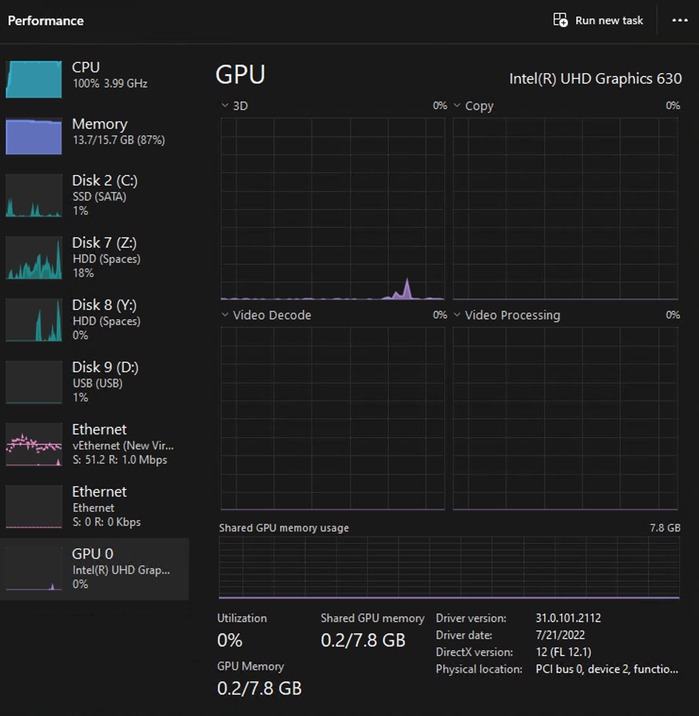
2 Likes

Did you make sure to use the hosted web app?
