Server Version#: 1.19.1.2645
Player Version#: 4.31.2
Hello everyone,
I am running Plex Media Server on a Windows 10 Home Edition Desktop currently.
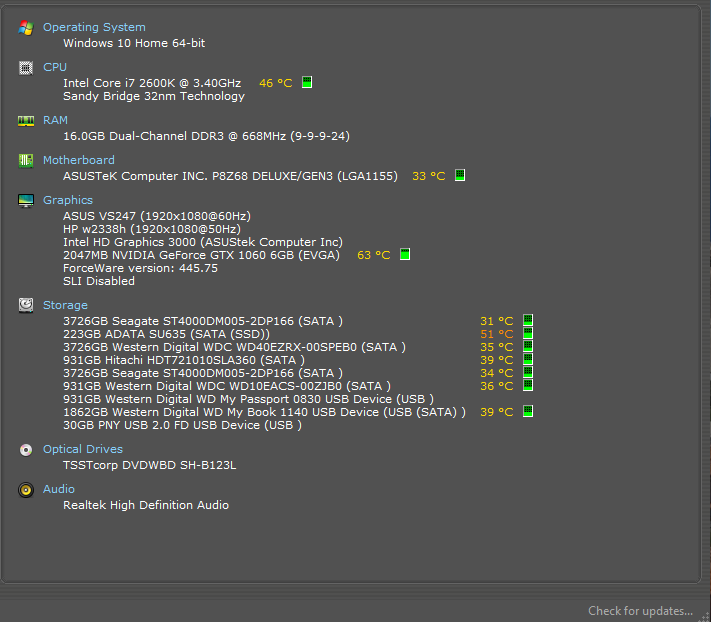
My Specs are:
Intel Core i7-2600k CPU @ 3.40 GHz
16 GB DDR 3 RAM
64bit OS
It is not specific to any player or user but my users, myself included are experiencing playback errors and transcoding errors that stop the stream. After you wait a minute or so and restart the stream it works again no issues until it errors out again randomly. It could go for a whole movie or multiple episodes before it errors out or it could happen 4 or 5 times during one movie. I am hoping you can help me figure out the issue that I am having and how to fix it.
I have attached both my logs and database for troubleshooting purposes.
Plex Media Server Logs_2020-04-16_14-38-22.zip (5.0 MB)
Thanks for taking a look and I cannot wait to see your feedback!
V/r
Ray Trombley
It won’t let me upload the database logs, maybe they are too large?
If I may ask. Does this only happen with trans-coding? Also what formats are you trans-coding from and to? Finally, did you ever not have this issue?
It seems to only be an issue when transcoding, it does not seem to be an issue with Direct Play or Direct Stream.
Most of the files that I have are MKV but some are AVI and MPEG and such. Do you need more detail than that?
This has been happening for awhile but I dont recall this happening since I’ve ran a Plex server.
The positive thing about MKV files is that they have great quality and the files are very small. The negative is that depending on the file format of the video within the MKV envelope, higher-end Video standards like H.265 don’t decode well on older CPUs. I think if I remember correctly that a dedicated video decoder was included in the Intel CPU’s after the Core iX-4xxx models. So what you could do to mitigate this issue is to play everything direct play or direct stream ( Direct stream might stutter as well since the CPU is repackaging the AV ). Without doing additional research, I’m going off of what I remember off-hand. I am sure someone else will eventually co-sign or correct what I have said so far but at the core of this issue is the fact that the CPU is no longer up to the task based on the files that are available today.
Just took a closer look at your pic. Check out this link for additional info and it does look like you might definitely be at the limits for your CPU. Are you able to check out the CPU load/Thermals when throttling?
The throttling is actually a good thing, it means that it got up to the percentage of transcoding that it needed to and it is now throttled until it needs to transcode again.
My CPU load spikes a bit when a video initally starts up due to the transcoding but it falls off. The average is around:
It may be my aging CPU that is causing the transcoding issues, it is possible.
I am waiting on a Synology 918+ for the new hardware and then I just need to purchase my NAS drives. Do you think that might fix the situation?
Are you planning on running the server on the NAS? You can also look into getting a GPU to offload the transcoding? Something else to consider. How old is your router and how is the server connected to the network?
Here is the Tempuratures.
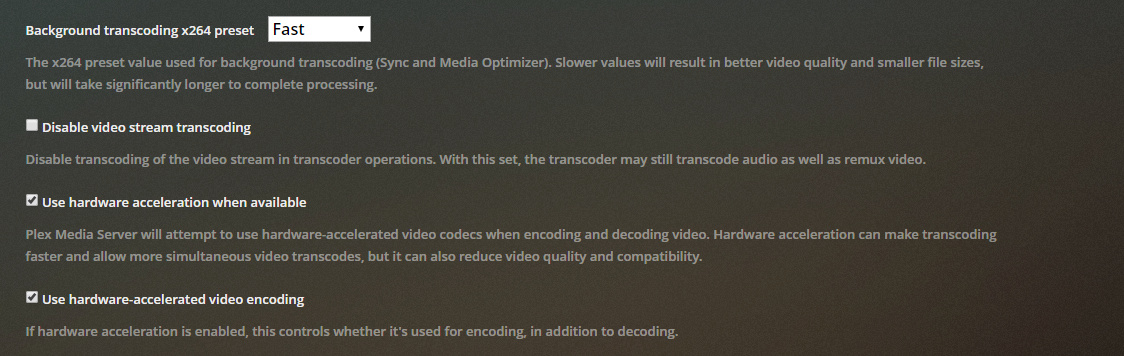
Also, I do have a 1060 GTX 6GB card, how do you offload it onto the GPU?
are you a plex pass member - Paid subscription or lifetime member?
I am a lifetime subscriber.
This is what your talking about right?
Yes, you do seem to have it enabled. So lets move to the next possible issue. It might be your network that’s taking a dump. I’ve seen this before. How old is your router and how is the server connected to the network?
I just bought the router, trying to eliminate that as an issue. Is an Archer A7 with Gig ports.
I have the spectrum cable modem, hooked into the router and then 2 ports coming into my duel NIC motherboard. All all ports are set to Auto-duplex but are cable of 1gig.
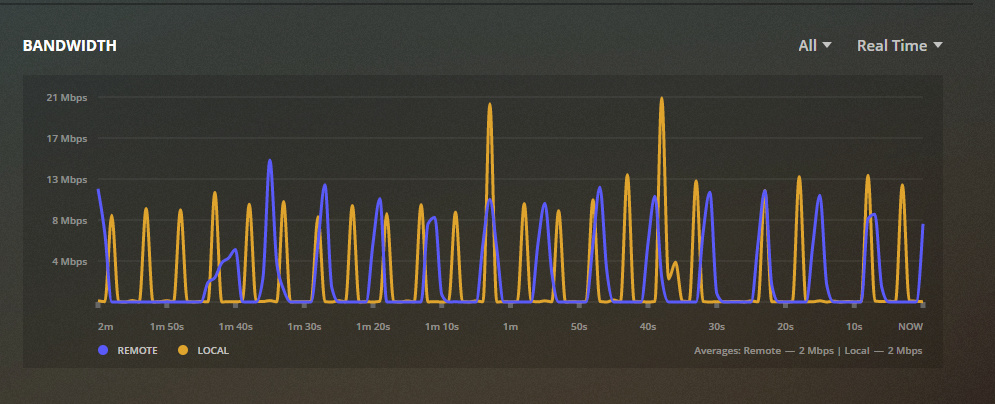
My network traffic doesn’t seem to be utilizing it all but hey ya never know.
Why do you have both Ethernet ports connected to the same router? Did you configure the ports to work in tandem? If not then youre not getting any positives from that and might be introducing issues since your PC might be showing up on your network twice. try only a single ethernet from the PC.
It also looks like this NAS would be good for you as well based on this:
I can try only one ethernet port and see if that fixes some issues.
My CPU is an older Intel one. I was reading that You need a Sandy Bridge 2011 or newer for hardware acceleration to actually work.
Your CPU is sandybridge. How Old is the Modem? Does the issues only happen outside of your home or while on your local network as well?
The modem is brand new, they just installed it.
It happens on the LAN and WAN.