this cpu has the intel gpu hd630 which is perfectly capable of doing 4k transcodes without even needing a p2k.
cpu is never hardware accleration.
GPU is what is hardware accleration (decode/encode)
the intel gpu 630 does both hardware decode/encode
the nvidia p2k does hardware decode (windows only)/encode
if you pull the p2k out of your system then the intel gpu should work by default
otherwise, you may need to disable the intel gpu via the BIOS and/or use a dummy plug for the p2k or plug in a monitor to the p2k.
@TeknoJunky I am only using this system as a test to see if I can get the p2000 to work. This won’t be my main PLEX server. That server is an i7-6700k.
I don’t understand why I can’t get this P2000 to work in now 2 different systems. Should I do an RMA? Is there a way for me to test it’s capabilities outside of plex?
I believe the iGPU is disabled already (I selected the PCI-e as the main GPU and turned off the ability to use both at the same time in the BIOS). I also currently have it hooked up to a monitor, though at only 1080p (it is a 4k monitor, but I am using it in multi-client mode with 2 other computers as I test)
I would not expect uninstalling/reinstalling plex to have any effect on the hardware acceleration, plex would simply use whatever HW resources it can detect. I would suspect driver or windows issue (or hardware issue) if plex is not able to properly detect and use the card.
as far as other ways to test, you could use handbrake and the applicable encoder profiles.
windows task manager should show gpu usage as applicable
I only reinstalled plex at the suggestion of somepeole who have said that it can help. I also have a DP dongle that I will try. I can see in the transcode logs how it is using NVENC for encoding. I still find it odd that PLEX won’t use it for Decoding.
So I installed Emby as a test. Emby correctly uses HWA for both encoding and decoding and it’s working like a charm. I really don’t want to move to Emby as I like plex.
I’m at a loss. any help out here? I can’t get the P2000 to work, not even with Emby on Windows Server 2012 R2 Essentials. Is it a limitation of the OS? Should I just return the card?
How am I supposed to get support for the service (Plex) I paid for? This is very frustrating that I have no one from Plex offering help. And while I realize that this is a community forum, when going to the main site and looking for support, it points directly here to these forums.
I’m in a similar position as you. p2000 but with server 2016.
Plex says that it’s using hw for both encoding and decoding but the encoding usage is hovering around 5% (using performance monitor I can see that it’s encoding at 15 frames per second)
p2000 has dp to hdmi port connected to tv if that makes a difference.
like sirmelli said is there a test that can be performed outside plex to see if it’s an OS limitation or something…
Tried the preview build. I get HW encoding and not decoding. Emby uses the p2000 to decode and encode so this has to be an issue with Plex.
On server 2016 (the same box) I’m getting 11fps transcoding speeds with GPU on Plex but Emby I’m getting 37fps. On top of that I can run multiple streams (Two 4K streams @ 37/43fps)
I have a suspicion that it’s related to the codec. Almost looks like decoding isn’t working well on HEVC / x265 codecs (at least from the few tests i did).
Had to remove the P2000 for now due to cooling issues in the box, but should have the required hardware some time next week and will start testing again after i’ve altered the box and put the P2000 back again.
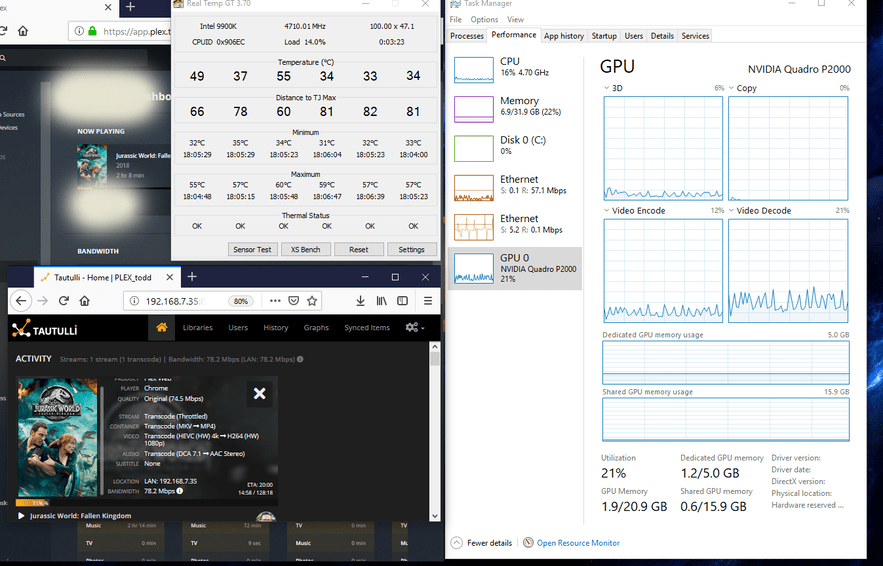
So far I am having luck with P2000. It’s chewing through everything I throw at it. Here, 4K->1080p transcode w/~16% CPU, ~20%GPU. So far doesn’t seem to be reachable HW transcode limit with P2000. I am using an i9-9900K on a AsrockZ390 Phantom gaming mini-itx mobo (and the P2000 itself is also actually simultaneously driving four 1080p screens).
I am no expert but I bet there can be some unexpected behaviors when trying to use a GPU with certain software in the Windows server OS ecosystem… have you tried running all this in Windows 10? Also, I assume you are using a windows server-specific Quadro driver. I could tell you what driver I am using, but I am in Windows 10 (and I am using whatever the latest 64-bit Windows 10 Quadro P2000 driver is available, and also the lastest public PMS version). Also all my 4K files are just straight HDR10 files with hi-res audio, not transcoded in handbrake or anything, but stored in MKVs.
I am running this in Windows 2012 r2 Essentials. I don’t see why it would matter as the driver is the same and windows sees the grfx card just fine.
I also tried on a fresh install of Win10Pro and while Plex refused to use it, Emby used it just fine (I just don’t want to use Emby). On my server, neither would use it, but I don’t see why using a server edition of windows for a product that is a “server” (centralized service) should be an issue. Plex should have a way around this.
I am also kinda upset that not once has PLEX tried to address this issue at all and their only method of support are these “forums”
I should note that I’m about to put 2016 essentials on. I’m hoping that and maybe the alpha above will work, but based on other posts, I’ m not overly confident.