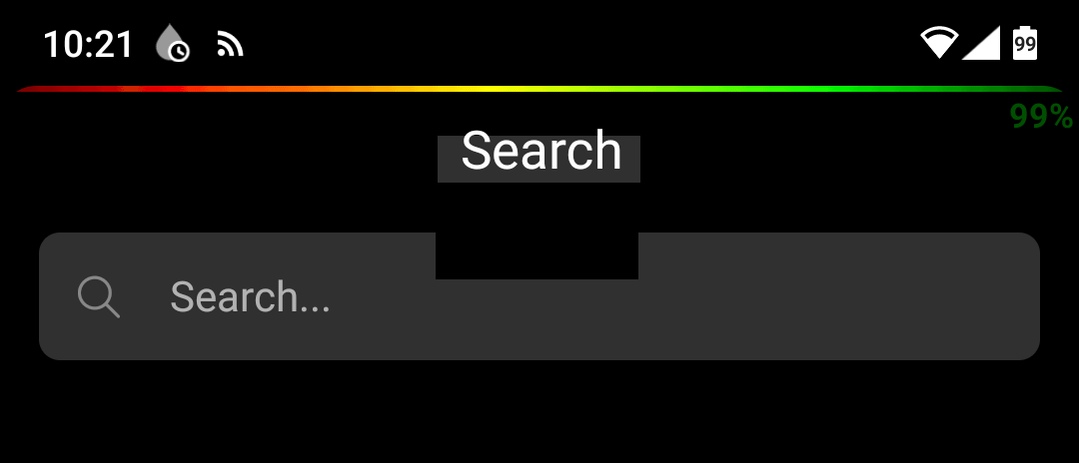
Translucent navigation bar has wrong position on Android 11

After the last update (Plexamp and Plex Dash), the navigation bar is placed too low on my phone (portrait mode). The text of the navigation bar is mixed together with the active scroll area.

The search bar is not accessible now

When i click inside the search bar, nothing is happening
Is it possible to place the navigation bar at the top of the screen?

Best regards,
Martijn

Do you have some sort of customization there, it doesn’t look like stock Android?

No, i have just installed Plexamp to a new completely ‘basic’ Android 11 phone. And it is exactly the same. It is started after the update yesterday.

Can you at least post make/model of these devices?

Hi Elan, Thank you for your quick response.

I have installed Plexamp on every android device I have.

  • My phone Nokia 8.1 Android 11 → Not OK
  • Basic empty phone also a Nokia 8.1 Android 11 → Not OK
  • Nokia 5.3 Android 11 → OK!
  • Samsung Galaxy Tab 10.1 Lineage 17.1 (Android 11) → OK!
  • Lenovo TAB 4 android 8.1 → OK!

Only the Nokia 8.1 has this issue.

I haven’t this issue with any other apps, only this Plexamp and Dash.

Maybe a miscalculation with the notch?

Best regards,

Martijn

1 Like

really appreciate the detailed feedback! i’m not familiar with the Nokia phone but it’s possible/likely the notch is implicated :sweat_smile:

the last version ran fine, though? the only difference was transparency in the nav bar (bottom part of the screen). does the phone have different settings for that (gesture, 2 button, 3 button) and do changing any of those help?

I have tried all three settings (gesture, 2 button, 3 button), but none of these are fixing my issue

And it definitely appeared this version?

Yes, it is started with 3.8. and Plexdash 1.1.

I have tried to install the previous version 3.7.1, but i received an error (App not installed)

Maybe i have a corrupt APK file

Hi Elan,

I have linked an old topic that contains also a screenshot made with the same Nokia 8.1

Plexamp and Plexcompanion

According these old screenshot, the top bar was/is still at the same location (the same y-position), but the inner scroll area is now larger so it can overlap with the top bar.

Martijn

Hi Elan,

I found a solution for my Nokia 8.1. It was indeed a problem with the notch area.

I had to change the ‘notch_full_bezel’ value from ‘1’ to ‘0’ in the database settings.

Because it is a European phone, this is not a regular setting nor in the developer settings to change this.

But now it works!

Thanks and keep on the good work

Martijn

Oh wow, thanks so much for the update, very interesting!

This topic was automatically closed 90 days after the last reply. New replies are no longer allowed.