Hi, I am trying to add some MKV files from my seedbox to my movie library but when i go in the files folder, all of the mkv files are greyed out. I have tried scanning them but nothing has changed. Any help would be greatly appreciated, thanks.
You don’t need to add individual movies.
Your Plex library is supposed to be linked to one (or more) folders in your file system. Depending on your OS / platform, Plex will automatically pick up changes and add new movies to your library or you can manually trigger the Scan Library Files action from the library context menu.
Preferably you point the library to a top-level folder that contains all your movie files (or movie files grouped in their own folders). Example:
Movies   <- the folder linked to your Plex library
  Movie Name 1 (year)
    Movie Name 1 (year).mkv
  Movie Name 2 (year)
    Movie Name 2 (year).mkv
  ...
  Megamind (2010)
    Megamind (2010).mkv
or
Movies   <- the folder linked to your plex library
  Movie Name 1 (year).mkv
  Movie Name 2 (year).mkv
  ...
  Megamind (2010).mkv
Hi, I appreciate you getting back to me! I have tried most of what you suggested but the mkv files remain greyed out so i can’t add them to my movie library.
Let me get back to the general misconception:
You don’t add individual files to Plex but folders. Therefore, individual files will be greyed out.
Let me give you an example…
Configuration of my main movie library
The library is connected to 3 main folders. In theory you can go with just one.
I’ve originally started with 2 top-level movie folders to distinguish the few files I got with only English audio (and English texts, like the Star Wars intro).
I recently added the plexiverse drive as my 1st HDD is running out of space.
I’ve highlighted the movies (de) folder… subsequent examples/screenshots will focus on that.
What’s in that folder and how does it show in Plex
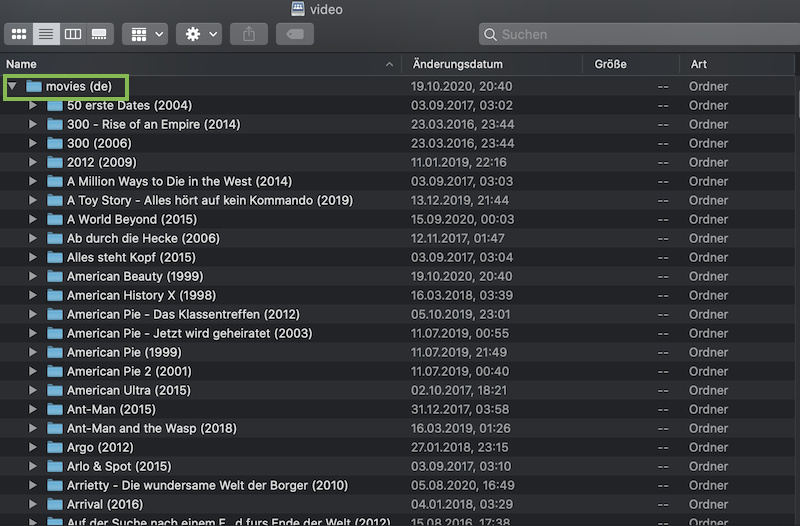
Find below 2 screenshots how the content of my “movies (de)” folder show in Plex and on my file system. I have organized my movies with subfolders… so each movie has its own folder (e.g. 300 - Rise of an Empire (2014)) inside my top-level folder (movies (de)).
This is how the file system is represented inside Plex. As you can see this is the exact same list of folders. The minor differences are based on how my computer vs. server expose and sort folders (computer file system: natural ordering of the folder names, hiding of system files; server file system: alphabetic ordering of the folder names, system files/folders are displayed).
Lastly I’m drilling down to an individual movie folder. Plex is displaying the files but only allows selecting folders.
As the library configuration says… this dialog is about adding folders to your library – not individual files. As described in the documentation, Plex expects a top-level folder for each library. If you add 1 folder for each movie to the Plex library, you’ll end up confusing Plex.
If I want to add a new movie to my library…
I add a new movie-folder to the top-level folder (movies (de)) – let’s say The King of Staten Island (2020) which is about to be released on disc in my country this week
I add the individual movie files (main movie, poster, extras)
I open Plex
I click the context menu of my movie library ... > Scan Library Files
Plex will scan the folders linked to that library for changes and additions. As part of that process it’ll recognize my new addition and create the respective library record.
Depending on what type of drive you use, Plex might be able to automatically detect the addition to your top-level folder (depends on the operating system… this is usually working for internal or directly connected drives but not for network shares).