Please grab a fresh set of logs.
This time –
- Make certain DEBUG logging is still on and VERBOSE is still OFF
- Restart PMS
- Wait 3 minutes
- Now play a track with TrueHD
- Next, play with the track I’ve sent you in PM.
- Download Logs
- Attach
Please grab a fresh set of logs.
This time –
Plex Media Server Logs_2022-11-18_13-10-55.zip (1.6 MB)
It errored out on my media, but it played yours just fine.
Something I’d like to reiterate is that the media on a specific disk is where the errors happen. I can play media that is on another disk in my array that has TrueHD and it plays just fine, which is why your media played just fine because it didn’t get placed into the disk causing errors.
So what you’re telling me is:
TrueHD only fails if the file itself is stored on a specific disk of your system?
If this is the case, I do not know how to help you other than suggest you run extensive diagnostics on the physical HDD.
PMS working everywhere else but one HDD – there is a problem with that HDD.
Supplemental: Also check all the file permissions. Something very basic is amuck
I just double checked and it seems to be the case. I did replace the drive this morning and it’s in the middle of a data rebuild, but it is still letting me access the data through “emulation”. Again, I’m not very knowledgeable on this stuff so I don’t know how that works.
There is unfortunately nothing i can tell you about unraid.
It’s not supported and, in spite of my efforts personally, i’ve not been able to do anything with it on the resources I have here.
Perhaps their forums can shed some light?
ChuckPa, thank you for your help. Although we weren’t able to figure out what is going on, I really do appreciate you contacting me consistently and trying your best to help me. It’s unfortunate that I can’t figure out what’s going on just before a big holiday trip I’m going on, but maybe when the data rebuild is done on this new disk it’ll work (fingers crossed). Again, thank you for your help.
Grab an ice-cream (or hot chocolate considering the weather) and enjoy the rest of your day!
If you’re doing a data rebuild, let it finish before passing judgement.
Alright, the data rebuild didn’t fix it, but I’ve come to find out that this error shows up no matter what disk the movie is on. I tried moving the movie to a different disk to see what would happen and that same error would show up so it’s dependent on the disk. Changing the transcode location seemed to work for a half second, but we’re back where we started.
You said that my /tmp was full and that’s why this error is showing up. What can we do about that because I have plenty of space for the transcode so I’m not sure why it’s thinking this. If you could pass on any other help it would be greatly appreciated.
OK… so if more than enough space for the hard data,
How many notify slots are in use ?
(kernel version sets the max default)
Can you count the total number of directories being monitored by PMS?
Default table sizes are:
8192 for kernels 3.x-> 5.0 kernel
65536 for the 5.0 Linux kernel and above

I recently updated inotify table to 65,536 during out conversation a few days ago.
If I’ve done this improperly just let me know. Again, still new to this subject.
Show me what/how you updated it?
If you only have 800-ish directories, it won’t matter but knowing how to is a good idea

I followed the instructions from here
Hopefully you did that on the main unraid host and not inside the container.
( /etc/ in the container isn’t the real one )
You’ll also need to reboot or sysctl -a (also as root)
Well that’s good to know. I actually did run this inside the container and not the main unraid server. Does this break the container in any way? If so, is there a way to fix it before I reboot?
I have since run the command as root on my Unraid server
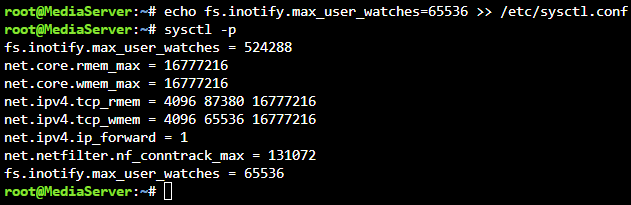
It doesn’t break the container. It’s never executed
I have run the sysctl -a command as root, do I still need to reboot my server?
Seeing this:
Now you need to UNDO what you just did. Unraid was already set to 524288.
sysctl -p again to update the kernel table sizes again.
Let me know if this looks correct.
