I am the only user so no user selection, but I have to link it every time after tv has been OFF for a few hours. Authorized Devices in Plex server is full of my TV duplicates. Never had this issue with previous versions. And about the clock issue - clock shows correct time at apps first start, then you have to keep OSD up at least for 30 seconds before it gets updated during playback. The playback end time is correct, relative to tv’s correct clock.
EDIT: Adding partial server logs that might help.
App linked:
Feb 09, 2021 14:04:32.099 [355276] DEBUG - HTTP requesting GET https://plex.tv/api/v2/shared_sources/owned?machineIdentifier=c5575afff8a4633f1252b881338980e46d162ae7
Feb 09, 2021 14:04:32.619 [355276] DEBUG - HTTP 200 response from GET https://plex.tv/api/v2/shared_sources/owned?machineIdentifier=c5575afff8a4633f1252b881338980e46d162ae7
Feb 09, 2021 14:04:32.620 [355276] DEBUG - HTTP requesting GET https://plex.tv/api/v2/server/access_tokens?auth_token=xxxxxxxxxxxxxxxxxxxx
Feb 09, 2021 14:04:33.158 [355276] DEBUG - HTTP 200 response from GET https://plex.tv/api/v2/server/access_tokens?auth_token=xxxxxxxxxxxxxxxxxxxx
Feb 09, 2021 14:04:33.159 [355276] DEBUG - MyPlex: updating with 7 access tokens
Feb 09, 2021 14:04:33.159 [256600] DEBUG - HTTP requesting GET https://plex.tv/media/providers?X-Plex-Token=xxxxxxxxxxxxxxxxxxxx
Feb 09, 2021 14:04:33.159 [355276] DEBUG - HTTP requesting GET https://plex.tv/api/v2/server/users?auth_token=xxxxxxxxxxxxxxxxxxxx
Feb 09, 2021 14:04:33.573 [355276] DEBUG - HTTP 200 response from GET https://plex.tv/api/v2/server/users?auth_token=xxxxxxxxxxxxxxxxxxxx
Feb 09, 2021 14:04:33.574 [355276] DEBUG - HTTP requesting GET https://plex.tv/api/v2/server/users/subscriptions?auth_token=xxxxxxxxxxxxxxxxxxxx
Feb 09, 2021 14:04:33.757 [256600] DEBUG - HTTP 200 response from GET https://plex.tv/media/providers?X-Plex-Token=xxxxxxxxxxxxxxxxxxxx
Feb 09, 2021 14:04:34.113 [355276] DEBUG - HTTP 200 response from GET https://plex.tv/api/v2/server/users/subscriptions?auth_token=xxxxxxxxxxxxxxxxxxxx
Feb 09, 2021 14:06:01.694 [366448] DEBUG - BPQ: [Starting] -> [Processing]
Feb 09, 2021 14:06:01.695 [366448] DEBUG - BPQ: generating queue items from 0 generator(s)
Feb 09, 2021 14:06:01.695 [366448] DEBUG - BPQ: generated 0 item(s) for queue
Feb 09, 2021 14:06:01.695 [366448] DEBUG - PlayQueue: 0 generated IDs compressed down to a 20 byte blob.
Feb 09, 2021 14:06:01.695 [366448] DEBUG - PlayQueue: 0 generated IDs compressed down to a 20 byte blob.
Feb 09, 2021 14:06:01.696 [366448] DEBUG - BPQ: [Processing] -> [Idle]
Feb 09, 2021 14:06:05.448 [61344] DEBUG - Request: [127.0.0.1:58765 (Loopback)] GET /servers (3 live) GZIP Signed-in Token (nijel8)
Feb 09, 2021 14:06:05.448 [256608] DEBUG - Completed: [127.0.0.1:58765] 200 GET /servers (3 live) GZIP 0ms 493 bytes
Feb 09, 2021 14:06:05.452 [61344] DEBUG - Request: [127.0.0.1:58766 (Loopback)] GET /library/sections (3 live) GZIP Signed-in Token (nijel8)
Feb 09, 2021 14:06:05.454 [256608] DEBUG - Completed: [127.0.0.1:58766] 200 GET /library/sections (3 live) GZIP 2ms 1299 bytes
Feb 09, 2021 14:06:05.457 [61344] DEBUG - Request: [127.0.0.1:58767 (Loopback)] GET /channels/all (3 live) GZIP Signed-in Token (nijel8)
Feb 09, 2021 14:06:05.457 [256608] DEBUG - Completed: [127.0.0.1:58767] 200 GET /channels/all (3 live) GZIP 0ms 387 bytes
Feb 09, 2021 14:06:05.462 [61344] DEBUG - Request: [127.0.0.1:58768 (Loopback)] GET /library/sections (3 live) GZIP Signed-in Token (nijel8)
Feb 09, 2021 14:06:05.464 [256608] DEBUG - Completed: [127.0.0.1:58768] 200 GET /library/sections (3 live) GZIP 2ms 1299 bytes
Feb 09, 2021 14:06:05.467 [61344] DEBUG - Request: [127.0.0.1:58769 (Loopback)] GET /channels/all (3 live) GZIP Signed-in Token (nijel8)
Feb 09, 2021 14:06:05.467 [256608] DEBUG - Completed: [127.0.0.1:58769] 200 GET /channels/all (3 live) GZIP 0ms 387 bytes
Feb 09, 2021 14:07:57.663 [355276] DEBUG - NetworkServiceBrowser: SSDP departed after not being seen for 20.701070 seconds: 192.168.1.4 (VIZIO OLED TV)
Feb 09, 2021 14:20:57.060 [256476] DEBUG - NetworkServiceBrowser: Parsing SSDP schema for http://192.168.1.4:8008/ssdp/device-desc.xml
Feb 09, 2021 14:20:57.060 [256476] DEBUG - HTTP requesting GET http://192.168.1.4:8008/ssdp/device-desc.xml
Feb 09, 2021 14:20:57.069 [256476] DEBUG - HTTP 200 response from GET http://192.168.1.4:8008/ssdp/device-desc.xml
Feb 09, 2021 14:20:57.069 [256476] DEBUG - NetworkServiceBrowser: found 1 SSDP devices via http://192.168.1.4:8008/ssdp/device-desc.xml
Feb 09, 2021 14:20:57.069 [256476] DEBUG - NetworkServiceBrowser: SSDP arrived: 192.168.1.4 (VIZIO OLED TV)
Feb 09, 2021 14:21:22.729 [256604] DEBUG - Auth: authenticated user 1 as nijel8
Feb 09, 2021 14:21:22.729 [61344] DEBUG - Request: [192.168.1.4:44516 (Allowed Network (Subnet))] GET /media/providers?includePreferences=1 (3 live) GZIP Signed-in Token (nijel8)
Feb 09, 2021 14:21:22.734 [256608] DEBUG - Completed: [192.168.1.4:44516] 200 GET /media/providers?includePreferences=1 (3 live) GZIP 5ms 7889 bytes (pipelined: 1)
Feb 09, 2021 14:21:22.878 [256604] DEBUG - Auth: authenticated user 1 as nijel8
Feb 09, 2021 14:21:22.878 [61344] DEBUG - Request: [192.168.1.4:44518 (Allowed Network (Subnet))] GET /media/providers?includePreferences=1 (4 live) TLS GZIP Signed-in Token (nijel8)
Feb 09, 2021 14:21:22.882 [256608] DEBUG - Completed: [192.168.1.4:44518] 200 GET /media/providers?includePreferences=1 (4 live) TLS GZIP 4ms 7889 bytes (pipelined: 1)
Feb 09, 2021 14:21:22.916 [256608] DEBUG - Auth: authenticated user 1 as nijel8
Feb 09, 2021 14:21:22.916 [61344] DEBUG - Request: [192.168.1.4:44520 (Allowed Network (Subnet))] GET /:/websockets/notifications (5 live) GZIP Signed-in Token (nijel8)
Feb 09, 2021 14:21:22.916 [61344] DEBUG - WebSocket: Performing handshake from origin https://app.plex.tv
Feb 09, 2021 14:21:22.916 [61344] DEBUG - Beginning read from WebSocket
Feb 09, 2021 14:21:22.964 [256604] DEBUG - Auth: authenticated user 1 as nijel8
Feb 09, 2021 14:21:22.964 [61344] DEBUG - Request: [192.168.1.4:44516 (Allowed Network (Subnet))] GET /hubs?contentDirectoryID=4%2C1%2C5%2C2%2C12&excludeElements=Actor%2CCollection%2CCountry%2CDirector%2CGenre%2CLabel%2CMood%2CPart%2CProducer%2CRole%2CSimilar%2CWriter%2CPhoto%2CVast%2CTopic&excludeFields=file%2Ctagline%2Csummary&count=30&identifier=home.continue%2Chome.ondeck (5 live) GZIP Signed-in Token (nijel8)
Next day app not linked:
Feb 10, 2021 07:59:49.936 [489944] DEBUG - HTTP requesting GET https://plex.tv/api/v2/shared_sources/owned?machineIdentifier=c5575afff8a4633f1252b881338980e46d162ae7
Feb 10, 2021 07:59:50.450 [489944] DEBUG - HTTP 200 response from GET https://plex.tv/api/v2/shared_sources/owned?machineIdentifier=c5575afff8a4633f1252b881338980e46d162ae7
Feb 10, 2021 07:59:50.451 [489944] DEBUG - HTTP requesting GET https://plex.tv/api/v2/server/access_tokens?auth_token=xxxxxxxxxxxxxxxxxxxx
Feb 10, 2021 07:59:50.977 [489944] DEBUG - HTTP 200 response from GET https://plex.tv/api/v2/server/access_tokens?auth_token=xxxxxxxxxxxxxxxxxxxx
Feb 10, 2021 07:59:50.978 [489944] DEBUG - MyPlex: updating with 8 access tokens
Feb 10, 2021 07:59:50.978 [729080] DEBUG - HTTP requesting GET https://plex.tv/media/providers?X-Plex-Token=xxxxxxxxxxxxxxxxxxxx
Feb 10, 2021 07:59:50.978 [489944] DEBUG - HTTP requesting GET https://plex.tv/api/v2/server/users?auth_token=xxxxxxxxxxxxxxxxxxxx
Feb 10, 2021 07:59:51.506 [489944] DEBUG - HTTP 200 response from GET https://plex.tv/api/v2/server/users?auth_token=xxxxxxxxxxxxxxxxxxxx
Feb 10, 2021 07:59:51.507 [489944] DEBUG - HTTP requesting GET https://plex.tv/api/v2/server/users/subscriptions?auth_token=xxxxxxxxxxxxxxxxxxxx
Feb 10, 2021 07:59:51.533 [729080] DEBUG - HTTP 200 response from GET https://plex.tv/media/providers?X-Plex-Token=xxxxxxxxxxxxxxxxxxxx
Feb 10, 2021 07:59:52.021 [489944] DEBUG - HTTP 200 response from GET https://plex.tv/api/v2/server/users/subscriptions?auth_token=xxxxxxxxxxxxxxxxxxxx
Feb 10, 2021 08:00:19.978 [489528] DEBUG - Statistics: Flushing 2 expired bandwidth entries, 0 expired media entries.
Feb 10, 2021 08:00:23.297 [489252] DEBUG - NetworkServiceBrowser: Parsing SSDP schema for http://192.168.1.4:8008/ssdp/device-desc.xml
Feb 10, 2021 08:00:23.297 [489252] DEBUG - HTTP requesting GET http://192.168.1.4:8008/ssdp/device-desc.xml
Feb 10, 2021 08:00:23.304 [489252] DEBUG - HTTP 200 response from GET http://192.168.1.4:8008/ssdp/device-desc.xml
Feb 10, 2021 08:00:23.305 [489252] DEBUG - NetworkServiceBrowser: found 1 SSDP devices via http://192.168.1.4:8008/ssdp/device-desc.xml
Feb 10, 2021 08:00:23.305 [489252] DEBUG - NetworkServiceBrowser: SSDP arrived: 192.168.1.4 (VIZIO OLED TV)
Feb 10, 2021 08:00:52.801 [489752] DEBUG - Request: [192.168.1.4:53018 (Allowed Network (Subnet))] GET /identity (4 live) GZIP Signed-in
Feb 10, 2021 08:00:52.802 [727736] DEBUG - Completed: [192.168.1.4:53018] 200 GET /identity (4 live) GZIP 0ms 443 bytes (pipelined: 1)
Feb 10, 2021 08:00:53.069 [489752] DEBUG - Request: [192.168.1.4:53018 (Allowed Network (Subnet))] GET /media/providers?includePreferences=1 (4 live) GZIP Signed-in
Feb 10, 2021 08:00:53.076 [728608] DEBUG - Completed: [192.168.1.4:53018] 200 GET /media/providers?includePreferences=1 (4 live) GZIP 18ms 7884 bytes (pipelined: 2)
Feb 10, 2021 08:00:53.314 [489752] DEBUG - Request: [192.168.1.4:53020 (Allowed Network (Subnet))] GET /:/websockets/notifications (5 live) GZIP Signed-in
Feb 10, 2021 08:00:53.314 [489752] DEBUG - WebSocket: Performing handshake from origin https://app.plex.tv
Feb 10, 2021 08:00:53.315 [489752] DEBUG - Beginning read from WebSocket
Feb 10, 2021 08:01:04.812 [727736] DEBUG - WebSocket: client initiated close
Feb 10, 2021 08:01:04.813 [727736] DEBUG - handleStreamRead code 2: End of file
Feb 10, 2021 08:01:04.813 [727736] DEBUG - NotificationStream: Removing because of error
Feb 10, 2021 08:01:04.813 [727736] DEBUG - Completed after connection close: [192.168.1.4:53020] -3 GET /:/websockets/notifications (5 live) GZIP 11499ms 3 bytes
EDIT 2: After setting up manual server IP address in app settings and disabling secure connection and adding my local network IP/netmask in server Network settings I no longer need to sign in or link app to access my server which works for me… Hope that works over time…
EDIT 3: Nope, not a good experience… Doesn’t remember Home screen customization and still asks for linking alto not required… And often can’t play anything… So annoying…
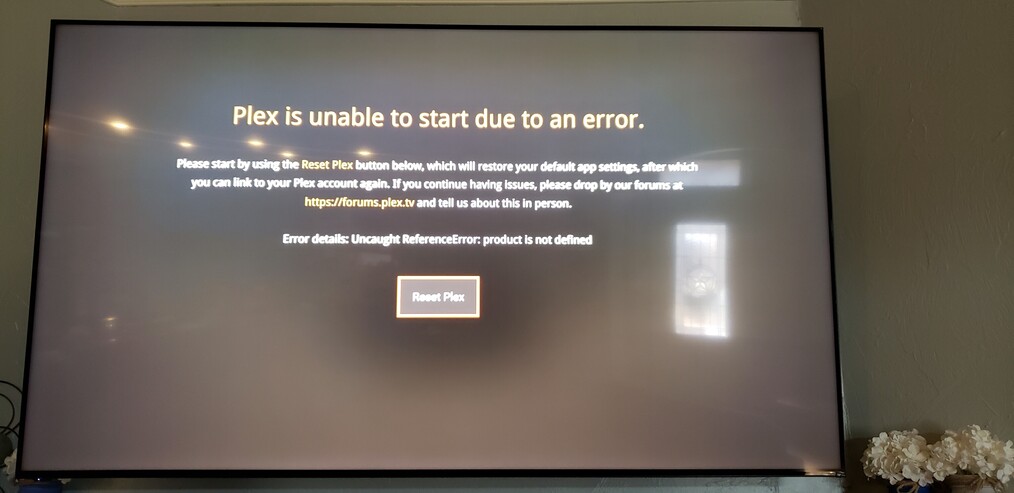
 but thanks for the report, and sorry for the pain. Hopefully this will help others avoid hitting the same issue.
 .
.