Trying to use webtools-ng to make a list of untagged movies

Hello,

I’m trying to use webtools to find all the movies I have that aren’t tagged for the collection field. I’m sure it is obvious how to use it but I’m stuck.

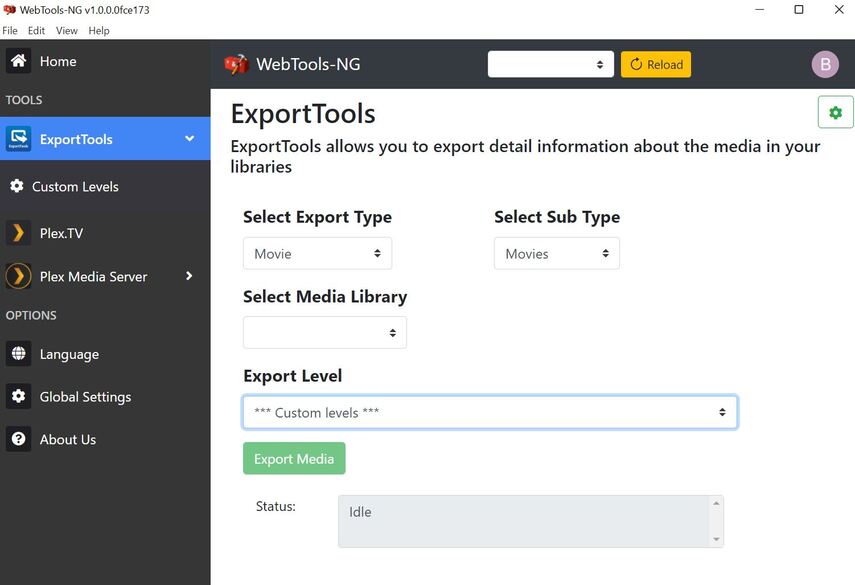
I have no idea where to put the script or if I’m using the right sub and media library doesn’t have a drop down.

Thanks.
Script

Select your server at the top, next to the reload button.

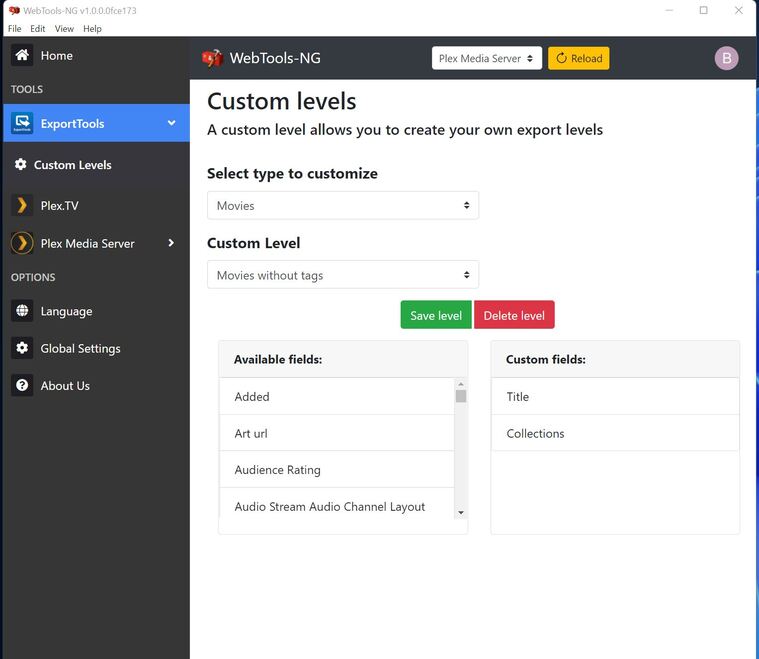
Then go to Custom Levels.

Select Type (movie, etc).

Custom Level is the name of your report. Choose then enter the name for your report.

Then drag the desired fields from Available Fields to Custom Fields.

When finished, select Save Level (green button).

Go back to Export Tools. Select Export Type/Sub Type/Media Library.

Export Level = pick the name of the level you just created.

Click on Export Media.

1 Like

Thanks!!

Can you tell me how I seperate the response into two columns when it exports? I set it to save as CSV


That is down to the import settings of your spreadsheet app.
Tell it to interpret the pipe | as a column separator.

Or tell Webtools to write a different character in its settings. I usually use the Tabulator character, as it is quite unlikely to occur in metadata fields.
Thanks!

Looks like CSV export uses a | as a separator.

Go to Global Settings → Export Settings. Change Delimiter between columns in CSV file to a comma.

Re-run your report. Fields should now be separated by a comma.

Should make it easier to import to a spreadsheet. I use Google Sheets, but any spreadsheet should work.


Edit: Two other options:

  1. You might be able to tell your spreadsheet to use | as a separator when importing.
  2. You could open up the current report in a text editor and do a global search/replace of | with ,.
1 Like

This topic was automatically closed 90 days after the last reply. New replies are no longer allowed.
