Im looking for a way to lock my Plex Servers so they do not do any scanning.
I’ve tried turning off all the Advanced Scanning settings, but it still scans after a while.
Im thinking there must be a way to put a Read Only lock on the .xml file Plex Server creates when it first starts.
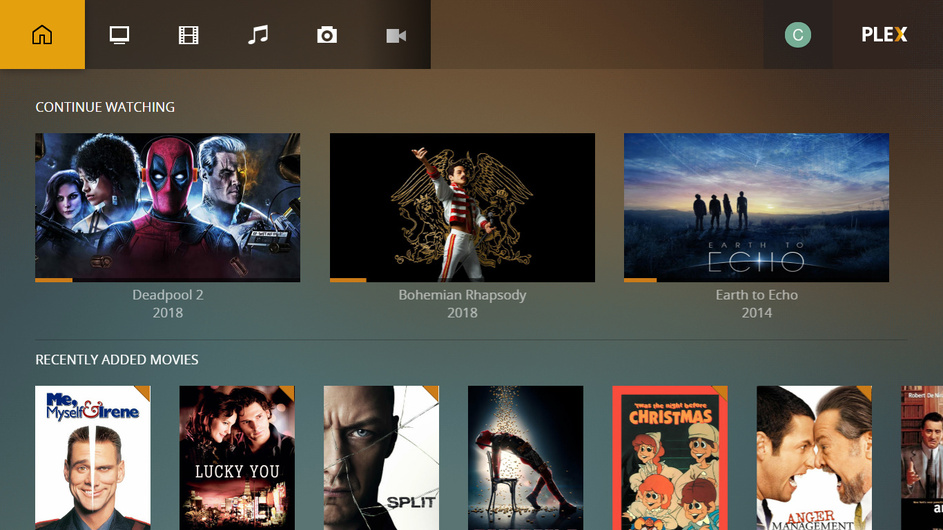
What I’m trying to accomplish is to have a “Clean” interface for the players, without any of the “Recently Added” “Recently Viewed” clutter it creates on its own.
When I first create a new server, it is perfect and just lists the shows and folders, nice and clean…until it scans and adds all the other tabs.
While this is not exactly what you want. It will at least remove items such as recently added… And not sure what player you use but for me I have android phone and a “HOME” screen that I can pin sections to so it will only display what I want… With the exception of recently added… Can’t get that to pin to home.
I already have all of my folders set as unchecked for Include In Dashboard.
The only way I’ve found to fix this issue so far is to:
Delete All Libraries on the Plex Servers.
Restart the Plex Server Devices (Nvida Shields, in my case)
Restart the Plex Server Apps
Re map all of the Library Paths
Restart the Plex Clients
If we do this, for about 7 hours we get a nice, clean Client interface with just “All” like we want.
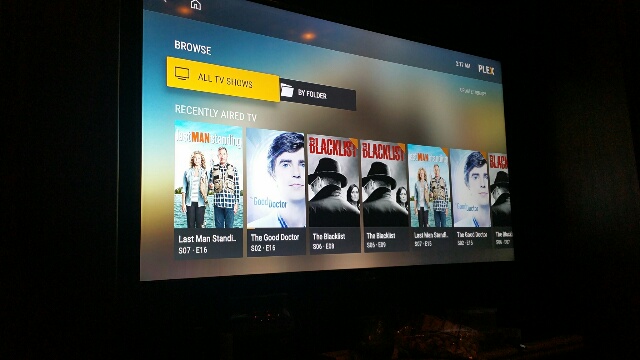
The problem is, after about 7 hours the Plex Server adds in all of its “Recently Aired/Viewed/Played” tabs and ruins the look and use of the client.
All we want is just a clean list of whats on the storage devices, like it starts off showing.
Is this too much to ask for?
Update:
We came up with a workaround, but its not ideal.
If you select a library and double-click on it, the interface shows the “All” tab like wanted.
Maybe theres a way to reprogram the remote to double-click by default to make this workaround more user friendly?
when you start to create the library’s if you select the above option (From NewPlaza Post) it will not show any recent played items but just items you have added recently (as my plex is offline at mo I don’t think it even displays recently added if you deselect include in dashboard… Will have to double check in a few hours) but
if you have already created the library if you de-select the option it should remove it from the web dashboard not from apps like SONY, or ROKU that I have found, how ever if you go in to library on the web page for your local PMS you will be met with a half watch icon, its how plex works to keep all your media in check and if you have part watched it or not, that’s why they brought in the function of start from beginning feature. and also why they brought in multi users so if one person has watched it does not show to the other…
When I first create a new Plex Server and add in new libraries, it looks super clean like this:
And when the user selects a library, it looks nice and clean like this:
.
.
.
.
But… after a few hours, the Plex Server does some indexing and adds in all of these
“Recently Aired/Viewed/Watched” tabs and trashes the look like this:
We don’t understand why it can’t just leave the folders alone so they just show whats in them.
It considers everything as “Recently” this, that or the other thing, even when we are adding in TV series from the 1960’s!!
What’s worse is, it thinks every episode is “Recent”, so it fills up the entire top of the interface with each and every single episode of each series.
This makes what started out as a useful, informative display into a mess of mass confusion.
Hey bud. I honestly don’t think there is a way of removing where it displays recent added or recent aired, although I haven’t used Nvidia Shield Android TV, but I think the plex media player is similar. and I get the same as you..
If it’s in the Database, I should be able to write a script that clears out all of the
“Recently Viewed/Watched/Aired/Liked on Twitter/Mentioned on FOX News/Thought about by a someone in a blue car…” etc crud it keeps clogging up the interface with.
The script can run in the background every few hours.

 Will have to double check in a few hours) but