TV 4K ACER transcoding with 4K

Server Version#:
Player Version#: android tv

Good morning,
I have a 50 inch Acer 4k TV year 2022 with android
as soon as I launch a 4K file. it is automatically transcoded,
I changed the video quality remotely to maximum but same problem

Acer TV is support with plex ?

Android or Google TV is fine

Do 4k HDR files play from another source like Youtube?

The most common reasons for transcoding is an unsupported file format/codec issue

It could be bandwidth but if you get a transcode on every 4k file that’s unlikely

You could just be overlooking a setting somewhere but to know for sure you can upload a set of logs

Play a 4k file that starts to transcode and wait a minute or two. Using the web UI, download a set of server logs from the troubleshooting section

The TV works well in 4K HDR on YouTube.
I would like to point out that I have 2 friends who have an LG C2 TV and Samsung TV 2023 and all 4k films work live without transcoding.
So definitely not a codec problem. or bandwidth.

the problem just appears on this 2022 Acer 4k TV. However in the plex video parameters: remote streaming quality is of course: Maximum.

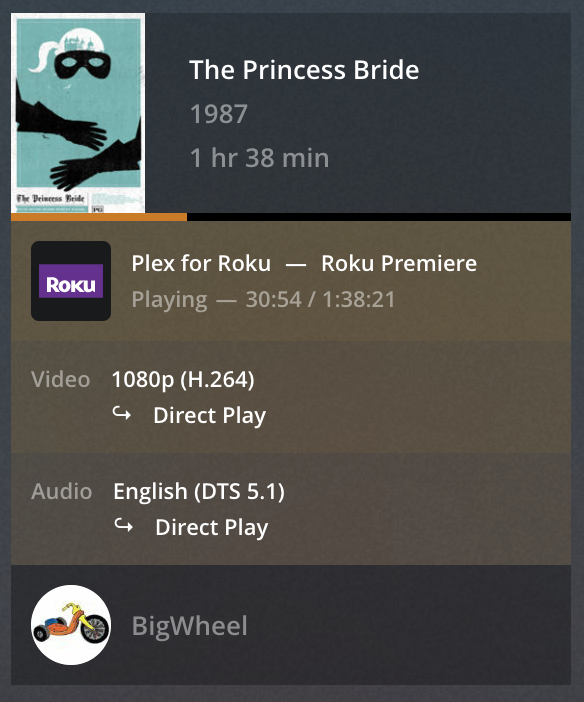
What information is showing in the “now playing” tile for that playback on the Plex server dashboard?
e.g.

  • Is the stream listed as Remote or Indirect?
  • What’s listed as the transcoding details for video, audio and subtitles?
  • What’s listed as average bitrate (=average required bandwidth) and are there multiple streams in parallel?

Exemplary screenshot from the "now playing" section
https://support.plex.tv/articles/200871837-status-and-dashboard/

Is this your server or you’re watching content from one of your friends servers?


after changing quality suggestions : on … then works…

I had the same problem on my Samsung TV model 2019 1 week ago. 4k movies also transcode
by removing the quality suggestions on : off… the 4k films worked perfectly again.

Since this added quality suggestion. I think a lot of people have reading problems…
Anyway thx for ur help .