Server Version#: 1.21.1.3876
Player Version#: 4.47.3
OS : Windows 10
What you did? Setup Collections in Movies and TV Shows
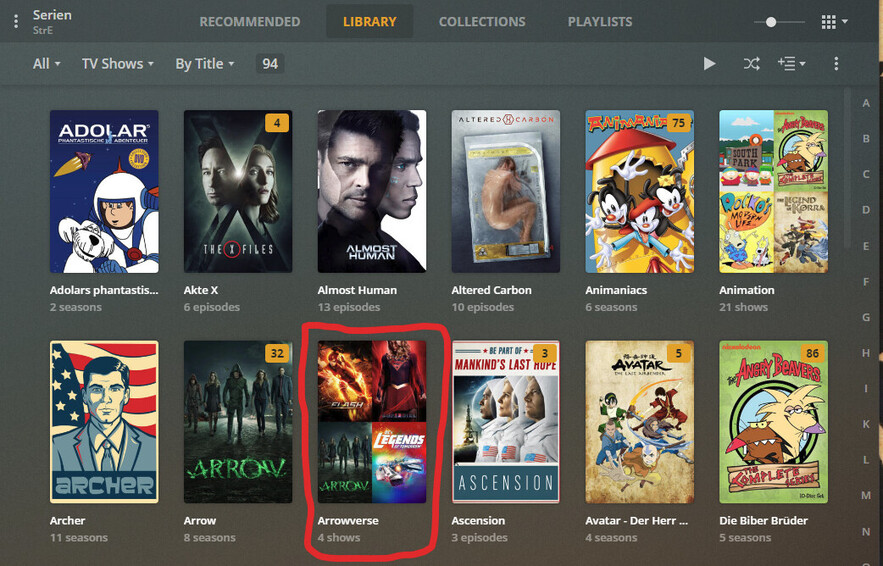
What happened? Collections are done, however only my Movie library behaves as expected. I wish to have my Collections within the Library view alongside the individual library items. This is set with the advanced library setting via " Show collections and their items ", this is configured following “Collection Inline library display options” as per here: https://support.plex.tv/articles/201273953-collections/#toc-2
What you expected? Like my Movies library, i’d expect to see tv collections mingled with my shows. Whilst this happens for Movies, under TV library it only displays the collections unless i select Collections to disabled (so then they only appear under collections Tab) and then it lists all my TV Shows in the Library view.
What are your (relevant) settings? I have tried using the TMDB and TheTVDB agent and edited the library settings under manage library>advanced>Collections. Here i have followed https://support.plex.tv/articles/201273953-collections/#toc-2 and set: Show collections and their items I have also set my Library view to Tv Shows and sorted by Title.
This library display behaviour happens on ios, android and web player. If i sort mmy tv shows by year etc my shows display again, however as expected i lose my collections within the Library view. Reverting back to sorting by title collections come back and tv shows are absent.
Is this a bug? Anyone replicate? Any ideas?