Server Version#:DSM 7.1.1-42962 Update 2
Player Version#: 4.87.2
I was formerly running Plex on Windows, and have just setup my DS220+. I didn’t realize there was a migration option so I just created new volumes on the NAS for all my media and did an install of Plex. I claimed my server token and setup my media in the different categories just like on my previous version. My music and movies all seem to be fine. All the data line up and everything is as it should be. My Tv series on the other hand are completely messed up. I only show 7 different series, and one of them says it has 928 episodes (that series only has one actual episode in reality). When I go into this series and look at different seasons it has episodes from other series in it, but a mixture of all kinds of different series under each season. There seems to be no rhyme or reason as to which series are in each season. I’ve tried changing the agent from Plex TV Series to TVDB and neither seems to work. I found an FAQ about deleting the cache and refreshing all the Metadata but that didn’t help either.
I’m at a loss as to what to do to get this fixed. Any help is appreciated.
Plex merging all videos in a single show implies it’s not so much an issue about stale metadata but some fundamental issue with the file organization inside your library folder.
Are your file names and organization in line with the official schema?
The current-generation scanner/agent is a bit more strict / less forgiving when it comes to certain deviations.
They were working fine on the windows side. It was only when I transferred to the NAS that I had an issue. The only thing that I can see may be an issue is the year being required in the folder name. Does it also have to be in the individual file name as well? Is there a way to bulk change this or do I have to do it manually?
The year is generally not required in the file name, unless it is a sequel/remake with the exact same name as the original.
Before you start bulk renaming, please provide an example of how you have the files named and organized - a directory listing, screenshot, etc. Include the file extension - mkv/mp4/etc.
Edit: Please show the full path to the files, and indicate which folder is added to the library.
Also, which version of Plex Media Server? Settings → Server_Name → General.
Which directory is added to the Plex library, the first TV or the second? It should be the second (i.e. /tv/tv, not /tv).
Plex does not support folders between the folder added to the library and the show folder.
If you add /tv to the TV show library Plex will not correctly recognize the shows.
If this is the case, please do the following
Delete existing TV show library
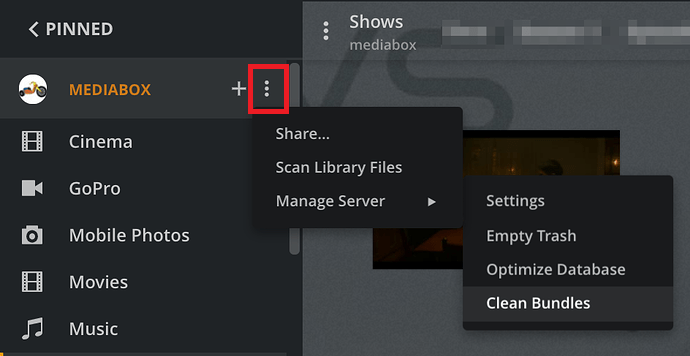
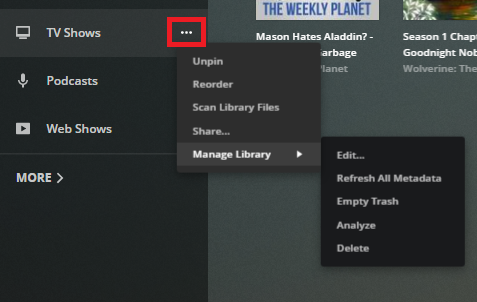
Empty Trash and Clean Bundles ← See pic below. Clean Bundles also in Settings → Troubleshooting
Optimize the Database ← See pic below. Also in Settings → Troubleshooting
Correct any naming/organization issues
Create a new TV show library
Note: Since this is a new library, with no play history, etc., it is easiest to delete it and start over. Emptying the trash, cleaning bundles, and optimizing the db clears out any incorrect information from the Plex database.
2. Show Organization
Each show must be in its own folder with season folders underneath. The episodes for Rick and Morty appear to be directly in the TV show folder. This is not supported and will cause problems.
/tv/tv  <-- folder added to TV Show library
/Rick and Morty (2013) <-- ShowName (year)
/Season 06 <-- "Season" in English, Two digits for number
/Rick.and.Morty.s06e02.other_stuff.mkv <-- sXXeYY required.
3. Embedded Metadata
Plex can read embedded metadata from MP4 files, if configured to do so.
If the MP4s have bad/incorrect metadata, it may cause Plex to incorrectly recognize/match the files.
I have the paid version of TMM. If TVDB or IMDB IDs require the paid version, you should be able to choose TMDB IDs in the free version.
PowerRenamer in Microsoft Power Tools is helpful for simple renaming with pattern matches or regular expressions. It makes quick work of tasks such as adding a year to file names, removing undesirable text from multiple files, etc.