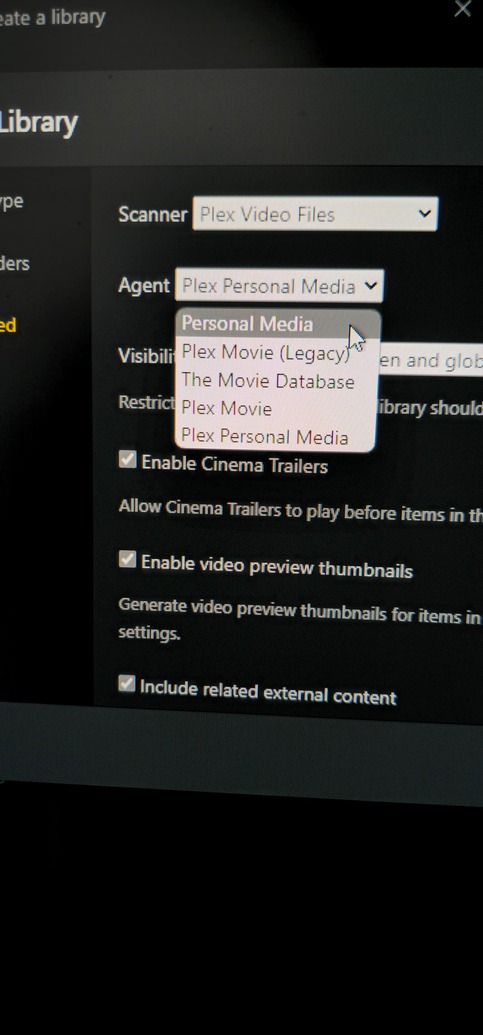
Server Version#:4.133.0 - Synology DS423+
Player Version#:5.86.5 - Samsung
Well, I’m back
I’ve read and I’ve watched videos on “YouTube”, and I just don’t get in
Initial set up:
I used “other videos” for TV shows and pointed them to the other videos folder as that path
The current issue:
I decided for the possibility of matching via “The TVDB” to set the videos in the “TV Shows” folder. I mapped to that section and dropped an light weight size (3GB) MKV to the root. The video refuses to show up. I then created folder and moved it. Nada. I then created folders in that folder and nada. The current structure is: History Channel>Washington and the video has been added to the last folder. Naming convention is as the show is named with the year.
Is it possible that the initial set up as other videos is having an impact? These are single videos. In other words a cut & paste, not a an additional copy within Plex. Again, I’ve read and watched how to videos. So, somewhere I’m either not getting it, or I’ve become lost in all of it.
Look up your shows at TheMovieDB.org and TheTVDB.com
Determine whether the two websites disagree about the ordering and organization of the episodes. Find out whether your files are conforming to either of them.
If you have a strong preference for one of the two websites, you can set the “Episode Ordering” in the properties of the Plex library as default.
This episode ordering can be overridden in the properties of each single show.
Maybe I missed something. I will read the article. I did use that process. However, I don’t seem to get “The TVDB”, and using The “Plex” search doesn’t get it done.
You don’t place video files in the root folder of the library.
Only folders live there.
/TV Shows <-- folder which has been added to the Plex library
   /Doctor Who (1963) <-- sub folder for each show
      /Season 01 <-- sub-sub-folder for each season
         Doctor Who (1963) - s01e01 - An Unearthly Child (1).mp4 <-- actual video file
         Doctor Who (1963) - s01e02 - The Cave of Skulls (2).mp4
   /From the Earth to the Moon (1998)
      /Season 01
         From the Earth to the Moon (1998) - s01e01.mp4
         From the Earth to the Moon (1998) - s01e02.mp4
   /Grey's Anatomy (2005)
      /Season 00
         Grey's Anatomy (2005) - s00e01 - Straight to the Heart.mkv
      /Season 01
         Grey's Anatomy (2005) - s01e01 - pt1.avi
         Grey's Anatomy (2005) - s01e01 - pt2.avi
         Grey's Anatomy (2005) - s01e02 - The First Cut is the Deepest.avi
         Grey's Anatomy (2005) - s01e03.mp4
      /Season 02
         Grey's Anatomy (2005) - s02e01-e03.avi
         Grey's Anatomy (2005) - s02e04.m4v
   /The Colbert Report (2005)
      /Season 08
         The Colbert Report (2005) - 2011-11-15 - Elijah Wood.avi
   /The Office (UK) (2001) {tmdb-2996}
      /Season 01
         The Office (UK) - s01e01 - Downsize.mp4
   / The Office (US) (2005) {tvdb-73244}
      /Season 01
         The Office (US) - s01e01 - Pilot.mkv
Each video file must contain the season/episode (e.g. s01e01) number in their file name. Otherwise they will get ignored.
Yes, and I did create folders with the shows moved to them. I tried all naming conventions that I can think of. Washington s01e01, Washington - s01e01, s01e01…
The history channel is the folder. I have tried the naming conversation I stated. So, relative to that, the image is not a reflection to those efforts.
I took a break and went back at it. The stubborn me with issues like this and sometimes that clouds logic.
When I went to my den/office, I went into Plex web and the series for “Washington” was there and appropriately named and set. Maybe its possible that in my frustration I was too quick for the files to be resolved.
The only issue is that I had is the file structure TV Shows - History Channel>Washington. In seeing the completed process, the folder structure was: History Channel>Washington>Washington. I moved the latter folder out to what I guess would be the root of TV Shows, and deleted the History Channel and the remaining folder in it. All is good. I also added the series for “Grant” from the History Channel and it immediately picked it up. Both are assigned the proper metadata.
I would say in the end and prior to my post, through all of the attempts, one was right. However, I can appreciate that one could argue I didn’t get it right.
I feel I may have frustrated you and wasted your time. I apologize in both.
Thank you for hanging in there and the input you provided. I do appreciate that