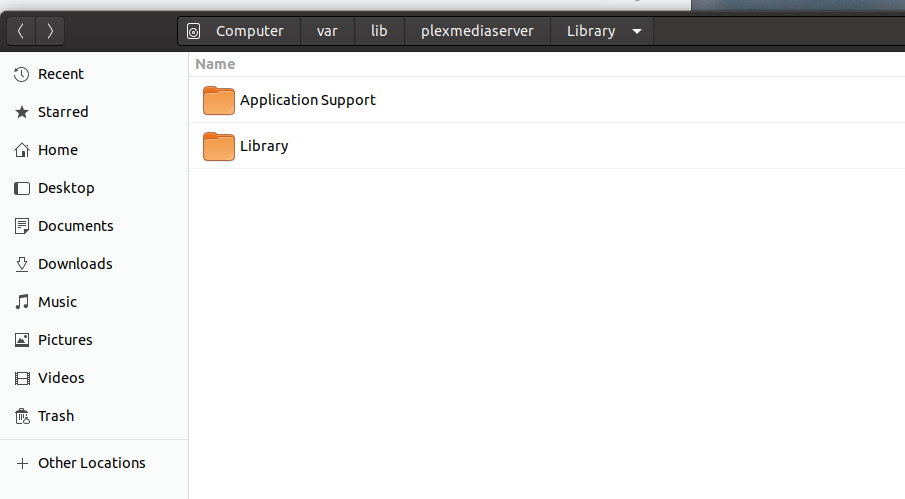
I followed all the steps after a few issues (forgot media was capital M)
I have the mounts all working however when i started plex on NUC i was greeted by the plex welcome screen saying it had found a new server and to name it, I left it as it was and loaded into PMS .
Doesn’t seem to have worked unfortunately this is what i get JLB-plex is syno plex
After stopping PMS on the nuc and moving the folders around I rebooted and restarted plex and there it is !!! all working
So amazing saved me lots of work as i was struggling to install Hama-movies plugin to pull data on all my anime now its just all there !! remote users are all there as well so good
Rename the nested Library (the one you want) to Library.keep for easy identification
Highlight & “Cut” (as in cut/paste)
Move up to the “plexmediaserver” level.
Now you see Library (the unwanted one)
In the free space somewhere there. Paste (or Paste into Folder) Library.keep there. (usually a Right-click will do it). You should see Library and Library.keep.
We now have it at the right spot. Swap them around.
Rename Library -> Library.unused
Rename Library.keep -> Library
I will now need you go go into the terminal window
cd /var/lib/plexmediaserver
sudo chown -R plex:plex . (don’t forget the trailing period character)
I edited my post but you must have been replying, all fixed and working great so much faster than my syno.
One quick question not a huge issue but network shares don’t trigger scans instantly on plex like local folders on the syno like i had previously ? I just set it to 15 minute scans which seems fine just wanted to be sure.