Ubuntu 22.04 plexmedia server 'lost' all content

Server Version#: plexmediaserver_1.32.2.7100-248a2daf0_amd64.deb
Player Version#: Multiple - Kodi plex client, browser web client, FireTV Plex Client, Cablebox with Plex app.
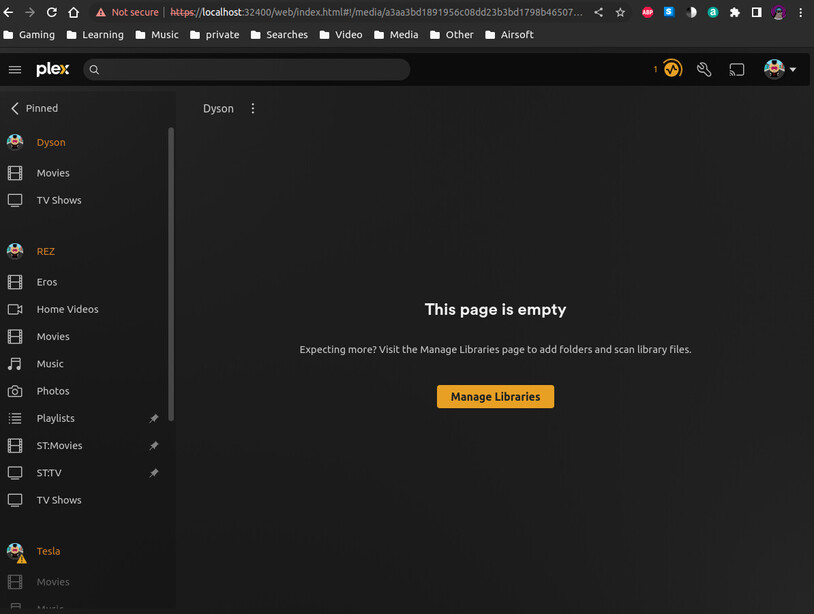
Server was showing all content (TV shows, Movies) until about 2 weeks ago. Suddenly all content vanished, library settings changed from /video/TV for TV, and /video/Movies for Movies, to /usr/lib/plexmediaserver/Resources/tv for TV, and /usr/lib/plexmediaserver/Resources/movies for Movies. I checked and these folders exist but are empty. The original /video/[TV,Movies] folders exist, and all the content is still there.
There is no file .plexignore anywhere on any of the filesystems. /video is a dedicated filesystem, a fast SSD for content delivery, while the root filesystem is on a spinner.
I switched the libraries back to their original locations with web client, server, manage server, libraries, edit libraries, which is how I found the changed content directories. Troubleshooting, I tried triggering library scans both from the web client and from the command line. Surprisingly, the web client shows that scans finish, but the commandline option Plex Media Scan --list results in aborted (core dump) and generates the attached logs.

As an aside, file names like Plex Media Scan on Linux are a PITA, you have to escape every space like Plex\ Media\ Scan. Using filenames without spaces makes life easier for us SysAdmins. All lowercase helps too.

Please look at the log and dump and advise. I am a Plex Pass Lifetime member.

Thank you

e0650287-038f-4504-443c3386-7db841ff.dmp.log (1.8 KB)
e0650287-038f-4504-443c3386-7db841ff.dmp.log.zip (23.5 KB)

Those DMP files are meaningless.

What we need are the DEBUG log files you get from PMS
(Settings - Server - Troubleshooting - Download Logs)

It’s a ZIP file.

You should probably Scan files again so the logs are fresh with scanner activity before downloading them.

Waiting 2 weeks was not the best choice.

Attach the ZIP here please

With respect to command line mode, that’s Linux. It is what it is.

Requested logs.
e0650287-038f-4504-443c3386-7db841ff.dmp.log.zip (113.3 KB)

Also before gathering these, I set to debug logging as requested.

I’m srry. you’re not getting the logs I’m asking for.

In Plex /Web

Settings - Server - Troubleshooting (left panel → lower part) - Download Logs (middle of the right pane which opens.

When you click “Download Logs” , It will give you a ZIP file (you’ll see it download / in your browser).

I need that file please

Screenshot from 2023-06-04 00-37-12

Sorry for my failure to procure the requested logs. Trying again.
Plex Media Server Logs_2023-06-04_00-17-44.zip (2.1 MB)
Plex Media Server Logs_2023-06-03_23-24-16.zip (2.0 MB)

Thank you for the logs. They clearly show what’s happening.

Jun 03, 2023 22:03:45.619 [140567241206584] ERROR - IsDirectory failed boost::filesystem::status: Permission denied [system:13]: "/video/TV/Speed Racer (2022)"
Jun 03, 2023 22:03:45.619 [140567241206584] ERROR - IsDirectory failed boost::filesystem::status: Permission denied [system:13]: "/video/TV/iCarly"
Jun 03, 2023 22:03:45.619 [140567241206584] ERROR - IsDirectory failed boost::filesystem::status: Permission denied [system:13]: "/video/TV/Hot Wheels"
Jun 03, 2023 22:03:45.619 [140567241206584] ERROR - IsDirectory failed boost::filesystem::status: Permission denied [system:13]: "/video/TV/Ed, Edd n Eddy"
Jun 03, 2023 22:03:45.619 [140567241206584] ERROR - IsDirectory failed boost::filesystem::status: Permission denied [system:13]: "/video/TV/Better Call Saul"
Jun 03, 2023 22:03:45.619 [140567241206584] ERROR - IsDirectory failed boost::filesystem::status: Permission denied [system:13]: "/video/TV/Bee and PuppyCat (2022)"
Jun 03, 2023 22:03:45.619 [140567241206584] ERROR - IsDirectory failed boost::filesystem::status: Permission denied [system:13]: "/video/TV/Steven Universe"
Jun 03, 2023 22:03:45.619 [140567241206584] ERROR - IsDirectory failed boost::filesystem::status: Permission denied [system:13]: "/video/TV/Brooklyn Nine-Nine"
Jun 03, 2023 22:03:45.619 [140567241206584] ERROR - IsDirectory failed boost::filesystem::status: Permission denied [system:13]: "/video/TV/Courage the Cowardly Dog"
Jun 03, 2023 22:03:45.619 [140567241206584] ERROR - IsDirectory failed boost::filesystem::status: Permission denied [system:13]: "/video/TV/The Marvelous Misadventures of Flapjack"
Jun 03, 2023 22:03:45.619 [140567241206584] ERROR - IsDirectory failed boost::filesystem::status: Permission denied [system:13]: "/video/TV/Clone High (2023)"
Jun 03, 2023 22:03:45.619 [140567241206584] ERROR - IsDirectory failed boost::filesystem::status: Permission denied [system:13]: "/video/TV/The Midnight Gospel"
Jun 03, 2023 22:03:45.619 [140567241206584] ERROR - IsDirectory failed boost::filesystem::status: Permission denied [system:13]: "/video/TV/MythBusters"

As you can see, user ‘plex’ doesn’t have READ permission to /video (or /video/TV)

That’s what changed. Check it to make sure it has 755 or similar permissions so user ‘plex’ (or the user you run as) can get in there.

Also, you have media in /var/lib/plexmediaserver. (tv)

That’s not recommended because any mistake and PMS will break.

Thanks for the reply, I checked and /video was 775 and radarr:radarr. But radarr user is part of the group plex, so it should have been working, and until recently, was. I didn’t go in and change ownerships, just updated the server version. But now I have changed /video to 775 plex:plex. Still seems to be failing to find anything, but I figure I’ll give it a 1/4 hour for the scheduled media scan.

I checked the service and it is running as plex:

root@Dyson-Media:/# cat /etc/systemd/system/multi-user.target.wants/plexmediaserver.service
# DO NOT EDIT THIS FILE DIRECTLY!
#
# Plex Media Server's variables can be customized by creating an 'overide.conf'
# file using 'systemctl edit plexmediaserver' which will create the following;
# /etc/systemd/system/plexmediaserver.service.d/override.conf
#
# An example of the override.conf would be as follows if you wished to edit
# your user, group, temp directory, or app support directory (without the leading #)
#
# [Service]
# Environment="TMPDIR=/path/to/new/tmp"
# Environment="PLEX_MEDIA_SERVER_APPLICATION_SUPPORT_DIR=/home/myusername/Library/Application Support"
# User=myusername
# Group=mygroup
#

[Unit]
Description=Plex Media Server
After=network.target network-online.target

[Service]
Environment="PLEX_MEDIA_SERVER_APPLICATION_SUPPORT_DIR=/var/lib/plexmediaserver/Library/Application Support"
Environment=PLEX_MEDIA_SERVER_HOME=/usr/lib/plexmediaserver
Environment=PLEX_MEDIA_SERVER_MAX_PLUGIN_PROCS=6
ExecStartPre=/bin/sh -c '/usr/bin/test -d "${PLEX_MEDIA_SERVER_APPLICATION_SUPPORT_DIR}" || /bin/mkdir -p "${PLEX_MEDIA_SERVER_APPLICATION_SUPPORT_DIR}"'
ExecStart=/bin/sh -c '\
export PLEX_MEDIA_SERVER_INFO_VENDOR="$(grep ^NAME= /etc/os-release | awk -F= "{print \\$2}" | tr -d \\" )"; \
export PLEX_MEDIA_SERVER_INFO_DEVICE="PC"; \
export PLEX_MEDIA_SERVER_INFO_MODEL="$(uname -m)"; \
export PLEX_MEDIA_SERVER_INFO_PLATFORM_VERSION="$(grep ^VERSION= /etc/os-release | awk -F= "{print \\$2}" | tr -d \\" )"; \
exec "/usr/lib/plexmediaserver/Plex Media Server"'
Type=simple
User=plex
Group=plex
Restart=on-failure
RestartSec=5
StartLimitInterval=60s
StartLimitBurst=3
SyslogIdentifier=Plex Media Server
StandardOutput=journal
StandardError=journal

[Install]
WantedBy=multi-user.target
ps -ef|grep plex also shows the processes running as plex

root@Dyson-Media:/# psg plex
plex       74331       1  0 00:55 ?        00:00:01 /usr/lib/plexmediaserver/Plex Media Server
plex       74364   74331  1 00:55 ?        00:00:02 Plex Plug-in [com.plexapp.system] /usr/lib/plexmediaserver/Resources/Plug-ins-248a2daf0/Framework.bundle/Contents/Resources/Versions/2/Python/bootstrap.py --server-version 1.32.2.7100-248a2daf0 /usr/lib/plexmediaserver/Resources/Plug-ins-248a2daf0/System.bundle
plex       74414   74331  0 00:55 ?        00:00:00 /usr/lib/plexmediaserver/Plex DLNA Server
plex       74415   74331  0 00:55 ?        00:00:00 /usr/lib/plexmediaserver/Plex Tuner Service /usr/lib/plexmediaserver/Resources/Tuner/Private /usr/lib/plexmediaserver/Resources/Tuner/Shared 1.32.2.7100-248a2daf0 32600
plex       74451   74331  1 00:55 ?        00:00:01 Plex Plug-in [com.plexapp.agents.imdb] /usr/lib/plexmediaserver/Resources/Plug-ins-248a2daf0/Framework.bundle/Contents/Resources/Versions/2/Python/bootstrap.py --server-version 1.32.2.7100-248a2daf0 /usr/lib/plexmediaserver/Resources/Plug-ins-248a2daf0/PlexMovie.bundle
root       74837   55648  0 00:58 pts/0    00:00:00 grep --color=auto -i plex
root@Dyson-Media:/# ls -la / |grep video
drwxrwxr-x   5 plex plex  4096 Jan 25  2021 video

root@Dyson-Media:/# cat /etc/passwd|grep plex
plex:x:998:998::/var/lib/plexmediaserver:/usr/sbin/nologin

root@Dyson-Media:/# cat /etc/group|grep plex
video:x:44:plex
render:x:109:plex
radarr:x:1001:dfelty,rfelty,plex
plex:x:998:radarr

I also restarted plexmediaserver, and checked status.

I tried the ‘Windows’ solution, and rebooted.

I will pull logs in a quarter hour or so and see what they tell us.

I was poking around some, and I found that the /var/lib/plexmediaserver/[tv,movies] are softlinks to the /video/[TV,Movies] too.

root@Dyson-Media:/# ls -la /var/lib/plexmediaserver/
total 12
drwxr-xr-x 3 plex plex 4096 Jan 25 2021 .
drwxr-xr-x 70 root root 4096 Oct 27 2022 …
drwxr-xr-x 3 plex plex 4096 Jan 25 2021 Library
lrwxrwxrwx 1 root root 14 Jan 25 2021 movies → /video/Movies/
lrwxrwxrwx 1 root root 10 Jan 25 2021 tv → /video/TV/

I wouldn’t do this.

I’d go into the Library section itself → Add Folders
Then I’d type the directory name /video/Movies and similar for TV

The Plex/web folder browser isn’t the smartest tool in the shed :confused:

This is what I do

  1. /vol is the mount point for the storage array
  2. /vol/media is where all media files are stored
  3. I then break out TV and movies in subdirectories under that (TV by genre)

My PMS is still in /var/lib/plexmediaserver but here you see my media is clearly elsewhere as it should be.

Server is working again. I think I found the source of the problem, which was a cron job I had running every 15 minutes to set the /video dir recursively to 774 root:plugdev, because i had a problem a couple of years ago like this, where the problem ended up being that radarr dropped files for plex with radarr:radarr ownership, and sonarr dropped them as owned by sonarr:sonarr. Worked fine for a few years, but maybe the latest server versions don’t like that? I changed the script from this:

root@Dyson-Media:/# vi /usr/local/bin/perms

#!/bin/bash
cd /video/
chmod -R 774 * && chown -R root:plugdev *

to this:

#!/bin/bash
cd /video/
chmod -R 775 * && chown -R plex:plugdev *

and now it works fine, see all the media.

Running via this cron job:

root@Dyson-Media:/# crontab -e

script to set proper perms on media files

*/15 * * * * /usr/local/bin/perms

Thanks for the nightowl support!

You should stop that.

PMS is now sensitive to permission changes.

If you’re doing it to set perms for files which aren’t correct, I recommend doing it this way,

This topic was automatically closed 90 days after the last reply. New replies are no longer allowed.
