Everyone’s saying “transcoding is working now” but nobody’s reporting their chipset.
Has anyone on Gemini Lake hardware confirmed transcoding works after upgrading to 6.8?
Everyone’s saying “transcoding is working now” but nobody’s reporting their chipset.
Has anyone on Gemini Lake hardware confirmed transcoding works after upgrading to 6.8?
I’m on Synology DS920+ on DSM 7.2
CPU: GeminiLake
Kernel: 4.4.302+
PMS v1.40.5.8854
And HDR tone mapping is not working properly, and providing bad video output where the colors look as if bleach was spilled on the video. Is anyone else seeing similar?
GeminiLake is the “Red Headed Stepchild” Intel broke and doesn’t appear interested in fixing.
We are working on it.
We fix it for one thing then something else with ICR (Intel Compute Runtime) breaks.
Can anyone way “Whack-a-mole” ? 
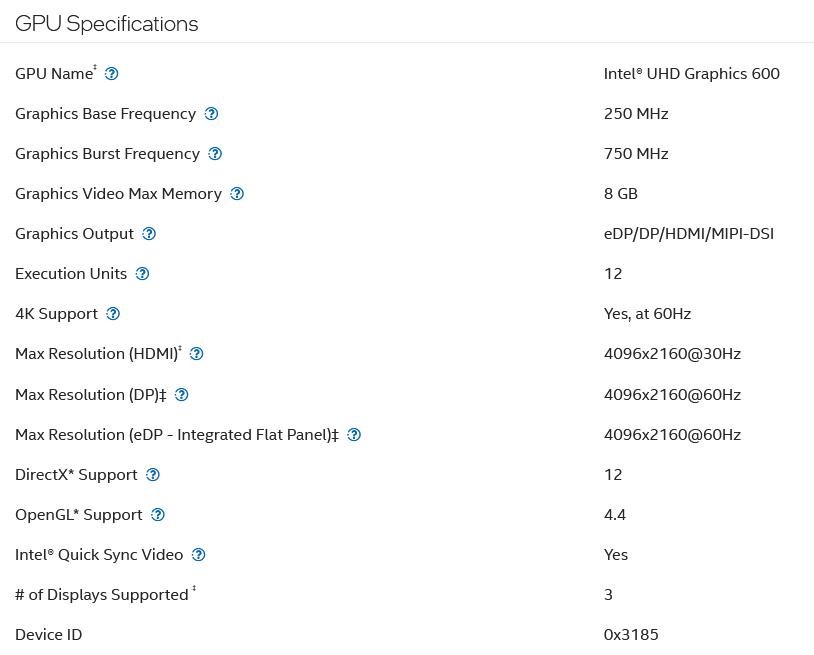
I have an Intel Celeron J4125, Gemini Lake CPU.
The drivers I see within my PMS Drivers directory are “i965_drv_video.so”, and under a separate directory (within the Drivers directory) the following:
All of which were updated 08/15/2024 in v1.40.5.8854
I’ve tried with the Hardware transcoding device set to both Auto and GeminiLake [UHD Graphics 600] within the Plex Web Interface (currently set to Auto). I haven’t modified initrd from what came within Synology DSM 7.2
GeminiLake, because Intel didn’t do it right, works with i965 driver…
That’s the best we can do right now.
All those libig.... are Intel Compute Runtime (which is the problem).
The issue isn’t the device you select, the issue is the driver.
Preferences.xml , add VaapiDriver="i965" before the closing /> is how we override the ICR driver , with PMS stopped.
When this starts, it tells PMS to ignore the Intel Compute Runtime drivers and go back to the i965 drivers.
i965 was Intel’s public domain driver. ICR is their proprietary driver for all CPUs especially for anything -10xxx and newer.
Oh Ok, I used to have that within the preferences a while back but thought it was no longer needed after one of the PMS updates, so I removed it. I will re-add it. So going forward are we always going to need to add that within preferences, or will we get a heads up when we should remove it from the preferences xml file?
Edit: After Making the changes it improved in some ways, tone-mapping seems to work properly when converting on a browser (Windows Desktop & iOS), but seems to make no difference for the tone-mapping of iOS devices using the native app. I believe this is also the case for a few other devices using their native apps as well.
Is there a way to force devices accessing my server not via a web browser to also use the i965 driver when having to rely on the servers hardware transcoding? I thought that was the default but it does not look to be the case.
You are the server owner.
Changes / settings at this level apply globally to anyone who uses your server.
Ubuntu Version 24.04
Kernel 6.8.0-39-generic
Alderlake CPU
I’m having the transcoding issue, do i need to wait for 24.04 to be patched before i can upgrade my kernel to fix the trancoding issue? (ubuntu noob here)
What I was looking for was, all client devices that cannot play the current media at original playback (regardless of if the client device is using a browser or the Plex app) then I want the device to transcode with working tone mapping; however, currently this is only the case for clients that use a browser. This is also the case for the recently released v1.40.5.8897.
24.04 is a hot mess.
As a noob, you’re probably not aware of the rule – NEVER install the “.0” release
(e.g. 24.04.0). 
22.04.4 is very stable.
I was reading up on what’s being released. Points of interest
We can still do 24.04.1 and 6.5 kernel to avoid all these bugs, right?
I need to get off 23.10 because it’s EOL, lol.
[edited/updated on 8/29]
Just upgraded from 23.10 to 24.04.1. I wanted to get off an EOL release for security reasons. I don’t have a need to run the 6.8 kernel so I’m running the proven 6.5 kernel. It’s working fine on some a few sanity tests. 
This thread has gotten very long, very technical, and has diverged into a forked discussion of HDR issues.
I’d just like to confirm that now that 24.04.1 LTS has been released (today!) - is the official guidance from Plex that Gemini Lake users on Ubuntu 23.10 should not upgrade to 24.04.1 because both transcoding and tonemapping are currently still broken?
Just upgraded to 24.04.1 LTS and HW Transcoding has stopped working on my Intel Kaby Lake GPU. The GPU shows up in Plex under the transcoding options and I can see /dev/dri/card0, /dev/dri/card1 and /dev/dri/renderD128 in the docker container. I was previously running 22.04.4 LTS with linux kernel 6.8 without issue.
Time to restore my Plex server from backups and go back to 22.04.4 LTS until 24.04.2 LTS is out.
EDIT: Have restored back up and all is good in the world again. Will probably have more of a play around with 24.04.1 LTS on the weekend to see if I can work out what the issue is.
I just upgraded from 23.10 to 24.04.1 LTS. I wanted to get off an EOL 23.10 for security reasons. I don’t have a need to run the 6.8 kernel so I’m running the proven 6.5 kernel. It’s working fine on some a few sanity tests (i.e. transcoding with HW, tone mapping with HW). I will hang out with 23.04.1 LTS with 6.5 kernel for a bit.
RULE OF THUMB.
When you get something that works ---- Don’t Fix It
Take it easy. There are good and bad stories from the 24.04.1 rollout.
Give the dust time to settle then decide.
I have been so busy putting out fires … and it’s now 3am for me.
I will leave this open and test my GeminiLake when I get up in the morning.
Fair?
What I’ve heard is 24.04.1 has been a major success on multiple fronts.
I haven’t heard anything about GLK because most have KBL or better.
Just upgraded from 24.04 to 24.04.1 without any major problems. Only issue was that the netplan config broke so I had to reapply the configuration to get my static ip.
kernel: 6.9.9
vmware
intel arc 340