Where’s the fun in that 
1 Like
So after spending some time playing around, with 24.04.1 it appears the the iGPU is being passed to the VM, and the /dev/dri devices are present. However, for some reason nothing seems to be able to use the iGPU from the VM, whether inside or outside of docker. Revert back to 22.04.4 and it works fine. Both are using kernel 6.8 Therefore, I don’t think it’s a Plex issue but something that 24.04.1 is doing with the i915 driver. I did a dmesg | grep -i 915 and I notice that there a slight difference between one of the error messages:
22.04.4:
WARNING: CPU: 3 PID: 155 at drivers/gpu/drm/i915/display/skl_watermark.c:116 intel_sagv_init+0x275/0x330 [i915]
Modules linked in: hid_generic crct10dif_pclmul crc32_pclmul polyval_clmulni polyval_generic ghash_clmulni_intel sha256_ssse3 i915(+) sha1_ssse3 psmouse drm_buddy i2c_algo_bit lpc_ich drm_display_helper ahci i2c_i801 usbhid libahci i2c_smbus cec hid rc_core bochs video drm_vram_helper wmi drm_ttm_helper ttm aesni_intel crypto_simd cryptd
Full output Ubuntu 22.04.4 i915 dmesg - Pastebin.com
24.04.01
WARNING: CPU: 1 PID: 410 at drivers/gpu/drm/i915/display/intel_display.c:7473 assert_port_valid+0x79/0xa0 [i915]
Modules linked in: i915(+) cfg80211 snd_hda_intel snd_intel_dspcfg snd_intel_sdw_acpi i2c_i801 i2c_smbus drm_buddy snd_hda_codec snd_hda_core snd_hwdep drm_display_helper cec snd_pcm binfmt_misc lpc_ich rc_core i2c_algo_bit snd_timer snd soundcore video vmgenid wmi joydev input_leds mac_hid serio_raw dm_multipath msr efi_pstore nfnetlink dmi_sysfs qemu_fw_cfg ip_tables x_tables autofs4 btrfs blake2b_generic raid10 raid456 async_raid6_recov async_memcpy async_pq async_xor async_tx xor raid6_pq libcrc32c raid1 raid0 hid_generic usbhid hid bochs drm_vram_helper drm_ttm_helper ahci psmouse sha256_ssse3 sha1_ssse3 libahci ttm aesni_intel crypto_simd cryptd
Full output Ubuntu 24.04.1 i915 dmesg - Pastebin.com
Hi ChuckPa! Can you give some more info about? Seeing as well some problems with HW transcoding in the newest versions which worked before.
More info about what please?
Can anyone assist me with installing ubuntu 22.04 with Kernel 6.5? When i fresh install 22.04, it comes with kernel 5.15, which no matter what I do, cannot detect the igpu of my beelink n100 minipc. Reading forums stated that I would need to get up to 6.2 ish for that to work. This thread states that 22.04 with 6.5 works, so that’s what I’d like to try to get it working. I attempted to update to 6.5 by running
sudo apt install linux-generic-hwe-22.04
this immediately tries to install 6.8. From here: https://ubuntu.com/kernel/lifecycle, I would expect it only would go up to 6.5. Does anyone have any tips or instructions on how I can get to 6.5?
Open a terminal window.
type:
ls -la /dev/dri
If it comes back with files in the /dev/dri directory then the hardware is found.
Since I also have a B-Link N100 machine, You should see this:
root@pve:~# ls -la /dev/dri
total 0
drwxr-xr-x  3 root video       100 Aug 30 19:24 .
drwxr-xr-x 20 root root       4580 Aug 30 20:37 ..
drw-rw----  2 root root         80 Aug 30 19:24 by-path
crw-rw----  1 root video  226,   0 Aug 30 19:24 card0
crw-rw----  1 root render 226, 128 Aug 30 19:24 renderD128
root@pve:~#
I’m on the 6.8 kernel so have it as card0. You might see card1. That’s ok
so you’re suggesting i upgrade to 6.8? i thought that it was problematic with hw transcodes no?
edit to add: i went up to 6.8, and now my n100 can barely handle 1 transcode, but plex is able to see my igpu. Is there some other thing I need to do to get it going?
You can stay on the kernel you have. It makes no difference.
Get into Plex/web
Settings - [server] - Transcoding - Show Advanced.
This is my N100 transcoder settings

I do not know why your machine isn’t behaving but I will find out and solve it
Here are my plex ( 1.41.0.8930) settings:
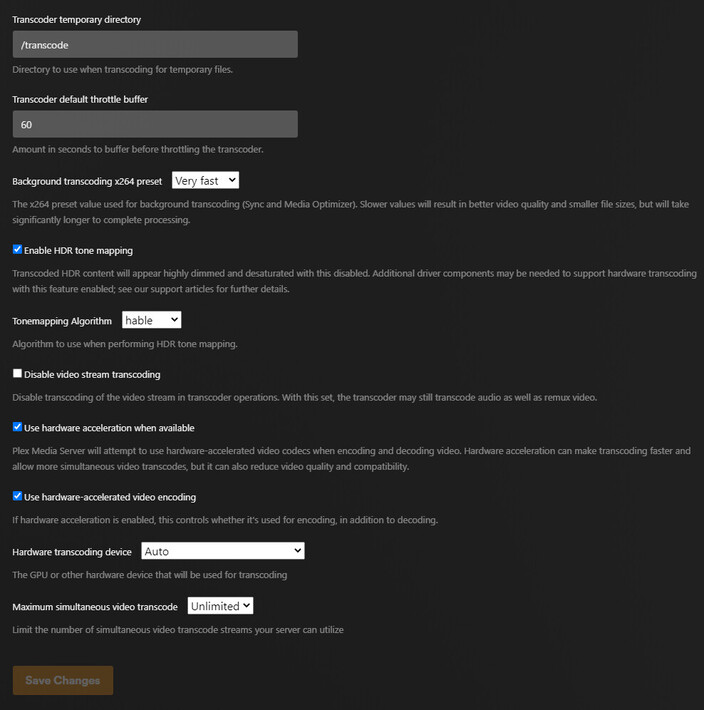
here is my /dev/dri
total 0
drwxr-xr-x  3 root root        100 Sep  2 04:09 .
drwxr-xr-x 19 root root       4.3K Sep  2 04:09 ..
drwxr-xr-x  2 root root         80 Sep  2 04:09 by-path
crw-rw----  1 root video  226,   1 Sep  2 04:09 card1
crw-rw----  1 root render 226, 128 Sep  2 04:09 renderD128
Here is a single transcode pushing my cpu to 100%

Stop the transcode
Settings - Server - Troubleshooting (lower left) - Download Logs.
Attach that ZIP file. I’ll go through it and see what it doesn’t like.
Plex Media Server Logs_2024-09-01_21-21-30.zip (889.4 KB)
Here you go
You didn’t tell me you were in docker
You don’t need it here. It only buys you headaches like this one.
I’ll show you what you have to do or you can just purge it all and install the native app.
1 Like
Unless you are adamant i should switch to native, I’d like to keep docker as it has all my metadata saved still, plus it’s useful for me to continue learning how to use docker.
Also, i’ve been glad that I could simply pack up and move my docker to a new system in the event that something went bad. Which is something I had to do recently, forcing me to move it to my new b-link n100.
I’m not adamant but you will have more administrative work to do.
To explain what’s happening –
- The GPU is owned by two groups:
videoandrender - Plex is a non-privileged container so it must obey the permissions assigned the GPU
- The PUID -or- PLEX_UID (if using Plex’s docker) must also be a member of both groups video and render. (the container must abide by the kernel’s permissions)
- Docker won’t add that for you. You must do it manually.
- If you’re using your UID/GID (1000/1000 = user ‘chuck’ in my case),
– Then I add groupsvideoandrendertochuckon the real host. - Log out, log back in
- Make certain the entire GPU directory is passed
--device=/dev/dri:/dev/dri - recreate/update the container spec as needed
- Start the container
What you get is the container launches with UID=1000, GID=1000,
and 1000:1000 is a member of the groups which own the GPU device nodes.
Making sense?
2 Likes
Steps 3/4 are done. I’m not sure how to do step 5 adding groups, but im googling now.
Step 7 i believe is already done via my compose
- /dev/dri:/dev/dri
If the above is correct i htink i just need to do step 5 before i restart the container
I’ll report back once i figure out step 5.
did you define /dev/dri as a volume or device (Important)
Volume
    volumes:
       - /dev/dri:/dev/dri
not correct … must be a device declaration
Here’s my docker run
sudo docker run \
-d \
--name plex \
--network=host \
-e PLEX_CLAIM="claim-J3YbuBpaBhE9oJS1jsma" \
-e TZ="EST" \
-e LANG="en_US.UTF-8" \
-e PLEX_UID=1000 \
-e PLEX_GID=1000 \
-e PUID=1000 \
-e PGID=1000 \
-h dockerplex \
-v /usb/dockerplex:/config \
-v /usb/dockerplex/tmp:/tmp \
-v /usb/dockerplex/transcode:/transcode \
-v /vie:/data \
-v /glock:/glock \
--device=/dev/dri:/dev/dri \
plexinc/pms-docker:plexpass
here’s mine now that i’ve made that change i think (im using docker compose)
    container_name: plex
    image: ghcr.io/hotio/plex
    restart: unless-stopped
    logging:
      driver: json-file
      options:
        max-file: ${DOCKERLOGGING_MAXFILE}
        max-size: ${DOCKERLOGGING_MAXSIZE}
    labels:
      - org.hotio.pullio.update=${PULLIO_UPDATE}
      - org.hotio.pullio.notify=${PULLIO_NOTIFY}
      - org.hotio.pullio.discord.webhook=${PULLIO_DISCORD_WEBHOOK}
    ports:
      - 32400:32400
    environment:
      - PUID=${PUID}
      - PGID=${PGID}
      - TZ=${TZ}
      - UMASK=002
      - PLEX_CLAIM_TOKEN=${PLEX_CLAIM_TOKEN}
      - PLEX_ADVERTISE_URL=${PLEX_ADVERTISE_URL}
      - PLEX_NO_AUTH_NETWORKS=
      - PLEX_BETA_INSTALL=${PLEX_BETA_INSTALL}
    volumes:
      - /etc/localtime:/etc/localtime:ro
      - ${DOCKERCONFDIR}/plex:/config:rw
      - ${DOCKERSTORAGEDIR}/media:/data/media:rw
    devices:
      - /dev/dri:/dev/dri
FYI i still havent added any groups, and this still pushes cpu to 100% with a single transcode. Still trying to figure out groups part of step 5.
Add the groups…
It has no permission to access the GPU without them
