Why does it say “May 15, 2019” on the manual download page? I thought this is supposed to be a release date, no? One could assume, that the package would be automatically uploaded to all distribution places upon release. Apparently it is not.
Anyways, not a problem for me, I don’t mind manual updates. It just looks odd 
Yup. Got that in there as it should be. What else could it be?
install inxi and run sudo inxi -r
and show us the result.
I always take that date as being the date of compilation.
but I could be wrong.
anyway, it looks odd to get an update-notification, and nothing is there.
Repos:     Active apt sources in file: /etc/apt/sources.list
           deb http://ftp.us.debian.org/debian/ jessie main non-free contrib
           deb-src http://ftp.us.debian.org/debian/ jessie main non-free contrib
           deb http://security.debian.org/ jessie/updates main contrib non-free
           deb-src http://security.debian.org/ jessie/updates main contrib non-f                                                                                                                                                                                                                                              ree
           deb http://ftp.us.debian.org/debian/ jessie-updates main contrib non-                                                                                                                                                                                                                                              free
           deb-src http://ftp.us.debian.org/debian/ jessie-updates main contrib                                                                                                                                                                                                                                               non-free
           Active apt sources in file: /etc/apt/sources.list.d/omv-extras-org.li                                                                                                                                                                                                                                              st
           deb https://dl.bintray.com/openmediavault-plugin-developers/erasmus j                                                                                                                                                                                                                                              essie main
           deb https://dl.bintray.com/openmediavault-plugin-developers/erasmus-t                                                                                                                                                                                                                                              esting jessie main
           deb https://dl.bintray.com/openmediavault-plugin-developers/erasmus-p                                                                                                                                                                                                                                              lex jessie main
           deb https://downloads.plex.tv/repo/deb/ ./public main
           deb https://dl.bintray.com/openmediavault-plugin-developers/erasmus-s                                                                                                                                                                                                                                              ync jessie main
           deb http://apt.syncthing.net/ syncthing release
           Active apt sources in file: /etc/apt/sources.list.d/openmediavault-ke                                                                                                                                                                                                                                              rnel-backports.list
           deb http://httpredir.debian.org/debian jessie-backports main contrib                                                                                                                                                                                                                                               non-free
           Active apt sources in file: /etc/apt/sources.list.d/openmediavault-lo                                                                                                                                                                                                                                              cal.list
           deb file:/var/cache/openmediavault/archives /
           Active apt sources in file: /etc/apt/sources.list.d/openmediavault-mi                                                                                                                                                                                                                                              llers.list
           deb http://http.us.debian.org/debian/ squeeze main contrib non-free
           deb-src http://http.us.debian.org/debian/ squeeze main contrib non-fr                                                                                                                                                                                                                                              ee
           deb http://debian.linuxmint.com/latest/multimedia testing main non-fr                                                                                                                                                                                                                                              ee
           Active apt sources in file: /etc/apt/sources.list.d/openmediavault.li                                                                                                                                                                                                                                              st
           deb http://packages.openmediavault.org/public erasmus main
           Active apt sources in file: /etc/apt/sources.list.d/plexmediaserver.l                                                                                                                                                                                                                                              ist
           deb https://downloads.plex.tv/repo/deb ./public main
first of all you are running Jessie, which has been followed by Stretch, almost 2 years ago. not saying that your problem comes from that
you have a lot of openmediavault, which you obviously need, but I would comment them out, just for testing.
you also have debian.linuxmint, which puzzles me, because you could be mixing distributions and that could be wrong. so comment that line out also, at least for testing.
you line for plex is in correct, or outdated.
this should be:
Sorry everyone for the late answer. We should have fixed this now. Someone decided to deploy on a Friday and the repo script had a bug. Let me know if it works for you guys now.
1 Like
Changing the source listings to just that fixed it without having to change anything else. Thanks!
Thank you, will check it on the next update
I did not get the “This must be accepted explicitly before updates…” error message – just a normal “All packages are up to date” response.
So I removed my existing entry from /etc/apt/sources.list.d and re-added it per https://support.plex.tv/articles/235974187-enable-repository-updating-for-supported-linux-server-distributions/.
Ubuntu 16.04.5 LTS
Works like a charm once again.
1 Like
I’m running CentOS 7 (64-bit) and PMS has notified me there is an update, but the yum repo is still showing there is no update available.
Settings - Server - General - Show Advanced.
What update channel are you on?
Public tracks the Repository.
Beta and Alpha must be manually downloaded.
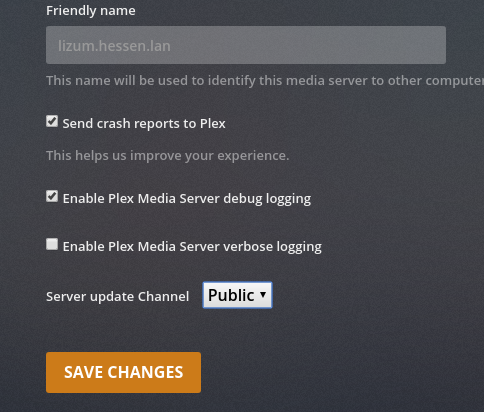
I am on the Public channel:

Here is the current version shown from my PMS Server Settings:
And here is the update notice that I get:
Here is my cli output when trying to refresh the repo cache and upgrade the version. I’m also including the contents of my plex.repo file:
$ cat /etc/yum.repos.d/plex.repo
[PlexRepo]
name=PlexRepo
baseurl=https://downloads.plex.tv/repo/rpm/$basearch/
enabled=0
gpgkey=https://downloads.plex.tv/plex-keys/PlexSign.key
gpgcheck=1


$ yum --disablerepo '*' --enablerepo 'PlexRepo' makecache
Loaded plugins: fastestmirror
Determining fastest mirrors
PlexRepo                                                                                                                                                                                   |  961 B  00:00:00
Error: requested datatype filelists not available


$ yum --disablerepo '*' --enablerepo 'PlexRepo' upgrade
Loaded plugins: fastestmirror
Loading mirror speeds from cached hostfile
No packages marked for update


$ yum --disablerepo '*' --enablerepo 'PlexRepo' upgrade plexmediaserver
Loaded plugins: fastestmirror
Loading mirror speeds from cached hostfile
No packages marked for update
While gathering this information, I noticed the line “Error: requested datatype filelists not available” when trying to refresh the repo cache. Guessing this is related to the issue? Note, I did run yum clean all before running these commands. Also, I am able to upgrade from other repos just fine.
Just for testing, I added the repo to another CentOS 7 server that does not currently have PMS installed. I get the same error when running makecache. When I do yum install plexmediaserver, the older version (1.15.6.x) is presented available for install instead of the latest (1.15.8.x):
$ yum install plexmediaserver --disablerepo ‘*’ --enablerepo ‘PlexRepo’
Loaded plugins: fastestmirror
Loading mirror speeds from cached hostfile
Resolving Dependencies
–> Running transaction check
—> Package plexmediaserver.x86_64 0:1.15.6.1079-78232c603 will be installed
–> Finished Dependency Resolution
Dependencies Resolved
=======================================================================
Package Arch Version Repository Size
Installing:
plexmediaserver x86_64 1.15.6.1079-78232c603 PlexRepo 103 M
Transaction Summary
Install 1 Package
Total download size: 103 M
Installed size: 221 M
Is this ok [y/d/N]: n
Same issue here and I am on Public from YUM repo.
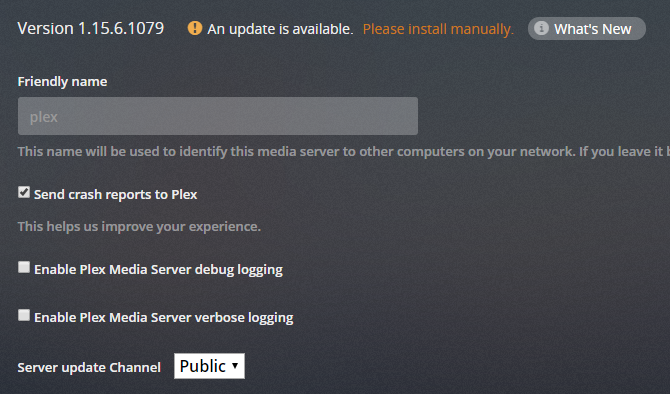
@ChuckPa Any ideas?
All -
I can confirm that this is still an issue. I’m currently running 1.15.8.1198 (from a manual upgrade) and I’m unable to use the repo to upgrade to 1.16.0.1226. I’m seeing a screen like elcheekytico above.
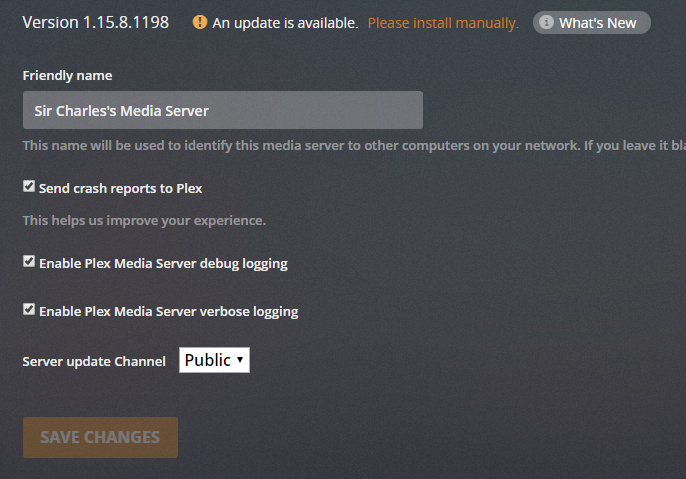
Suggestions?
Charles
We have asked the team to take care of it.
They are busy on other things…
Only they can fix it.


