Server Version#:1.23.6.4881
Player Version#: 1.33.0.2444-a220eae4
Hello,
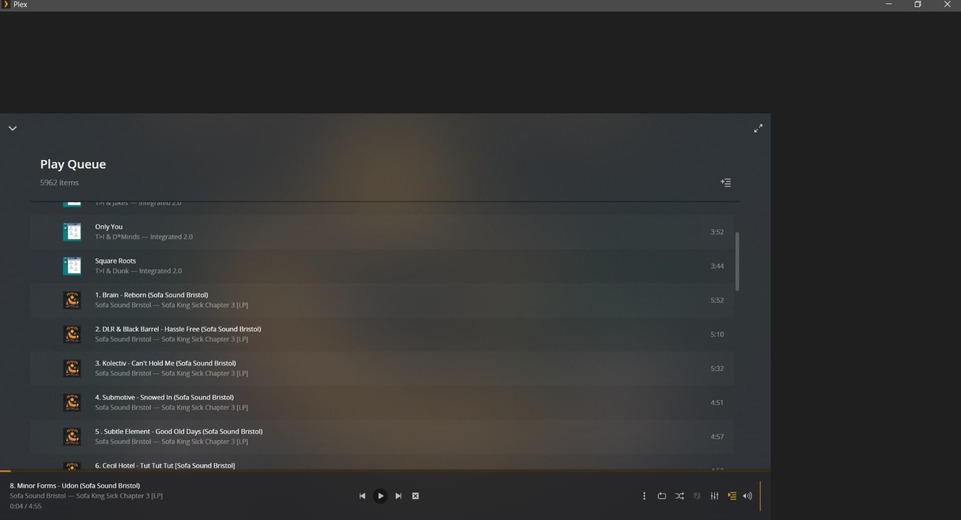
Every time I lock my PC then unlock it (Windows10) I get this:
Server Version#:1.23.6.4881
Player Version#: 1.33.0.2444-a220eae4
Hello,
Every time I lock my PC then unlock it (Windows10) I get this:
The same thing has been occurring to me lately. Just curious, do you have a multi-monitor setup? I do, and thought it might be related because of a quick fix I tried. When I disable output to one of the displays, the scaling of the player returns to normal and stays that way after re-enabling the other display.
yes, I have multi monitors. I wouldn’t toggle my monitor before I’d simply close and reopen the player though.
Interesting, even when I close and reopen it doesn’t fix, only resetting the computer or doing the multi-monitor toggle.
When it happens to me, the main UI in Plex is scaled down to 1/4 on the bottom left screen. My main screen (which Plex opens up to) is a 4k 3820x2160 resolution and the second screen is a 1080p 1920x1080 resolution, which is 1/4 the resolution of a 4k screen. Probably not a coincidence.
Based on your screenshot I’m curious if your second monitor is a lower resolution than your main, but not much smaller.
If so it may help Plex techs narrow down a solution to the problem.
Yes, but they differ only slightly. We may have a similar problem.
Can you provide some reproducible steps?
1. Fullscreen app? Fullscreen player?
2. Lock PC
3. Sign in from lock screen

Player app is in this state after these steps?
Something like that.
Can you share what is under your [ui] key from the player’s plex.ini file? Located here: "C:\Users\Laseristhatyou\AppData\Local\Plex\plex.ini".
Can you share your logs in that same directory as above?
Lastly, close the player, then delete everything under [ui] key from the player’s plex.ini file and see if you can reproduce the issue afterwards.
This topic was automatically closed 90 days after the last reply. New replies are no longer allowed.