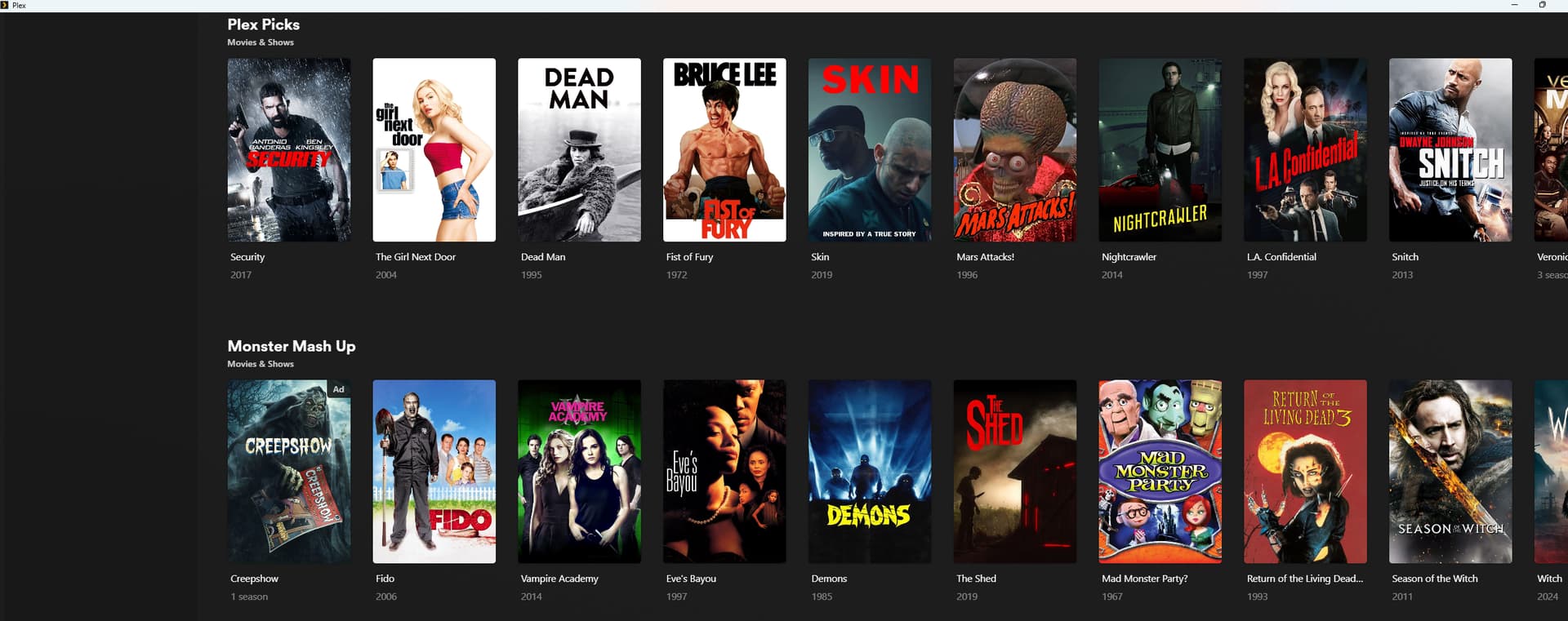
Server Version#: 4.147.1
Player Version#: v.1.110.0.351-4e48eb83
I decided to give Plex a try. Of course, I want to use a separate player app, not the browser - but it proved to be unusable. On my laptop screen (Framework, Windows 11) the UI is scaled down to take a fraction of the screen .However, the click targets for the buttons are where they actually should be, so I need to hover over a blank section of the upper left portion of the window in order to click the button that actually shows in the lower left.
When I show Plex on a large external monitor, it doesn’t show any of the UI controls - only the thumbnails.
Update: really? I post a serious bug and my post is marked as spam? That’s a fine how-do-you-do. Gotta say, less than 24 hours attempting to use Plex, and I am not impressed. Anyway, rephrasing to say - given this player bug, I don’t see myself using it until the bug is fixed. Hopefully it will be fixed someday.
Have same problem. Two different computers. Both have a mix of 1080p and 4k Monitors and the windows app is crap as it doesn’t scale to the monitor it’s opened on. Sometimes I can move it from one to the next and it ‘resets’. Most time, I have to open and close it multiple times top fix it.
Thanks @OttoKerner . Windows Explorer > Right click Plex icon > Properties > Compatibility - Change high-DPI settings > Overwrite behaviour with high DPI scaling > Scaling performed by: > System
Does seem to work - I may test Plex more sometime.
Still, this is something that should be fixed in the Plex app itself, instead of expecting every Windows user to go through these steps. I hope Plex fixes it someday with a code change.
A quicker way to fix is to change scaling on the display its open on and back again.
The Plex player for Windows is the second worst app I have for handling windows scaling. I have another app that grows every time I open it.
No issue with that here. With an UW screen, you don’t have the issue above.
But you may find it useful to define some zoom buttons, if you are not in the habit of removing black borders from your video files.
Plex HTPC is awful on ultrawide. Normal plex is useable but not great. Already defined zoom buttons, a bit clunky and inaccurate but do at least allow for watching in full screen now.
The resolution is defined by the operating system, or rather the GPU driver.
If you play a movie, and that movie happens to be ultra wide, then you can watch it in this UW aspect ratio.
Your screenshot only shows the GUI.
And that is indeed fixed to a 16:9 aspect ratio.
It is merely derived from the already existing UI of the Plex clients for Smart TVs, to save developer time.
It has always been said that there won’t be a 10-foot Plex user interface for different aspect ratios.
Yeah. It just looks a bit off wasting all that space when the res is set to UW, a somewhat lacking user experience, as I said. Thankfully the standard app fills the screen properly, and the browser one in a pinch. At least it isn’t the new experience yet.
Anyway, it’s gone 3:30am here, have a great day. I’m going to bed. Take it easy, I do appreciate your clarification.