Server Version#: 1.41.6.9685
Soft-hosted on ubuntu22.04
Hello,
I’m unable to see any subtitles on my laptop (tested firefox and chromium) or my phone (using the app). Right now I’m trying to make it work with a MKV file with embedded subtitles. I’ve tried extracting the subtitle using mkvextract from mkvtoolnix, but it doesn’t change anything.
I’m a little bit lost at this point and I have no idea where to look next, I tried looking at the logs (with debug) but there is too much information / I didn’t find anything mentioning subtitles.
Thanks!
Is this happening on all your files or just this one file?
If you’ve extracted the subtitle, use SubtitleEdit or notepad to verify that there’s actually subtitles in there. Also if it’s a “forced” subtitle, it’ll just be foreign language lines so maybe that’s why you’re not seeing it on screen because there’s actually no subtitles for those parts.
Hello, thanks for answering!
It’s happening with all my files unfortunately. I took a look at the extracted subtitles and they look good to me. I assume that since the same subtitles work with vlc, then the files are good ?
Just to check, you are selecting the subtitle on the Plex client correct?
I’ve heard of subtitles not showing up for some reason on some devices, but I’ve never heard of them not showing up on all devices.
Try lowering your resolution (so that it forces plex to transcode) so that the subtitles are burnt in.
Are you new to Plex?
Yes I’m new to plex, I might be doing something wrong.
To select the subtitles, I click on the parameters (where I also select the audio) and then select the subtitle I want, that all I do. Is there something more I should configure ?
On the same panel, I just tested lowering the (which I definitly see happening) but the subtitles still don’t show.
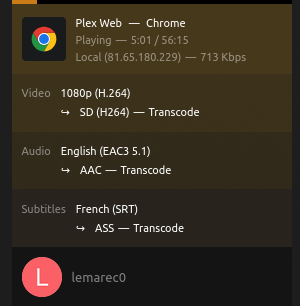
Do you know about the Plex Dashboard? It should show Transcode if it’s transcoding. If you can confirm it’s transcoding? Because that’s actually a big clue if it’s transcoding and the subtitles are still not showing up. It means the subtitles aren’t there at all.
Also it should show if a subtitle is currently selected:
I’m assuming those subtitles are SRT subs?
Alright, I didn’t test trans-coding on my phone earlier, but if I select the 360p resolution, I get that:
And I see the subtitles !!
Still, if I transcode to 360p on my laptop, I get that:
But I still don’t see the subtitles.
Good progress though, thanks! Any idea why that’s behaving differently ?
Update: I noticed this “Local” in the dashboard, which I see because I’m connected directly to the server via my LAN. So, instead I tried via app.plex.tv and it works aswell !
Any idea why it doesn’t work while I’m not going through the official plex website ?
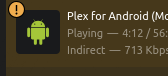
So this isn’t related (I think) to your subtitles issue, but on your screenshot it says indirect which means your phone can’t connect to your plex server directly (even tho I assume it’s in the same local network, unless you have wifi disabled).
Make sure you’ve set up port forwarding by following the guide here, I would also disable UPnP (on your router) and Plex Relay (in the plex server settings) as those just complicate troubleshooting. Plex Relay also limits to 1mbps (or 2mbps if you have plex pass). Best to just do port forwarding correctly.
It should say Fully accessible in your Remote Access settings, like so:
As for your subtitles issue, at least we now know that they’re actually there because it works when transcoding. So now just have to figure out why it’s not showing up unless the subtitles are burnt in (which is what transcoding does)
Download the Desktop Plex Client and see if you still have issues with the subtitles.
I forgot to reconfigure my firewall after a reset, so the port I use for plex was also blocked, which is why I couldn’t have a direct connection. Now somehow, it’s working!! With the local web app or Plex’s app & with my phone on original quality. I’m a little bit confused as to how it worked with the port blocked, expect for the subtitles?! Regardless, thanks a lot ! That fixed the issue for me