I ripped a set of DVDs that I own to mp4 files many years ago. They’re crappy quality, but they’re small files. I’d like to set my niece up to be able to watch them on my Plex server from college on a small screen, but I think I should possibly re-code/convert the files to something more standard. The video is transcoding for me - can someone help me figure out what parameters I should re-code these files with? I hate ripping eps off of a crap-ton of DVDs, so I’d rather work with the files I already have. Here’s a ss of one I currently have playing
Re-encoding bad files won’t give you better quality output.
If you’re not happy with the quality, you’ll be best of to go back to the source material (e.g. re-encoding the original DVDs using Handbrake).
That being said… if the sole purpose of this exercise is to make the files more compatible (while quality isn’t critical)… you can run the files through Handbrake and use one of their standard presets.
Thank you Tom. I’ll check out Handbrake. Quality isn’t critical (I think she’s going to be watching on a laptop, possibly an ipad). I figured it made sense to get the files in a format that plex doesn’t need to transcode. I’m not really sure what I’m doing I ripped these dvds at least 10 years ago and I don’t even know what program I was using. Disk space was a bigger deal back then lol. They look pretty bad on my TV, but should be fine on a small screen.
Ripping my The Office dvds is looming in my mind as well, since it’s going bye-bye on Netflix. DVDs just aren’t that handy anymore!
Hi, thank you for the Handbrake tutorial. I’m not sure what to do with my weird small Friends files to keep them from transcoding. I hope you don’t mind me asking a few questions. I remember converting downloaded movies to play on dvds lol. That’s the last time I’ve understood what I was doing :). Now I’m just overwhelmed.
What is the smallest I can rip my The Office dvds where they’ll still be fairly decent and won’t transcode? I don’t have a ton of disk space right now. I often download 720 files and they look fine, but I don’t know much about any of this except if it looks ok on my tv. The Friends files aren’t letterbox, or whatever it’s called. I obviously want the office episodes to fit the tv, and I’m kind of liking everything with subtitles lately. Do I need to do anything special to not have the talk-overs on the dvds? I love the deleted scenes, but probably don’t need to have them on Plex. I know it’ll take forever to rip 10 seasons of shows. Netflix has made me lazy
Thank you
Public tips and tricks shouldn’t be private… what helps you - may help someone else at the same time…:
I suggest you make some 240 second previews using my settings EXACTLY for DVD encodes - you’ll find they work perfectly on everything you have.
If you want to Murder The Aspect Ratios so there are no black bars - you’re on your own. I won’t help you do that. If you want to maintain the Aspect Ratios - easily done, by following the instructions.
The way you do this is first ‘Rip’ out the files from disc with MakeMKV:
Then you see what’s in them and encode what you want discarding what you don’t want - drag and drop only the files you want on HB:
Interlaced material will need to be ‘de-interlaced’. MediaInfo tells you it’s interlaced, or not, the instructions tell you what to do about it.
Audio should be converted to a compatible format - whatever that is - for all your players. <—AAC 2.0 or AC3 2.0/AC3-5.1 is usually sufficient.
Once the material is ripped off the discs - you can listen to the audio and encode the correct track(s) - discarding the unwanted. Commentary Tracks can be included in secondary slots <—main audio in the first slot - Commentary Tracks in slots after the main track - to be selected at playback time if you want.
Subtitles should be converted from PGS/VOB subs to text based subs with:
Subtitle Edit: Nikse.dk
or by going here and get some that fit: https://subscene.com/
You’re going to have to look at the pictures, do what they do, make some previews and drop them in an Other Videos library to look at on everything you have.
Eventually - not too long - you’ll get a feel for what has to happen and acquire the skills to make it happen. It’s not hard - just hard to get started. Get started. No time like the present.
Your questions will be answered as you go.
When you see something that isn’t happening - or see something awful that is happening - you’ll figure it out.
I did - and I’m not the sharpest knife in the drawer, but I can follow instructions and make previews to watch to see how I’m doing.
A 240 Preview - happens a lot faster than a 2 hour encode… that much I can promise you…
Also, is there a way to tell what settings were used when a file was converted?
Not really - but this will show you what you have - so you can decide what to do different:
Basically - I’ve acquired enough skills to make decent encodes that work for my eyeballs and displays - over the last 15 years. The New Handbrake is much easier to deal with and is almost bulletproof - providing you follow the instructions.
The instructions are designed to cut many years off ‘the process’, but you’ll need to hone your own skills - and that’ll take as long as it takes.
You should make ‘small adjustments’ in bit rates if you feel you need more and only you and your eyeballs can make that call. My high-mileage eyeballs won’t work for you - they only work for me.
This may also come in handy:
Read everything - hidden gems are where you find them.
I know it’ll take forever to rip 10 seasons of shows.
DVD encodes fly through my HB like their hair is on fire…
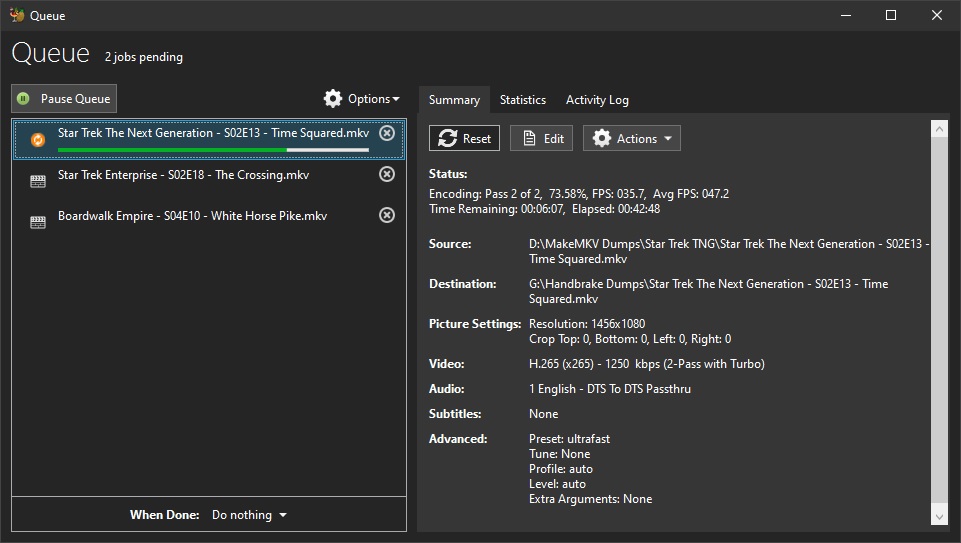
The 400 episodes I’m encoding at x265/1080p aren’t flying - they’re not even walking - and could be considered crawling - it may take the rest of what’s left of my life - but it won’t take ‘forever’:
Those FPS numbers basically mean it’s taking as long to encode them as it does to watch them - painful - and if they didn’t look so good I wouldn’t do it.
HEVC won’t help you for DVDs - don’t even think about it.