Unraid - Not updating library and folder issue

Server Version#: Unraid 6.9.2
Player Version#: Docker Plex-Media-Server updated to latest version (it says up-to-date)
Hi all,

Since a few days, I am having an issue with my library in Plex-Media-Server. I have always added movies to my movie folder and Plex updates the library itself, to show the new movies. Since having added movies, it does not want to update the library. Not even after giving the command to scan the entire library. I have 914 movies in the library, but it doesn’t want to update - also tried refreshing all the metadata. All my movies are named “moviename (year) resolution.ext” with an .nfo file with a link to themoviedb for the movie and a jpeg with the movieposter, each movie is in it’s own folder, except for collection sets (Harry Potter, Lord of the Rings, The Hobbit, Fast and Furious, etc).

To do a test, I have made a new library in my Plex, which is pointing to the same directory as the one described above and the new movies do pop up there, so I know it’s not a naming issue. Strange thing is, it tells me there are 853 movies in there (vs 914 in the original). Because I thought this was very strange, I made another exact library, and in that one, I get 635 movies… Should all be the same number of movies, no? They should all be set up with the same movie scanner and agent as far as I’m aware.

Ideally I would want to keep “library 1 / the original”, as that knows which movies I have seen and which not yet and get it to update with the new movies.

I am using a docker “Plex-Media-Server” in Unraid since a few months now, ever since I was having issues with the Binhex-Plex docker (which is disabled/not running at the moment). (the Plex-Media-Server docker container is up-to-date too obviously).

Next to that, since yesterday, I am having an issue with another library which contains tutorials. I have set up the library as ‘other video’s’, scanner Plex Video Files with Agent ‘Personal Media’. The files show up just fine, in the ‘recommended’ section, and also in the library, but as I have many different files, I usually use the “folder” option, which always worked fine, but not anymore. As soon as I hit the “folder” in stead of the movie in library, I get a notice “Something went wrong” an unexpected error occurred. (sorry if naming is not 100% accurate, I am translating from Dutch.) I also made a new library, but get the same issue with the folders. I don’t understand as this has always worked great, all of the sudden, it doesn’t anymore…
A couple of days ago, I have put this problem on the Unraid forum too, but sadly haven’t gotten any reply yet…

Hope someone can help, as I didn’t find the answer on the forum.

Thanks in advance,
Best regards,

DrBobke

I run Binhex version for years without any issues. Check your library settings and make sure that your library scan options are set correctly. As for the missing movies in your new libraries, I am assuming that the missing movies are found as duplicates and merged together. Just taking a guess as I never had tried this.

Thank you for your reply. I haven’t changed anything in either library, so why would it all of the sudden start to not pick up movies and others do which are pointing to the same folder?

Next to that, why is there an error occuring on seeing the folder structure in the library? Should be straight forward to produce without issues, no?

Run a library scan and monitor the console logs to see if there is any indication of what the issue is.

Thanks for pointing me to the console, never knew it was there…
I do get some warnings and errors.

SQLITE3:0x80000001, 11, database corruption at line 67183 of [1b256d97b5]

[Database optimization/com.plexapp.plugins.library.db] SQLITE3:0x80000001, 11, statement aborts at 1199: [analyze] database disk image is malformed

Thread: Uncaught exception running async task which was spawned by thread 0x14ad7aa89b38: sqlite3_statement_backend::loadOne: database disk image is malformed
SQLITE3:0x80000001, 11, statement aborts at 9: [select id from media_items where library_section_id=? and media_analysis_version<>?] database disk image is malformed

And dozens more of those types of errors. Any idea why that is happening? I was only scanning the main library.
By the way, the issue of the folders not showing happen for all libraries consistently (that was not happening before).

I am running an optimization of the library now, see if that helps.

It means your database is dying.
You need to act now or you’ll lose the database.
https://support.plex.tv/articles/repair-a-corrupted-database/

If the current version of the DB file is not salvageable, try one of the (hopefully present) backups in the same folder https://support.plex.tv/articles/202485658-restore-a-database-backed-up-via-scheduled-tasks/

1 Like

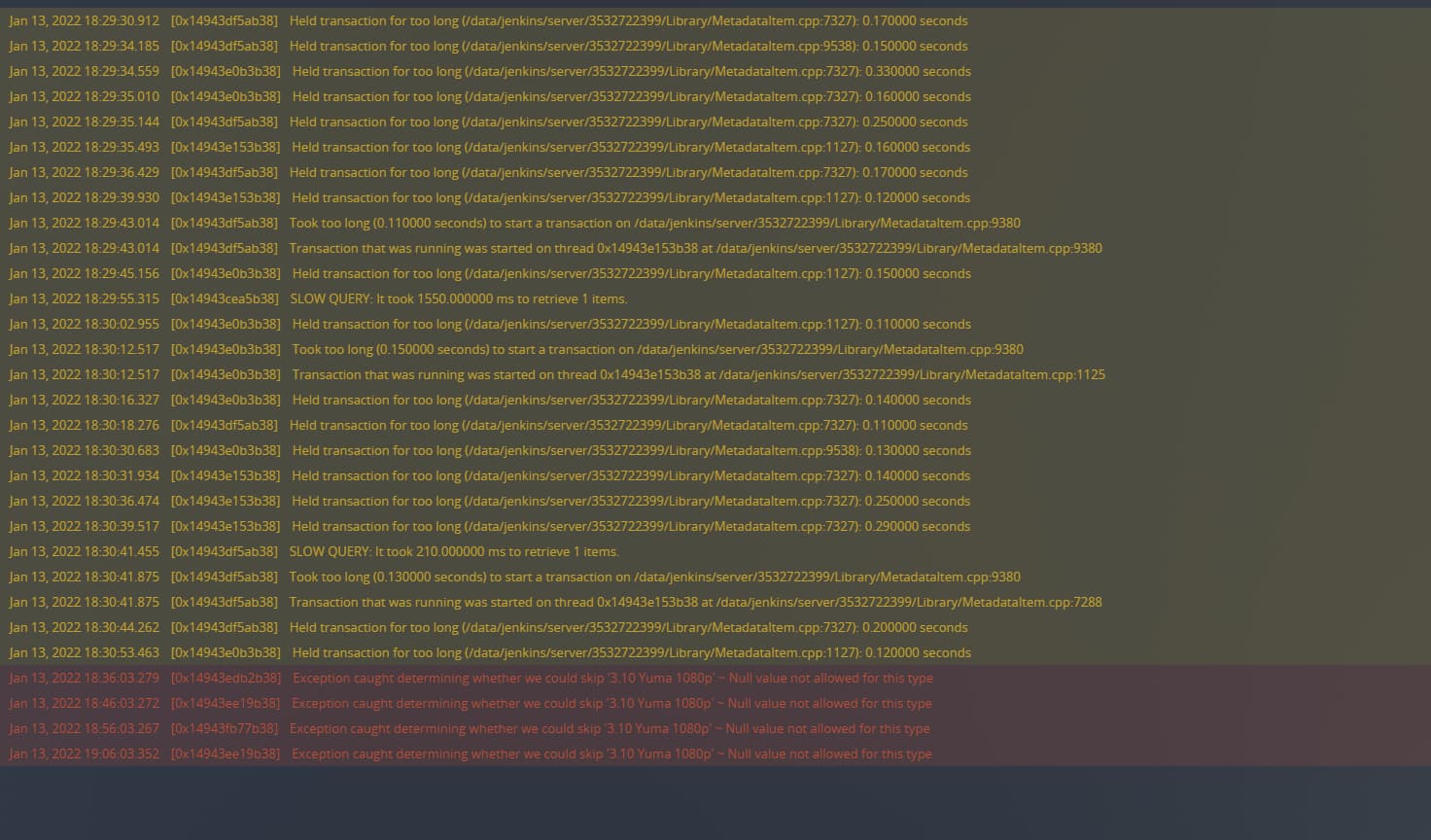
I decided to go for one of the DB’s that was backed up from beginning of December, which seems to do the trick. The new libraries I made, still show up, but with an “!” next to it that it cannot be found (I don’t care). The folder structures are back and so are the newly added movies in plex. However, I am still missing some older movies (for example Fast & Furious). When running the renew all metadata in the movie-folder, I have a lot less errors, but a lot of warnings showing up.

most seem to bee “Held transacation for too long (0.220000 seconds) to start a transaction on …” or “Held transaction for too long (…) 0.290000 seconds”. Any ideas why that is happening?

It also seems that I have lost my collections (they do not show up when I enter Fast&Furious, Lord of the Rings,… Although I have checked that I have that set up in the settings of the library (even selected the ‘minimum number for auto collections’ as 1), but not working, that was working before… And obviously also set ‘Collections’ to Show Collections and items separately.

These messages may be an indicator that even these backup versions of the DB have already the damage in them. Which means if you keep using them, they are bound to break as well.

I went in again when I found this video : How to fix a Corrupt Plex Database - YouTube. When I typed in the commands to see if the library was good, I got an “OK”, but still, I went on with all the steps and corrected everything. Now when I scan, I have no errors anymore, GOOD!!

However, I STILL don’t have the collections pop up, although I have put those into the library settings, should I try making a new one to see if that will give me the collections? (In that case, I will probably loose the history of what I viewed, so I’d rather fix the current library).

What exactly are you expecting to see?

Collection sets of movies (Harry Potter, Fast and Furious, Lord of the Rings and other). When using the search function, I used to be able to navigate to the movies and then Collections, but those collections do not appear anymore.

Btw : When I just added a new library to scan for the movies, it’s giving errors again :frowning:
image

See attched screenshot of the Collections I mean (which is from the newly made library), not the old one. Settings for both libraries are identical. (the old one contains 921 movies, the new one a staggering 1.093 movies, which is very strange, no?

The number at the top of the library view is an “item count”, not necessarily a “movie count”.
Which means it can include collections, but can also miss the number of movies which are part of a collection but are not shown because of that. It all depends on how the library is set up regarding to the visibility of collections.
Setting the sorting order to and fro “by Title” can be revealing, because only “by Title” includes or excludes movies in collections and the collections themselves.
(see the arrow in the below screenshot)

When you look at the library in the web app, do you see the “Collections” view mode for this library?
If it’s there, can you switch to it and see what (and how many) collections there are in this library?

Aha okay, sorry about the mistake. On the old library (movies), I don’t see the collection tab in the web app, but in the newly created library (films), I do see the collections tab. In the collections tab, I see different movies/collections just fine, but not in the ‘old’ movies library.

Both libraries have been set up exactly the same.

Perform “Refresh Metadata” for the whole old library.
Give it plenty of time. See what happens.

Hi, thank you so much for your tips. I have made Plex run through and I don’t have an indication it is running anymore since ‘Refreshing Metadata’ for the old library, I still have all the same movies, no collections showing, etc. It does seem like the ‘films’ (new library) does remember which movies we watched. However, when that is scanning, the console pops up with warnings and errors… Not sure what to do now.

Please tell me which agent is selected in the properties of your old library.

Please do also go into the properties of any movie in the old library, for which you expect to see a collection.
Take a look at the “Tags” tab, then scroll down to the “Collection” input field. Is it “locked” (indicated by an orange padlock icon)?

Scanner and agent in both libraries have been set to “Plex Movie”.
Not sure where the “Tags” tab is. I can’t see it in either the old, or the new library. However, when I navigate to for example Fast and furious, in the new one, I scroll down and I can see it is part of a collection, with the old library, the collection details are not stated.

What about the errors in the console when updating the new library? Is that an indication it is dying again?

It appears when you edit a movie, not the library as a whole.

I don’t know what kind of errors these are.

When I edit a movie, I do see it appear, it is not locked with the yellow padlock, I see a padlock but it is greyed out / normal.

I have just been running the ‘Refresh Metadata’ command on the new library, it is still running after 45 min, waaayyyyyy longer than the old library, that finished in under 5 min or so. Seems I am getting fewer errors and warnings than before. I have checked, the 3:10 to Yuma movie might have the error as there is an old trailer in the folder (from back when I was using YAMJ on Popcorn hours C200’s and a C300).

It’s still running the refresh metadata, but seems to not get additional errors for now.

I don’t know why, but the scanner is still running…
I also see a notice that there is a serverupdate (in the web app), but the docker is up-to-date.