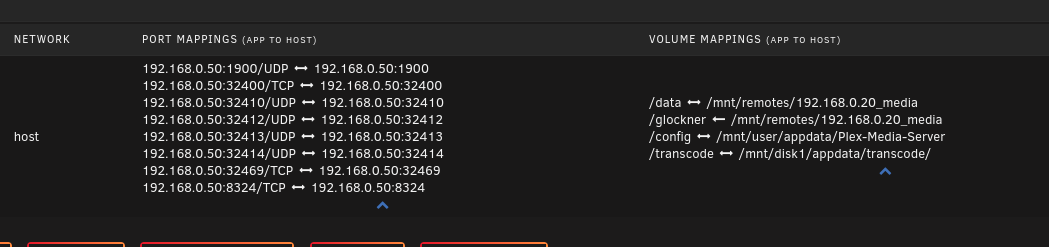
Server Version#: 1.32.8.7639
Player Version#: NA
After a number of days, since the most recent container update in Unraid, the docker image starts to balloon in size. I have tracked the issue to Plex specifically as it starts pushing upwards of 30 gigs as a container. Within the docker directory, the overlay2 folder grows in size and contents, getting into the 10s of millions of files. This started happening after I updated the container sometime in late November / early December.
Looking through know issues on unraid, I have ruled it out as the culprit. Not sure what logs / images I can post to be helpful here.
I am not talking about the app data folder where plex stores its metadata. Mine is over 1TB and that is fine given my library size.
I am talking about the container directory for Docker. e.g. where the docker image is stored.
The overlay2 folder, is a folder docker uses to deal with many aspects of whatever installed containers you have running. It should be many files. but not hundreds of gigs or tens of millions of files in one day.
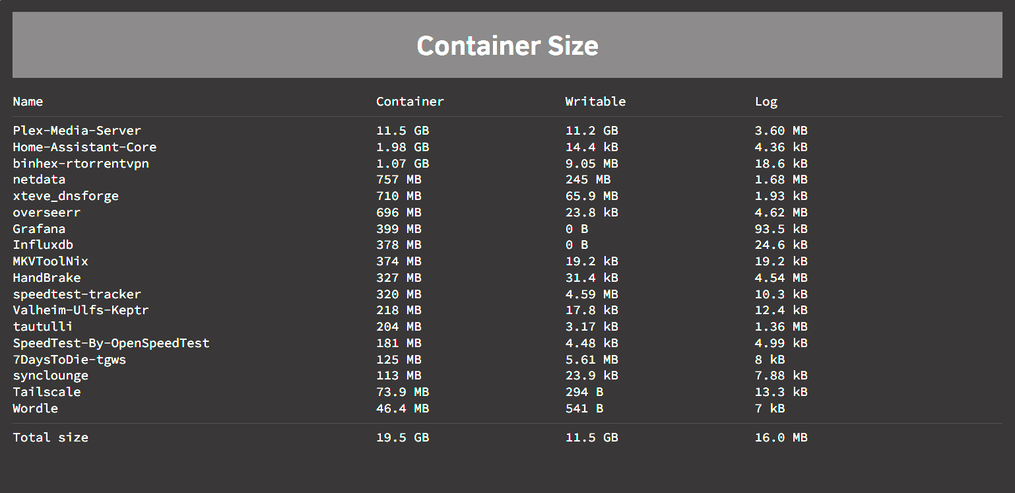
The attached screenshots taken from my Unraid GUI show the container sizes as of this morning for the first image. Plex, should only be taking up a few hundred megs here, as the docker image is rather small. The second image was taken a while back, before my latest docker image rebuild, yes I had to completely nuke it and rebuild the images because it ballooned to an absurd scale, beyond what this screenshot showed when I took it. Likely, double or triple the size and volume.
My app data folder is another story, and as i said, perfectly fine. This is specifically an issue with the plex container doing something it should not be and breaking the entire docker image directory and started occurring around the time the container was updated late 2023.
Here are some additional screenshots.
You can see that my configuration of the container should be correct.
I have added variables to enable my Nvideo GPU, and provide access to my media storage.
Thie config has been static since I installed this container, which was right around when it was officially published in the Unraid App-store.
I have not been able to tie to any specific behavior. At first, I assumed it was doing this during downtime, which I have set from 2am - 12pm EST, for metadata and media analysis stuff. But that was not the case. Next I assumed it was maybe doing something with transcoding but that also proved not to be the case as it happened while only direct streams were running. The newest though I have is possibly live TV. I have only just recently, about the same time I updated the container, started using the DVR/Live TV. So maybe something with temporary data being written while DVRing? Really cannot say for sure though.
Also one more thing to note, because I haven’t been able to narrow it down to a specific activity/ process in Plex, it can take a few days for the issue to start to present itself. I just rebuilt my docker images about 2 hours ago, and as of now, Plex is right where it should be. Using roughly 500 megs and the total size of the Docker directory is only 16 gigs which given my number of containers, looks correct.
(Note that the GPU variable is not in there twice, its just how the screenshots came out)
Not sure I am following youi have it there in your screenshot.
/config is the internal docker location… so its what you can see from inside the container. It is mapped to mnt/disck1/appdata/plex media server.
But again, this is not an issue. The metadata and dabase stuff is fine.
its what is happening to the docker image itself. That is not specified in the config here. This is just the variables of what the container will get access to, and where to store app data. The problem, is that the plex container, currently, is writing massive amounts of data to a location it shouldn’t be, for a purpose we don’t know.
The docker settings, show where your docker image file or directory are located. This is what is breaking, meaning what is getting blown up in size in a way it should not be. If you set it as an image file, you specify what the capacity of that image is. If you do this, well, if I do this, after a few days that image is eaten up by plex. If you set it to a directory instead, there is no maximum size it can become, other than whatever your storage capacity is. And in this form, you can see that its a subfolder inside the main docker directory called overlay2. Overlay2, is a docker folder that is for. storing writable information for your docker containers. It gets flooded by plex. And again, that all started after the last update I did on the container, which sadly I do not have the date. I would assume you folks would know when you updated the container repository, but something in that update has triggered this behavior. It may be a specific combination of things that make my environment unique, but how we would figure that out I do not know.
I would run it for a few days and see what happens to your container directory / image. I am monitoring it as well to see if it blows up again, but as of now it has not. However, it has only been a few hours since I completely nuked, and rebuilt my container directory and re-installed all containers.
One more set of images, to help point out this.
This is what the docker directory looks like for me, with roughly 15 containers, after a clean wipe.
As you can see from the second screenshot 99.999% of it is all in this overlay2 folder. After a few days, I expect this to balloon to 10s of millions of files/folders and triple or more in size. If you then go look on your docker tab, and hit the container size button at the bottom, you will see, at least in my rig.. that it is all Plex doing it. It wll have grown from taking up less than 500 megs to the dominant container at multiple gigs. The container itself should never be that size. the container itself, is more or less the .exe file you would see in windows. The appdata folder, which should grow is the only thing that really should get bigger over time as more metadata is added with library updates and whatnot.
And there it is.
Overnight the container blew up quite a bit.
Last night as far as activity is concerned, there was nothing major. No new media was being dealt with. So yeah, in 1 day this time, something borked.
Can’t comment on that, but wouldn’t’ that cause problems with any container?
The only thing I see affected is, Plex. And, only after the last update that container had.
today’;s update.
Grew again last night. The odd thing was, it ran like almost 2 weeks without growing and now all the sudden it is again. So I really have no idea what is triggering it.