I just upgraded to PMS Version 4.145.1 on a Debian Bullseye (freshly installed) system. It works with Plex on iOS (Platform version 18.3.2, Client Version 2025.13.0 (1025). Also works when I use the web page to play videos. But I just tried to play videos on my Apple TV system 8.54 (9684) and it won’t play them. Whenever I try to play a video, there is a long pause with the spinner showing it’s working, then I get:
“Playback stopped conversion failed. The transcoder exited due to an error”
So I have upgraded the Plex server, I’m on the latest version of Plex on my Apple TV (it does not give me any options to upgrade it), and I can’t play videos on Apple TV anymore.
Please tell me this is something I can fix by changing a setting or something!
That’s the web player version, not the server version fyi. Latest stable server is Version 1.41.6.9685. What is the media codec you are playing and what model Apple TV? I have the 3rd gen 2022 version and it direct plays most content except for AV1.
Okay, so how do I get the server version? Somewhere in the web UI, or something I do on the command line on the Linux server? (This server is headless, I use ssh to connect, so there’s no GUI can use.) For reference, I just downloaded and installed the server last night, so I figure it’s the latest.
I’m not sure, where in Settings, to check what codec I’m playing. I haven’t updated the Apple TV app (I don’t know if it was auto updated), but it was working with my old PMS install yesterday. I thought Plex determined the codec, not the Apple TV. The Apple TV is model A1625 (32GB) and running tvOS 18.3 [22K557]. I looked that up on Apple and it says it’s 4th gen (but available in 2015 - I know I didn’t buy it until at least 2019 or 2020 and it was the standard non-4K model at the time).
Under video settings:
Resolution: 1080P
HDMI Output: YCbCR
I don’t see anything about video codecs, but if it was working with the previous PMS, then it seems odd it suddenly won’t work with the new one (and that the new one is okay with playback on iOS - the web would be a different issue, or so I’d think).
Server version would be under the web gui, then scroll down to your server name and it’s under General.
So in plex settings for my Apple TV:
VIDEO QUALITY
• Auto adjust quality OFF
• Home Streaming MAX
• Internet Streaming MAX
ADVANCED
• Allow Direct Play ON
• Use old video player OFF
• Use old audio engine OFF
You might want to try those settings in the Plex app and see if it still tries to transcode.
The codec is the type of video file, (mpeg2, avi, h264, hevc) when you long press on the show and look at the more info in the plex app it will tell you all the info.
It at least plays Live TV, but the Live TV has always been problematical. (It does a poor job of recovery if a signal is temporarily lost and has other similar issues.)
Okay, added this later:
Force quit the app and restarted and it’s behaving now.
I wonder if I had not force quit it earlier and it was talking to the new server and thinking it was the old one.
I tried playing video on another Apple TV, same model, and it just gives me the spinner in the middle of the screen. It sees all my libraries, so I know it’s “Talking” to the server, but it won’t play video.
This time, though, as I said, it just gives me the spinner. That does not stop and I don’t get an error message.
(And I really need to fix this because my wife is upset we can’t watch a few episodes of her favorite show tonight!)
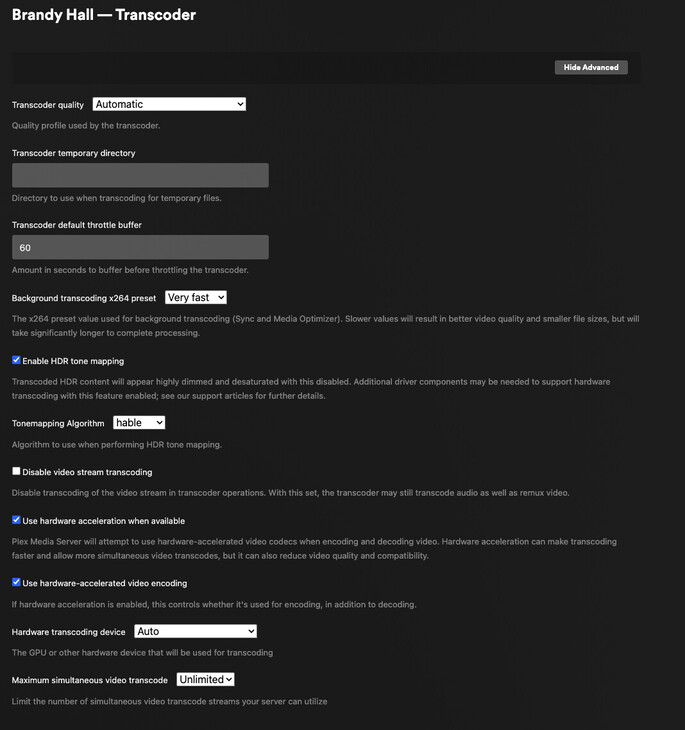
When you go to web gui Server -> Settings -> Transcoder Do you have hardware transcoding turned on? When you try to watch something, what does the server dashboard say? You can also post server logs.
I signed out of my account on the Apple TV having trouble, then signed back in, to see if that would help. Whenever I tried playing a local video, it said it couldn’t find it in the expected location. I went to look at my video settings and I could not set the Home Streaming quality - that feature was not available. So even though it “sees” my libraries and the shows, it’s somehow not acknowledging that it can play any local videos.
I’d restart the apple tv. Then make sure that when you go to web ui, server name -> Settings -> General and make sure your server is claimed. Then try to re-login to Plex with your user id.
I’m including in this a history of what happened, which may matter in the long run.
I didn’t get to update this thread when I would have liked to - once I got it working, we put my wife’s favorite show on and both of us just collapsed on the sofa to watch it, so I didn’t get back to the computer in that time. Thank you for the suggestions and issues to check.
I don’t know the development cycle or when the latest Apple TV version was released, especially in relation to the latest version of PMS. (And, since I downloaded that and installed it less than 36 hours ago, I’m presuming I have the latest version of PMS.) But it wasn’t changing settings that fixed it - at least not in a transparent way.
On the 2nd system, I turned on the TV and Apple TV and tried Plex and it wouldn’t play. This time I did not get errors about the transcoder - it just stalled and, even after 2 or more minutes, was still stalled. I tried several times, then force-quit Plex and restarted. No luck. Then I tried rebooting the Apple TV. No luck. So I made sure my settings matched the ones @TheLivingBubba posted and even force quit again and restarted. No luck. So I logged out of my account and logged back in. That’s when I tried to play videos and my libraries were there, but whenever I tried to actually play something, I got the “Unavailable Media” message - not anything about a transcoder, but about it not finding my files. I went to check settings and the setting for Home Streaming was not there - as if Plex realized there were no local videos.
That’s when I came up and reported what was going on here, in this thread. I went back down and looked over settings, both in Plex and Apple TV, hoping to find something that would be a clear indication of what needed fixing. I couldn’t find anything. So, just to try something, I force quit again, it came back up, and it played.
I think there are two important takeaways from all this:
At that one point where it told me the media was not available, it still had all the metadata. It was clearly communicating with the server, but somewhere between the client and the server, there was a communications issue and either the server or the client was not asking for the proper files or the server did not see them. All the directories and files are in the same place, in the new system as the were in the old system, but, somehow, they were “lost.” When I saw that, I tried playing a file on my iPhone and there was no problem.
I don’t think it was the settings I changed that was the critical factor. In both cases, the videos started playing after multiple force quits and, in one case, a reboot in between some of those force quits. So if I can change settings, but nothing happens until I force quit more than once, there is some persistence of information, or maybe the client is assuming it’s still talking with the same older library version. I can’t report this as a bug because it’s going to be hard to try to repeat it. (I have some other Apple TV units and will see what happens with them.) But the client was not playing videos and, even after the last time I changed settings, it still took at least two force quits and then it started wroking.
Considering how I only changed Home Streaming quality to Max and all the others I didn’t have to change, and that I had an issue with the videos disappearing, I’m thinking this is not really a transcoder issue, but more something about miscommunication between the Apple TV clients and the server - as it if takes multiple reboots and/or force quits to finally get the client to talk to the new server without anything funky going on.
The server is running on an “Intel Inside” CPU. Does Apple TV use Gemini Lake CPUs?
That’s what’s weird. As said in my previous post, it started working after several force-quits without me changing any settings between the last two. So something is up in terms of some persistence of data or something like that.
Old server - the computer is still on the LAN, but will be taken off soon. It has a few quirks and I need to do some testing before I’ll think of it as reliable (if I ever do) again. That’s one of several reasons I did the upgrades and replaced it. But the old PMS is not active - not running or anything.
Yes. While I was planning on moving names and IP addys around (in the DHCP server config) so the new server had the same name and IP address as the old one. I changed that slightly - the new server has the same name as the original server (as assigned from the DHCP server). The old server has a new name. But the new server has a different IP address. The friendly name of the two servers is the same, since the new server is a clone of the old one. I made a tarball of the important directories, moved it to the new server, and unpacked it there.
33:model name	: Intel(R) Core(TM) i3-5005U CPU @ 2.00GHz
5:model name	: Intel(R) Core(TM) i3-5005U CPU @ 2.00GHz
61:model name	: Intel(R) Core(TM) i3-5005U CPU @ 2.00GHz
89:model name	: Intel(R) Core(TM) i3-5005U CPU @ 2.00GHz
(Note: I have an alias set for grep so it automatically adds line numbers on each line.)
I knew it was Intel because when I installed Debian the night before last (Okay - misremembered, so my version was downloaded 48 hours ago, not 36!), I had to check what CPU it had so I could download the right version of Debian.
The Intel HD Graphics 5500 is the only device listed for Hardware Transcoding Device - other than the “Auto” option.
Okay, I’ll do that. From what I can see (and tell me if I’m wrong), but I don’t see any options in the client to handle HVEC. Are those options only on the server end?
Also, any thoughts on why I had to force quit multiple times before things finally worked - even after the last of my setting changes?
The client app derives most of the settings from the current Apple TV display settings.
If you have it set for HDR (which the ATV confirms before allowing it)
then the app will pass that capability to PMS
The Player app will use your Quality settings (in the Plex app) , and what the TV can play, to negotiate with PMS how to play the video you’ve asked for.
Given this is a dual-core i3, if you try to play HEVC, it will fail miserably.
It’s not anywhere near fast enough to do it in software.
At this point it’s finding all the media and playing. My concern or thought was that since this was happening during the troubleshooting process and when things were not working AND that when I went to settings, there was no setting for home streaming available, the two together seemed to indicate PMS was not finding the libraries. It did fix itself after I force quit and restarted.